Summarize this blog article with AI:
 Ask ChatGPT
 Ask Grok
 Ask Perplexity
 Ask Claude
 Ask Google AI
For years, virtual machine migration was an operational task that most enterprise IT teams could perform without changing the underlying infrastructure strategy. A workload moved between hosts for maintenance, storage moved to a new datastore, or an application transferred to a different data center. The objective was straightforward: keep the application running while the infrastructure changed underneath it.
In 2026, that familiar process has become a strategic decision. Organizations are reassessing VMware licensing and infrastructure costs, modernizing data centers, repatriating selected workloads from the public cloud, and preparing platforms for new AI and data-intensive applications. The question is no longer simply how to move a VM; it’s whether the migration will support infrastructure operations for the next five years.
Now, VMware has become a significant catalyst for infrastructure change. Following Broadcom's acquisition of VMware in 2023, changes to licensing, product packaging, and the partner ecosystem have prompted organizations to look for new virtualization platforms. An independent research firm recently found that 48% of organizations intend to leave VMware by 2028. However, the publication noted that intent does not equal execution, as one-quarter of those organizations have yet to find a one-to-one VMware replacement and that re-creating a VMware environment would mean cobbling together solutions from a variety of providers.
Ultimately, a poorly planned VM migration can cause a lot more damage in the long run, leading to application downtime, corrupted or inaccessible data, degraded performance, and gaps in backup protection. With a well-planned migration, your company can create a more manageable and sustainable infrastructure foundation.
In this guide, we explain the different types of VM migration, presenting a practical five-phase planning framework while examining the specific challenges and failure points of VMware workload migration. We also explore what enterprises need to think through specifically when migrating away from VMware.
What Is VM Migration and What Are the Different Types?
VM migration is the process of moving a virtual machine, including its virtual disks, compute configurations, operating system, and associated data, from one host, storage system, or virtualization platform to another. Depending on the method, the VM may continue running during the move or be shut down temporarily. The migration type determines the tools, downtime, and compatibility checks required. The following taxonomy helps infrastructure teams choose an approach based on business requirements rather than convenience.
- Live Migration (Hot Migration): A running VM moves between compatible hosts while its memory state is copied incrementally. The final switchover is brief, allowing applications to remain available. VMware vMotion and Sangfor aSV live migration are examples of this approach.
- Cold Migration (Offline Migration): In this case, the VM is shut down before its disks and configuration are moved. This is simpler than transferring live memory and can be useful for non-critical systems or workloads with planned maintenance windows. The only trade-off here is application downtime.
- Storage Migration: With this method, VM disk files move between datastores or storage systems while the virtual machine continues running. This is commonly used during storage refreshes, data center consolidation, and storage tiering, and allows the compute host to remain unchanged.
- Cross-Platform Migration: Here, a workload moves between fundamentally different environments, such as Physical-to-Virtual (P2V), Virtual-to-Virtual (V2V), or Virtual-to-Cloud (V2C). The migration may require disk format conversion, guest OS driver changes, network reconfiguration, and extensive validation.
- Cross-Hypervisor Migration: This is a specialized V2V migration in which a VM moves from one hypervisor to another, such as VMware ESXi to Sangfor aSV, KVM, or Hyper-V. It requires compatible conversion utilities or a structured migration platform.
The key distinction is that live migration and cold migration describe how the workload is moved, while cross-hypervisor migration describes where it is moving. A VMware workload could undergo a cold migration to a different hypervisor, or a live migration within a compatible destination environment. So, how do you put this information towards a practical migration plan?
Planning a VM Migration: The Five-Phase Framework
Enterprise VM migration should be managed as a repeatable process rather than a collection of one-off moves. The following five phases provide a practical framework for reducing operational risk.
Phase 1: Inventory and Dependency Mapping
Before moving a single VM, establish what exists and what depends on it. A database server may support several application servers, while those applications rely on DNS, authentication, file shares, or external APIs. Remember, a successful VM-level migration can still fail at the business application level.
Your inventory should include CPU and memory allocation, storage footprints, operating systems, IP addresses, VLANs, virtual switches, application owners, backup schedules, and recovery objectives. Dependency mapping is particularly important for large estates where undocumented connections can create unexpected outages.
Phase 2: Compatibility Assessment
Cross-hypervisor migration needs a bit more than just checking whether the destination has enough CPU and memory. Your team should assess disk formats, virtual hardware versions, guest operating systems, boot configurations, network adapters, and storage controllers. Then, identify workloads that require driver updates, OS upgrades, or application-specific remediation.
For VMware migrations, this assessment should also cover VMware Tools, snapshots, backup integration, vSwitch and distributed switch configurations, and any NSX dependencies. A workload that is easy to convert may still require substantial post-migration configuration.
Phase 3: Migration Wave Planning
Do not treat the entire VM estate as one migration event. Group workloads into waves based on application dependency, business criticality, maintenance requirements, and technical similarity. While a sensible first wave might contain isolated development servers or low-impact internal applications, later waves can include production systems with tightly connected databases, authentication services, and customer-facing applications.
Remember, each wave should have a named owner, an approved maintenance window, a validation checklist, and a documented rollback procedure.
Phase 4: Execution With Validation
Always execute migrations in controlled groups. Before each move, record the source configuration, confirm recent backups, and establish the expected performance baseline. During the move, monitor the migration process, source and destination resource utilization, and application availability.
After the shift, you need to check if the VM is up and running and confirm that applications can reach their dependencies, users can authenticate, scheduled jobs run correctly, and backup policies are active. Only then should the next wave proceed.
Phase 5: Decommission and Cleanup
The last phase is to keep the source environment available until the migrated workloads have operated stably for a defined period. For critical systems, two to four weeks may be an appropriate starting point, although the duration should depend on application cycles, recovery requirements, and business risk.
Decommissioning should include the removal of obsolete snapshots, unused storage, old network configurations, monitoring objects, and source backup jobs. Always keep the migration records safe for audits, troubleshooting, and future platform changes.
These are tangible steps you can take to implement a successful VMware migration without missing any bases. However, there might still be a few obstacles in the way.
VMware Migration: The Specific Challenges of Cross-Hypervisor VM Migration
Moving VMware workloads to an alternative platform is quite different from moving VMs between ESXi hosts. The destination may expose virtual hardware differently, use a different disk format, and provide different networking and guest integration mechanisms. These are some of the challenges you’d need to look out for on this journey.
A VMware VM Is Not Just a Disk File
VMware virtual machines commonly use VMDK virtual disk files, VMware virtual hardware abstractions, and VMware Tools for guest integration. Copying a VMDK to a new hypervisor does not automatically recreate a fully compatible VM. The destination must be able to boot the guest OS, recognize its virtual devices, and provide the correct drivers.
VMware Tools And Guest Integration
VMware Tools support guest OS integration, optimized device drivers, and operational functions within VMware environments. When migrating to another hypervisor, the source tools may no longer be appropriate for the destination virtual hardware. Your chosen migration plan should be able to identify the correct point to remove VMware Tools and install the destination platform's guest agent or drivers. This may require a maintenance window and a controlled reboot. Skipping this step can lead to degraded performance, driver conflicts, or unexpected guest OS behavior.
Snapshot and Backup Compatibility
VMware-specific backup integrations are another important consideration. Backup platforms that rely on VMware vSphere APIs for Data Protection (VADP) cannot automatically be assumed to provide the same coverage for VMs running on another hypervisor. Before retiring the source, verify that every migrated VM is protected by a supported backup workflow. The first successful backup should be confirmed, and recovery procedures should be tested for representative workloads.
Here, Sangfor's ecosystem integrations with Veeam and Cohesity provide backup and recovery support for Sangfor aSV. Veeam covers backup, recovery, and disaster-recovery orchestration, while Cohesity (following its merger with Veritas) extends data resilience, management, and security across the migrated environment. Together, these partnerships let enterprises establish target-platform protection as part of the migration plan, rather than as a follow-on project.
Network Configuration Must Be Rebuilt
Virtual switches, port groups, distributed switch policies, and NSX networking do not automatically transfer to a different hypervisor. The target environment needs equivalent connectivity and security policies, configured according to its own networking model. For VMware-to-alternative migrations, network validation should include gateway connectivity, DNS, application-to-database communication, firewall rules, and any load-balancer or identity-service dependencies.
VM Migration Tools For VMware-To-Alternative Platforms
Enterprises generally have three migration tooling approaches:
1. Native Conversion Utilities: These are tools provided by the destination hypervisor vendor that can automate disk conversion, guest preparation, and migration workflows. They are often preferable when migrating a large estate to one target platform.
2. Third-Party V2V Migration Platforms: Independent tools may support multiple hypervisors and provide conversion, orchestration, and validation. Evaluate their support for your guest OS versions, disk types, and enterprise-scale migration requirements.
3. Manual Conversion Tools: Utilities like qemu-img can convert disk formats, which can be viable for smaller estates or specialized workloads, but can also place more responsibility on the migration team for guest configuration, drivers, networking, and validation.
The correct choice of tool depends on the number of VMs, the diversity of workloads, the required downtime, and the amount of automation your organization can support. So, how do you ensure a seamless transition?
VM Migration Best Practices: What Separates Smooth Migrations from Disasters
Your VM migration plan needs to be precise, secure, and reliable to be successful. Here are some best practices that your company can follow to ensure an easier and more fruitful migration.
Make Dependency Mapping Non-Negotiable
The most damaging migration failures often occur outside the VM itself. A migrated application may lose access to a database, identity provider, file share, or API because a network route, firewall policy, or service dependency was overlooked. This is why it’s important to map critical dependencies and involve application owners in validation. Even if your application is ready, your infrastructure might not be.
Test Rollback Before You Need It
Every migration wave should have a clear rollback procedure. This helps to define the conditions that trigger a rollback, identify the source VM and data recovery point, and confirm who can authorize the decision. A rollback plan that exists only in a document is not enough. You need to test it on representative workloads before the production wave. This is especially important when moving between hypervisors, where a failed conversion may require restoring the original VM rather than simply reversing a live migration.
Validate Backup Coverage Before Decommissioning
Backup protection must follow the workload. Always confirm that the destination platform is supported, the VM is included in the correct backup policy, and the backup is successful. For more demanding environments, you should also verify recovery time and recovery point objectives through a restoration test. A backup job that reports success is useful evidence, but it does not replace recovery validation.
Migrate During Low-Traffic Windows
Live migration reduces downtime but does not eliminate resource contention. Copying VM memory and synchronizing storage can consume network bandwidth and CPU resources, particularly for busy workloads with high rates of memory change. Schedule your migrations during low-traffic periods where possible, then monitor resource utilization and avoid moving large numbers of high-churn VMs simultaneously unless the infrastructure has been tested for that load.
Document the Estate and the Outcome
Always record the original VM configuration, migration tool and version, changes made to the guest OS, network assignments, validation results, and any issues encountered. Consistent documentation allows subsequent waves to improve rather than repeat earlier mistakes. A migration runbook would also be useful for someone who did not participate in the first wave. This is a practical safeguard against staff turnover, rushed maintenance, and incomplete handovers.
Now, executing this framework at scale is where most in-house teams need additional support, particularly for compatibility assessment, wave sequencing, and rollback testing across a large VM estate. This is where Sangfor's migration tooling and professional services are designed to help.
How Sangfor Supports Enterprise VM Migration
Sangfor is a global multinational corporation serving large enterprises, with a virtualization and infrastructure portfolio designed for enterprise data center modernization. Its aSV hypervisor and HCI platform provide a destination for organizations evaluating VMware alternatives as part of a broader infrastructure strategy.
Sangfor aSV is a Type 1 hypervisor available as a standalone compute platform or as the compute component of Sangfor HCI. It’s designed to support enterprise virtualization workloads and provide a migration path for organizations moving from VMware ESXi to an alternative hypervisor.
For enterprises considering a VMware replacement, the relevant question is not only whether the destination can run existing VMs; it’s whether the migration process can be standardized, tested, and repeated across production workloads. Sangfor also provides migration utilities for VMware ESXi-to-aSV workload migration, supporting the conversion and preparation steps required to move workloads into the target environment. Remember that the precise supported guest OS versions, source configurations, and automation capabilities should be confirmed during a technical assessment.
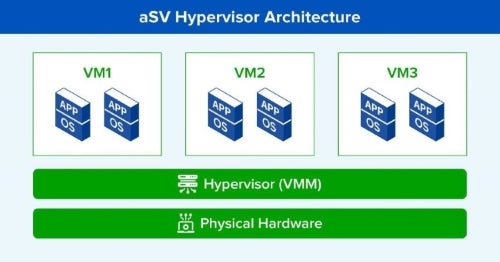
This is where a structured migration workflow matters. Rather than treating disk conversion as the entire project, enterprises should evaluate how the tools support VM discovery, guest preparation, network configuration, validation, and rollback planning. Sangfor aSV further supports live migration between compatible hosts, providing a familiar operational capacity for maintenance, load balancing, and hardware refreshes after workloads have been established on aSV. While live migration is not a substitute for cross-hypervisor conversion, it can help when moving VMs within the destination environment once they’re running on aSV.
Sangfor’s HCI combines compute, storage, networking, and management capabilities into an integrated infrastructure platform. For organizations pursuing a broader data center modernization project, HCI can provide a consistent operating model alongside the hypervisor migration. The Sangfor Cloud platform also provides centralized management and visibility across virtualized infrastructure. During a migration program, a centralized management layer can help teams track VM placement, resource utilization, migration status, and post-migration health, reducing operational fragmentation as the estate moves from one platform to another.
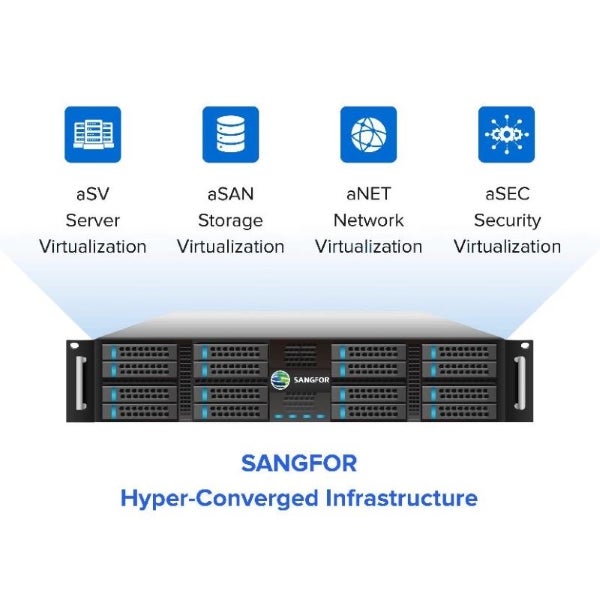
Sangfor's wider infrastructure portfolio also extends the same integrated approach to storage, networking, and security. Where VMware customers often add vSAN as a separately licensed storage layer, aSAN is built into the HCI stack as fully integrated, distributed software-defined storage. Where NSX adds network virtualization as an advanced, separately licensed and skill-intensive layer, aNET provides built-in, visualized network virtualization as part of the same platform, with aSEC handling micro-segmentation and security. These components can be evaluated alongside aSV when a VMware migration forms part of a larger infrastructure transformation.
Your migration team should verify the supported integration, configuration requirements, and recovery workflows for its specific environment. Your backup coverage is ultimately a project deliverable, not a post-migration afterthought.
Most times, large-scale VMware replacement programs involve multiple data centers, diverse guest operating systems, complex application dependencies, and strict change-control requirements. Sangfor's global professional services organization can support migration planning, execution, and post-migration validation for enterprises managing these programs. For organizations looking for a VMware alternative, the decision should include both platform capabilities and the practical ability to execute the migration at the required scale.
Make Your VM Migration a Controlled Business Transformation
VM migration in 2026 is no longer just a technical procedure. It is an opportunity to improve infrastructure economics, simplify operations, and establish a platform that supports changing business requirements. The safest approach is a disciplined one: inventory the estate, map dependencies, validate compatibility, migrate in waves, test rollback, and confirm backup protection before retiring the source. These practices apply whether the destination is another VMware cluster, a cloud platform, or an enterprise-grade alternative like Sangfor aSV and HCI.
For organizations looking at their VMware migration, the decision should be based on workload requirements, operational risk, total cost of ownership, and the ability to maintain reliable application and data protection throughout the transition. At the end of the day, the right framework and tools can turn a complex migration into a controlled, repeatable infrastructure transformation.
FAQ
The process of moving a virtual machine and its associated data, configuration, and operating system from one host, storage system, or virtualization platform to another. It may be performed while the VM is running (live migration) or after it has been shut down (cold migration).
Live migration moves a running VM with minimal interruption, while cold migration requires the VM to be powered off before it is moved. Live migration is useful for maintenance and load balancing, whereas cold migration is often simpler for offline workloads or cross-hypervisor conversions.
Start by inventorying the VMs and their dependencies, then assess disk formats, guest OS compatibility, drivers, network configuration, and backup requirements. Use a supported conversion utility or migration platform, validate the destination workload, and retain the source until rollback and recovery requirements have been satisfied.
Application downtime, broken dependencies, incompatible guest drivers, network connectivity failures, data integrity issues, and backup coverage gaps. Cross-hypervisor migrations add the risk of disk format and virtual hardware incompatibility, making testing and rollback planning especially important.
Native conversion utilities from destination hypervisor vendors, third-party V2V migration platforms, and manual disk conversion utilities such as qemu-img. The best choice depends on the source and target hypervisors, workload diversity, scale, downtime requirements, and the level of automation needed.