
Summarize this blog article with AI:
 Ask ChatGPT
 Ask Grok
 Ask Perplexity
 Ask Claude
 Ask Google AI
In today's data-driven business landscape, ensuring the continuous availability of mission-critical applications is a top priority for IT organizations. Whether it is a core database supporting financial transactions or an enterprise resource planning (ERP) system running factory operations, unexpected downtime can lead to devastating financial and reputational losses.
To combat this, enterprises have long relied on Windows Server Failover Cluster (WSFC) to guarantee infrastructure resilience. However, as organizations transition from traditional legacy hardware to modern cloud infrastructures, bringing legacy clustering mechanisms into virtualized environments presents unique challenges.
This technical blog explores the fundamentals of WSFC, the critical role of shared storage, and how Sangfor Hyper-Converged Infrastructure (HCI) delivers a seamless, high-performance platform to host these critical workloads.
The Background of Windows Server Failover Cluster (WSFC)
Windows Server Failover Cluster (WSFC) is a foundational high-availability (HA) feature built into the Windows Server operating system. It links a group of independent servers (nodes) together into a cohesive cluster to increase the availability of applications and services.
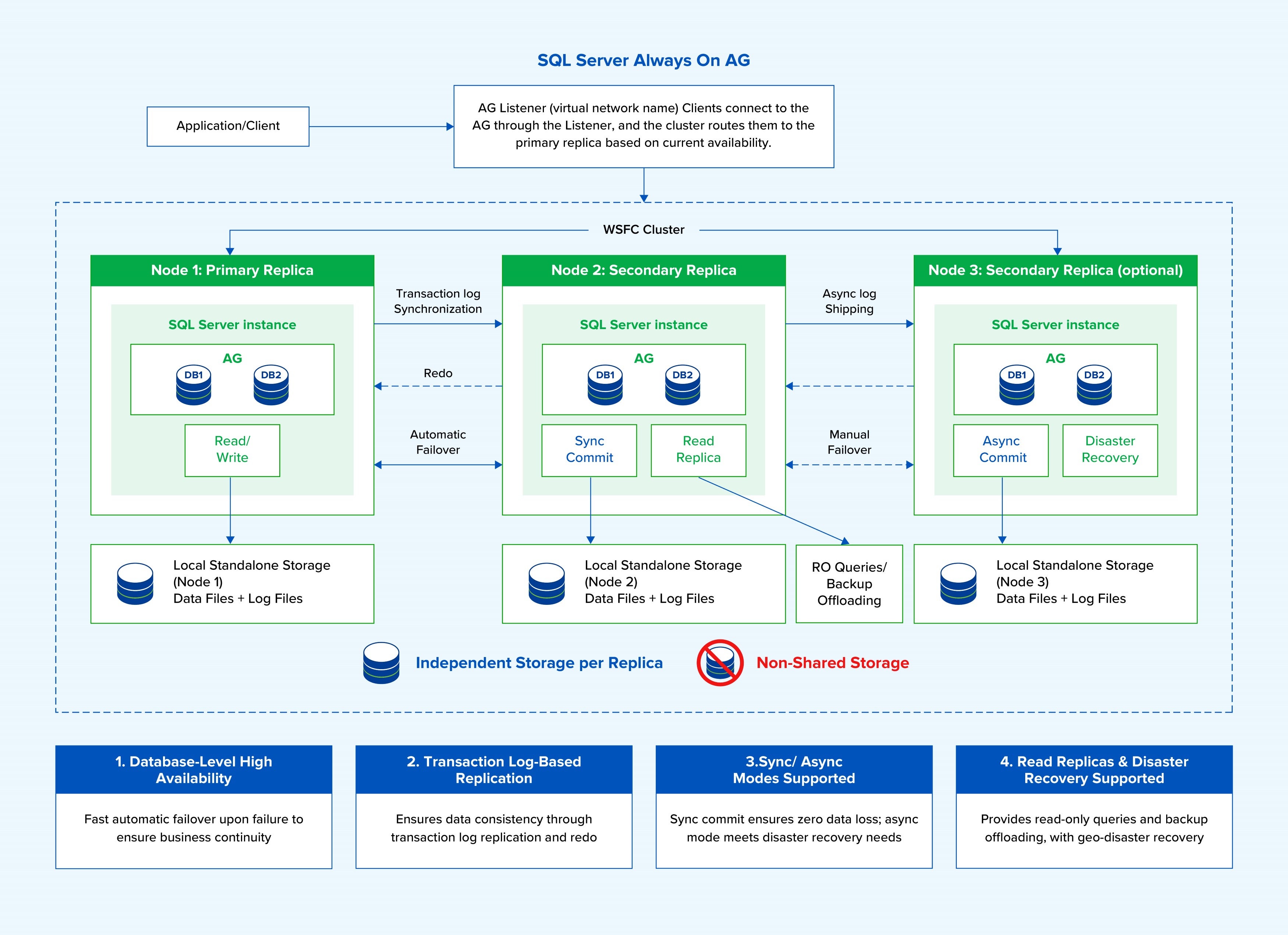
WSFC continuously monitors the health of all cluster components, including server hardware, network status, operating systems, and application services. If an active node encounters a critical failure—such as a host crash, OS error, or hardware failure—the WSFC cluster automatically detects the fault. It then orchestrates a failover, gracefully shifting the ownership of the application instances, virtual IP addresses, and underlying configurations to a healthy standby node. This process minimizes application-level disruption and keeps the connection endpoints unchanged for end users.
Common production workloads utilizing WSFC include:
- SQL Server Failover Cluster Instances (FCI): An instance-level HA solution where the entire SQL Server instance runs on an active node, storing all data files and log files inside shared storage.
- SQL Server Always On Availability Groups (AG) with Shared Disk Witness: A database-level HA solution where replicas maintain independent storage but utilize a centralized shared disk purely for quorum voting to prevent split-brain scenarios.
Why Do Cluster Scenarios Need a Shared Disk?
To achieve true instance-level failover without time-consuming data synchronization or the risk of data corruption, a shared disk is indispensable.
1. Single Copy of Data for Seamless Failover
In architectures like SQL Server FCI, data files and log files are not replicated across multiple node storage drives; instead, a single copy of the data resides entirely on the shared disk. This ensures that when the active node fails and a standby node takes over, the new node reads from the exact same up-to-date data blocks instantly, bypassing data replication lag or loss.
2. Preventing Split-Brain via SCSI-3 Persistent Reservations (PR)
When multiple servers are physically or virtually wired to the exact same storage unit, data corruption could easily occur if two servers write to the same sector at the same time. To To prevent the risk of split-brain conditions, WSFC relies on the SCSI-3 Persistent Reservations (PR) mechanism:
- Exclusive Access Control: The active node registers a unique PR key with the shared storage array to lock exclusive write privileges.
- Preemption on Failure: If the active node crashes, the standby node triggers a SCSI-3 PR preempt/clear command. This breaks the old lock, registers the standby node's own PR key, and securely claims sole access over the shared disk to safely spin up services.
3. Maintaining Cluster Quorum
In smaller clusters, a shared disk acts as a Shared Disk Witness. It provides a neutral voting mechanism to establish cluster quorum, ensuring that nodes can definitively agree on which side of a network partition holds the right to remain operational.
The Sangfor HCI Solution: Architectural Enablement
Historically, hosting shared-disk failover clusters inside traditional hypervisors required complex configurations, specialized physical zoning, or performance-sapping software emulations. Sangfor HCI natively bypasses these hurdles by providing two elegant, enterprise-grade methods for provisioning shared storage to cluster virtual machines:
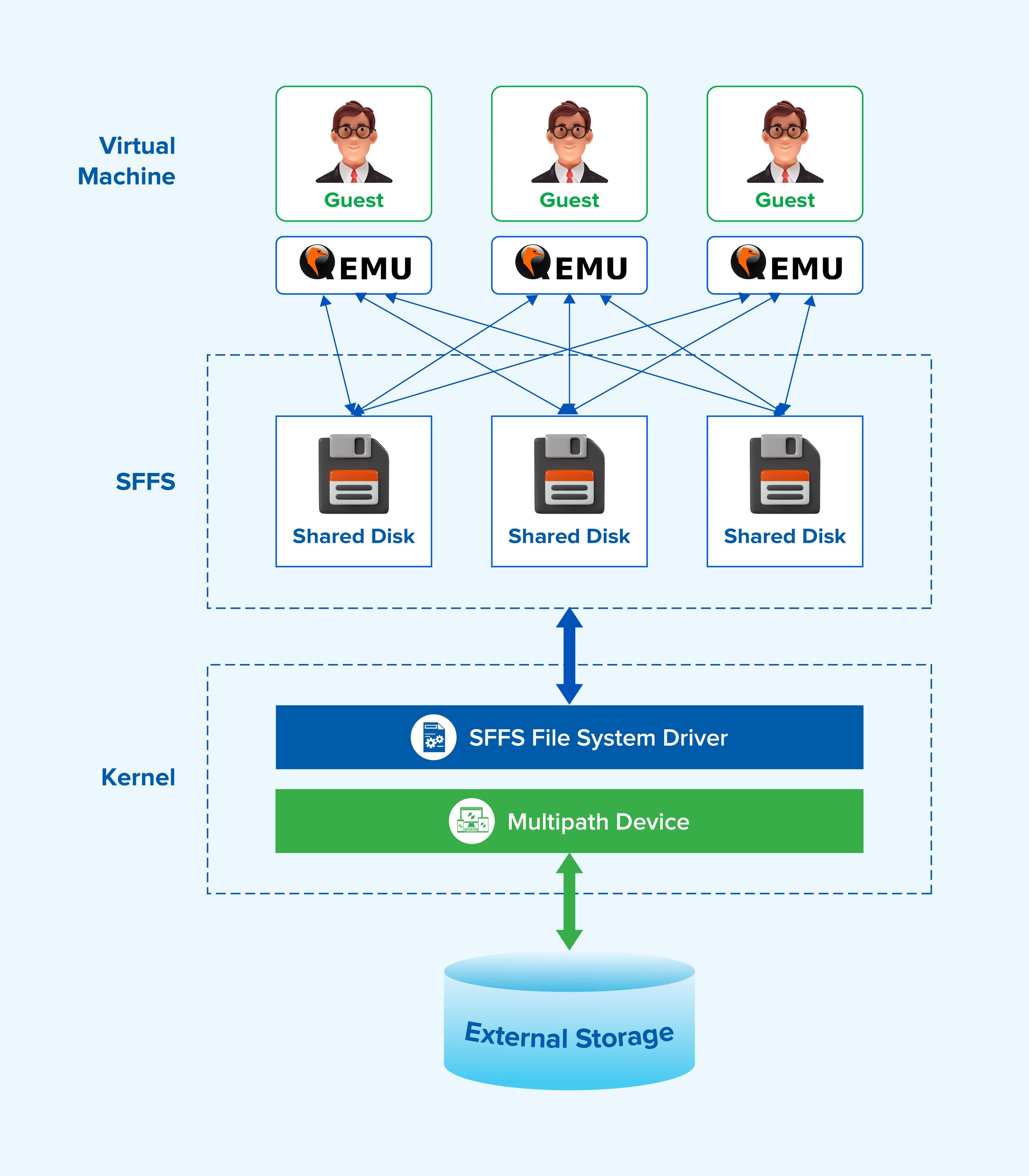
Option A: Shared External Storage Disks (SFFS Managed)
Under this architecture, external storage blocks (LUNs) are formatted with Sangfor’s proprietary, cluster-aware Sangfor Flawless File System (SFFS).
- SFFS allows the creation of virtual shared disks that can be concurrently mounted across multiple cluster VMs.
- When the Windows Guest OS transmits SCSI-3 PR commands, the underlying SFFS layer intercepts, processes, and logs the PR reservation status inside the HCI platform. This removes the requirement for complex raw storage mapping for standard virtual disks.
Option B: RDM Passthrough Disks
For organizations requiring pure, unadulterated hardware capabilities, Sangfor HCI supports Raw Device Mapping (RDM) passthrough.
- SCSI-3 PR commands bypass virtual storage drivers entirely, routing straight from QEMU through qemu-pr-helper and multipathing tools down to the physical storage LUN.
- The physical storage array manages the reservation keys directly, while Sangfor HCI acts as an optimized, ultra-low-latency pass-through highway.
The Business and Technical Value of Sangfor HCI
Deploying your WSFC infrastructure on top of Sangfor HCI delivers clear advantages that elevate security, control, and reliability:
- Robust Multi-Protocol Storage Support: Sangfor HCI accommodates high-performance storage environments seamlessly, providing universal compatibility for Fibre Channel (FC), iSCSI, and NVMe-over-ROCEv2 protocols.
- Native VM Anti-Affinity Policy Controls: To protect against a single physical server breakdown taking down an entire cluster, Sangfor SCP includes native VM-VM Anti-Affinity scheduling policies. Administrators can enforce a mandatory rule ensuring cluster nodes are permanently separated onto distinct physical HCI hosts.
- Network Isolation Best Practices: The architecture enforces total separation between operational networks. Heartbeat, business traffic, storage data paths, and AG log replication lines run on dedicated, isolated virtual networks, keeping intra-site round-trip time (RTT) well under the recommended 2 ms limit for flawless cluster synchronization.
- Streamlined UI Management: Enabling shared storage capabilities on Sangfor HCI requires zero CLI hacking. Activating SCSI-3 PR compliance is as simple as selecting a single checkbox—"Mount shared disks for failover"—directly inside the intuitive storage console UI.
By combining the proven application resiliency of Microsoft WSFC with the agility, and native storage intelligence of Sangfor HCI, organizations can confidently modernize their legacy databases and enterprise applications while maintaining high availability.
Conclusion
Running Windows Server Failover Cluster on a virtualized infrastructure should not require compromises in availability, performance, or operational simplicity. With native support for shared disks, SCSI-3 Persistent Reservations, and flexible deployment options, Sangfor HCI enables organizations to confidently run mission-critical WSFC and SQL Server FCI workloads.
For organizations evaluating VMware alternatives, preserving existing WSFC and SQL Server FCI architectures is often a key requirement. Sangfor HCI allows enterprises to maintain their proven WSFC deployments while modernizing their infrastructure, reducing migration complexity and minimizing operational disruption.
Recognized as a Visionary in the 2026 Gartner® Magic Quadrant™ for Server Virtualization Platforms, Sangfor continues to help organizations build resilient, future-ready infrastructure with confidence.