
Summarize this article with AI:
 Ask ChatGPT
 Ask Grok
 Ask Perplexity
 Ask Claude
 Ask Google AI
Key Takeaway
- Sangfor HCI's cold migration and clone operations run up to 5x faster than VMware's native implementation, based on side-by-side lab testing across disk sizes from 500GB to 3072GB.
- The performance gain comes from qemu-cp, a purpose-built transfer engine that replaces the earlier sfscp tool.
- qemu-cp transfers only actual user data, skipping zero-filled and sparse regions instead of writing them to the target disk.
- Multi-coroutine concurrent processing lets qemu-cp fully utilize available storage and network throughput during transfer.
- Standard-sized enterprise VMs that once required multi-hour downtime can now migrate in under 20 minutes.
- Large-scale VMware-to-HCI cutover projects involving hundreds of VMs can be compressed from weeks to a handful of planned maintenance evenings.
- All performance gains are delivered without sacrificing byte-level data consistency between source and target disks.
When enterprise IT teams plan virtual infrastructure refresh, platform migration, or workload rebalancing projects, cold migration and cold clone are two of the most mission-critical, widely adopted operations for moving virtual machine disk images between different storage locations. For decades, VMware's built-in cold migration and clone capabilities have been the industry baseline, but many organizations continue to face frustrating bottlenecks of unacceptably long transfer times that extend maintenance windows, delay project timelines, and drive up operational overhead.
Today, we are breaking down how the specially optimized cold migration and clone capabilities of Sangfor HCI deliver up to 5 times the efficiency of VMware's native workflow, eliminating long-standing pain points for modern enterprise virtualization environments.
The Legacy Bottlenecks of Traditional Cold Migration & Clone Workflows
Traditional cold migration and clone implementations, including VMware's native cold migration and clone mechanism, are designed to process full disk volumes during the entire transfer process:
- The system is forced to read and write every single byte of the entire provisioned disk space, even large portions that are empty, zero-filled, or marked as unused
- Extra computation overhead is required to scan the full disk volume and perform explicit zero-write marking on all empty data regions
- Limited parallel processing capacity restricts throughput, leading to excessively long transfer times for large virtual machine disks
This performance gap is clearly visible in side-by-side lab test data between the two platforms:
| Provisioned Disk Size (G) | Effective Data Volume (G) | VMware Cold Migration/Clone Time | Sangfor HCI Cold Migration/Clone Time |
| 500 | 100 | 57m44s | 11m20s |
| 500 | 300 | 1h28m9s | 15m5s |
| 500 | 500 | 1h58m27s | 18m46s |
| 1024 | 200 | 1h53m49s | 20m50s |
| 1024 | 600 | 2h54m43s | 28m13s |
| 1024 | 1024 | 3h56m41s | 36m2s |
| 3072 | 600 | 5h39m47s | 58m50s |
| 3072 | 3072 | - | 1h25m32s |
For enterprise teams managing hundreds of virtual machines during platform refresh projects, these multi-hour migration windows per workload quickly pile up to create unacceptable business disruption risks, and stretch project timelines out for weeks longer than planned.
Read VMware Migration Guide 2026
How Sangfor HCI Accelerates Cold Migration and Clone
To resolve these long-standing industry pain points, Sangfor's hyper-converged infrastructure R&D team launched a full redesign of the cold migration and clone workflow, replacing the legacy general-purpose transfer workflow with a deeply optimized architecture built exclusively for virtual machine disk image scenarios.
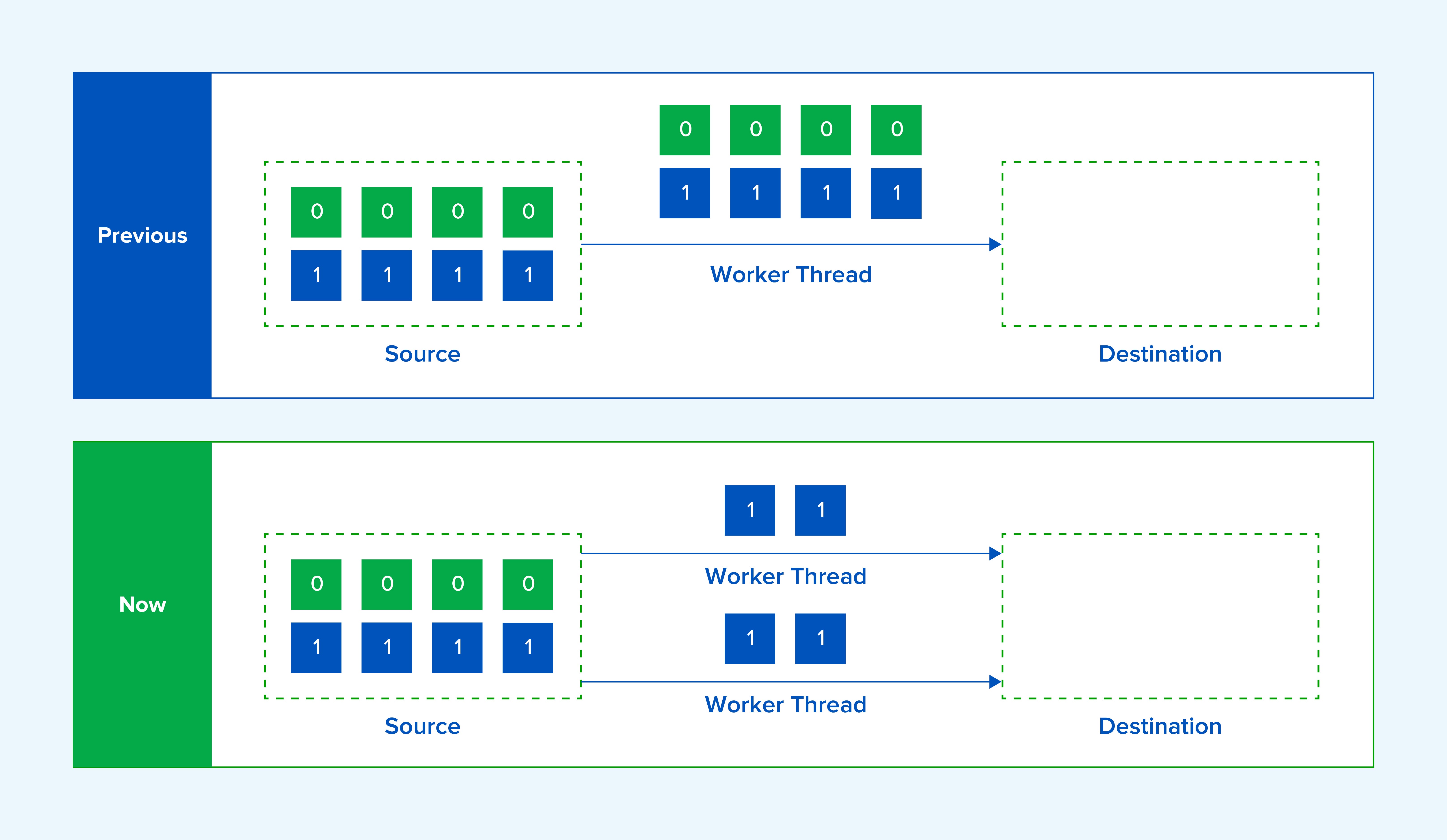
Earlier versions of Sangfor HCI used sfscp, a self-developed file copy tool optimized for disk image scenarios, which supports cross-host file copy, to handle cold migration and clone operations. While this tool outperformed generic file transfer utilities, it still carried three inherent limitations that capped performance:
- It was required to read and write all full disk data, regardless of whether the regions contained actual user data
- Full disk scanning was mandatory to identify and mark zero-data regions for zero writing
- It lacked multi-depth concurrent processing capabilities to unlock higher throughput
The New-Generation qemu-cp Driven Transfer Engine
Two Techinical Innovations Behind qemu-cp
The latest release of Sangfor HCI replaces the old sfscp workflow with the specially optimized qemu-cp utility for virtual machine disk image migration, delivering two game-changing core advantages over traditional implementations:
- Effective Data-Only Transfer: qemu-cp only processes actual valid user data. It reads but skips all unused sparse blocks and zero-marked regions, eliminating the wasted I/O overhead of writing empty space to the target disk entirely. No extra full-disk zero data region marking and zero-write steps are required, slashing total data volume to transfer by up to 90% for many enterprise workloads.
- Multithreaded Coroutine Parallel Processing: The new architecture adopts a multi-coroutine concurrent processing mechanism, which fully leverages available storage and network throughput to drastically accelerate disk image copy operations.
How the qemu-cp Workflow Works
The full qemu-cp workflow runs in a streamlined, low-overhead sequence:
- Source File Reading: The utility first opens the source qcow2 virtual machine disk file, and parses all core metadata including disk format, total provisioned size, block size, and existing snapshot records
- Target File Initialization: After source metadata validation completes, the target qcow2 file is created and pre-initialized to match the source disk's structural attributes
- Segmented Data Block Processing: The workflow processes the disk in ordered, manageable data blocks:
- Read the current valid data block from the source qcow2 file
- Apply any required on-the-fly conversion operations such as compression or encryption
- Write the fully processed data block directly to the target file
- Metadata Finalization: Once all valid data blocks have been transferred, the target file's metadata is updated to ensure full consistency with all attributes of the source virtual machine disk
- Transfer Completion: Both source and target file handles are gracefully closed, marking the end of a fast, error-free cold migration or clone operation.
Real-World Business Value for Enterprise IT Teams
This 5x performance uplift for cold migration and clone translates to tangible, measurable gains for organizations of all sizes:
- Drastically Reduced Maintenance Windows: Workloads that previously required multi-hour dedicated downtime to migrate can now be completed in under 20 minutes for most standard-sized enterprise VMs, minimizing disruption to production business operations.
- VMware Refresh Project Acceleration: For the massive number of global enterprise users migrating away from legacy VMware deployments to more cost-effective, feature-complete hyper-converged platforms, the cutover timeline for hundreds of virtual machines can be condensed from weeks to a small number of planned maintenance evenings.
- More Efficient Workload Rebalancing: IT administrators can move large, storage-heavy virtual machines across nodes or storage pools in a fraction of the previous time, making it far simpler to optimize resource utilization and eliminate performance hotspots across the HCI cluster.
- No Compromises on Data Consistency: All optimizations are built to guarantee 100% byte-level consistency between source and target virtual machine disks, so teams never have to trade data integrity for higher transfer speed.
Combined with Sangfor HCI's industry-leading VMware-aligned operation experience, built-in native security features, and seamless non-disruptive warm migration capabilities, this optimized cold migration and clone capability delivers yet another powerful tool to make legacy virtual infrastructure replacement projects smoother, faster, and lower risk than ever before.
Frequently Asked Questions
Cold migration is the process of moving a virtual machine's disk image between different storage locations while the VM is powered off, commonly used during infrastructure refreshes, platform migrations, or workload rebalancing.
Based on lab test data, Sangfor HCI completes cold migration and clone operations up to 5 times faster than VMware's native workflow, with the gap widening as disk size and effective data volume increase.
qemu-cp is Sangfor HCI's new-generation transfer engine for cold migration and clone. It transfers only valid user data, skips unused sparse blocks and zero-marked regions, and uses multi-coroutine concurrent processing to fully leverages available storage and network throughput.
Earlier versions used sfscp, a self-developed file copy tool. While it outperformed generic file transfer utilities, it still had to read and write full disk data, required full-disk scanning to mark zero-data regions, and lacked multi-depth concurrent processing — all of which qemu-cp was built to eliminate.
Shorter maintenance windows (many standard VMs migrate in under 20 minutes), faster VMware-to-HCI cutover timelines (weeks compressed into a few maintenance evenings), and easier workload rebalancing across nodes or storage pools without long dedicated downtime.