Summarize this blog article with AI:
 Ask ChatGPT
 Ask Grok
 Ask Perplexity
 Ask Claude
 Ask Google AI
1. Introduction
As VMware transitions into an entirely subscription-based ecosystem under Broadcom, enterprises around the world are re-evaluating their virtualization and HCI stack. For many organizations, the challenge is not only the rising cost and complexity of VMware licensing, but also the architectural rigidity, multi-tool dependency, and operational friction of VMware’s virtualization, storage, networking, and disaster recovery (DR) modules.
At the same time, modern HCI platforms like Sangfor HCI are delivering: Lower TCOa unified solution that combines compute, storage, and network, with built-in disaster recovery and backup. These platforms also offer integrated security, predictable licensing, simplified operations, and a lower total cost of ownership (TCO).
As a result, migrating from VMware to Sangfor HCI has become a strategic modernization initiative for many IT leaders.
This guide provides a deep technical blueprint for how to migrate from VMware to Sangfor HCI safely, efficiently, and with minimal downtime, using Sangfor’s dedicated migration tooling and best practices.
2. Why Enterprises Are Migrating from VMware in 2026
Subscription-Only Licensing
VMware has eliminated perpetual licensing in favor of mandatory subscription bundles, which heavily impacts long-term cost predictability and financial planning for enterprises.
References: VMware by Broadcom Dramatically Simplifies Offer Lineup and Licensing Model
Forced Bundling & Complexity
Enterprises are often forced into large bundles like VMware Cloud Foundation because vSphere and vSAN can no longer be licensed independently. This is exacerbated by strict licensing floors, such as a 72-core minimum subscription order.This transition increases total costs, architectural rigidity, licensing dependency, and overall support overhead.
References: VMware Licensing Changes Explained: 2025-2026 Update for Enterprises
Reduced Partner Ecosystem
Broadcom’s removal of thousands of partners in 2024 has significantly reduced global engineering availability and regional support coverage, making it harder for firms to maintain their environments.
References: Broadcom Dumps Registered VMware Resellers
Integrated HCI Platforms Are Now Mature
Modern HCI alternatives now offer superior performance, unified management, and built-in security and disaster recovery. Their ability to scale simply makes these mature platforms more attractive than ever for organizations looking to migrate.
3. VMware Migration Challenges Engineers Must Consider
- Architectural & Licensing Friction: The layered nature of VMware modules often translates into significant operational overhead. For engineers, managing complex license entitlements across different clusters can create administrative bottlenecks that hinder technical agility.
- Migration Risks & System Integrity: Maintaining data integrity and minimizing downtime during the cutover phase are paramount. Engineers are tasked with ensuring that moving mission-critical workloads doesn't compromise the Recovery Time Objective (RTO) or lead to corruption.
- Interoperability & Integration Gaps: A primary concern is the seamless handoff between the new hypervisor and existing hardware, backup agents, and specialized networking configurations. Avoiding "vendor lock-in" while ensuring ecosystem compatibility is a difficult balance.
- Support Ecosystem Volatility: Post-acquisition uncertainty regarding VMware’s technical roadmap and support responsiveness has increased risk. Engineering teams require reliable, deep-level technical access to resolve production issues without delay.
4. Migration Methods and Technologies: A Sangfor HCI Technical Perspective
Most modern virtualization platforms are built on KVM (Kernel-based Virtual Machine). Unlike VMware ESXi, which uses the VMDK format, KVM uses QCOW2 for virtual disks. Since QCOW2 cannot directly read VMDK files, migrating a VM involves converting VMDK data to a format KVM can recognize. A primary concern in this process is ensuring data integrity, making sure the data is accurate, stable, and secure, so the VM functions properly after migration with minimal disruption to business operations.
In typical VMware environments, there are two main deployment types:
- vSphere with FC or iSCSI storage (disaggregated deployment)
- vSphere with vSAN storage (integrated deployment)
The migration path is the same for both. Since the new platform can't read VMDK files directly, a migration network is needed to transfer VMs from vSphere to the new storage for format conversion. This requires a reliable data transfer link and enough storage on the target platform.

VMware provides an OVA export/import feature, but this method requires the VM to be shut down during the process, which is impractical for businesses needing high availability. This has led to the adoption of online migration solutions, which involve an initial full transfer followed by continuous incremental updates.
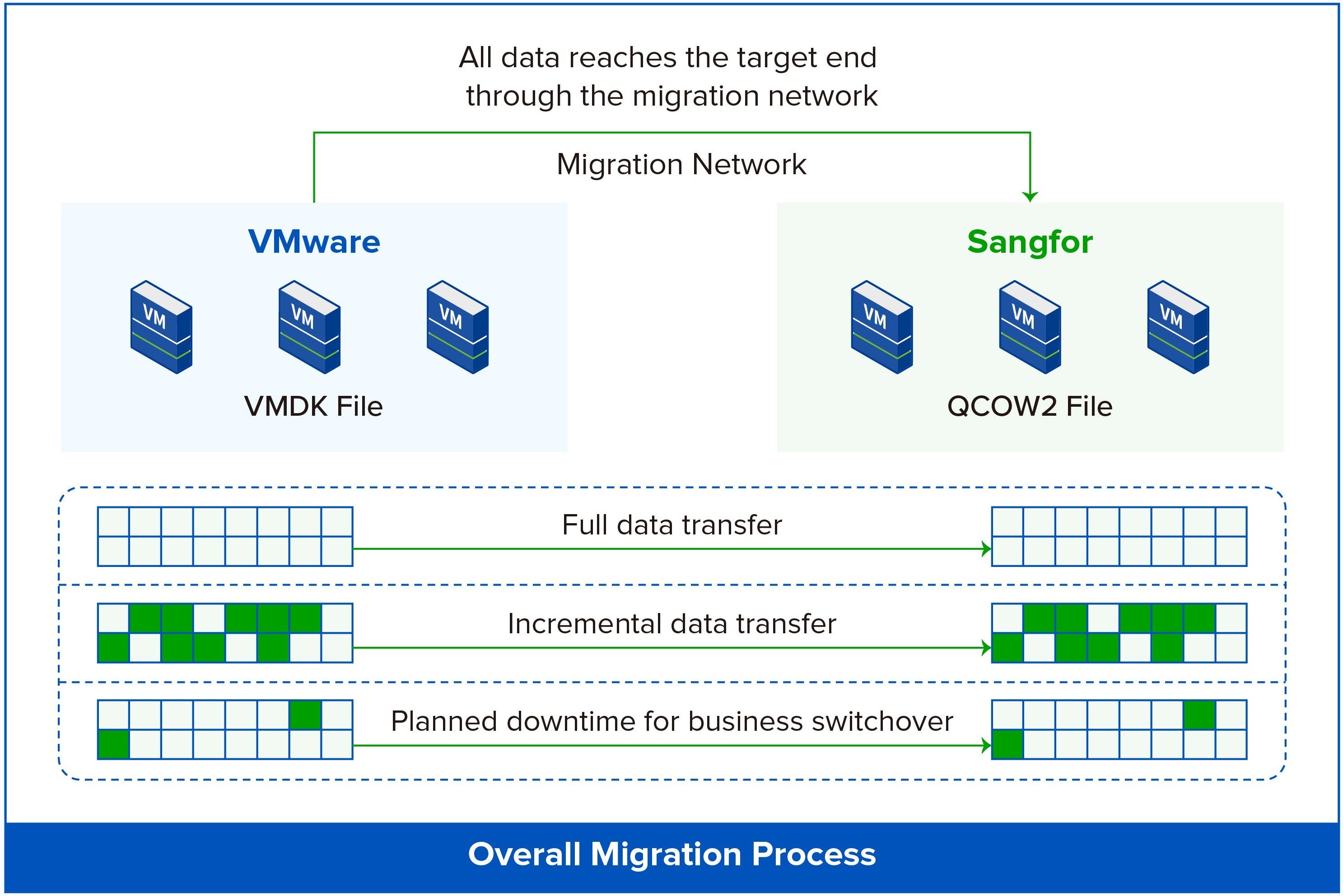
The most common migration method today uses a full initial transfer plus incremental updates, enabling online migration without affecting VM operation. By increasing transfer frequency, the volume of differential data is reduced, ensuring data consistency before the final switch.
5. Seamless VMware Migration: Sangfor SCMT Migration Tool
Sangfor offers the SCMT migration tool, which uses the same VDDK-based agentless technology to connect with vCenter and perform migration tasks. Unlike managed migrations, SCMT provides additional features, such as migration configuration adjustments, scheduled switchovers, and virtual machine verification, making it more versatile for various migration scenarios.
The SCMT migration tool supports deployment on Sangfor's cloud/virtualization platform, allowing migration tasks to be completed without requiring extra physical hardware.

Additionally, SCMT offers a comprehensive set of functions, including a clear, visual interface for monitoring the entire migration process and integrated migration risk alerts. When setting up a new migration plan, it allows for optimization of system resources, IP/MAC addresses, and application configurations, avoiding the need for multiple system reboots during configuration changes.
Post-migration switchovers can be done without shutting down the source operating system, ensuring a safer migration process with lower risks. SCMT supports manual, scheduled, and batch switchovers, making it particularly useful for unattended migrations and non-database cluster migrations.
6. Architectural Alignment: Why Migration to Sangfor HCI is Seamless
Sangfor HCI integrates compute, distributed storage, network virtualization, micro-segmentation, security, cloud-native readiness, and multi-site disaster recovery into one unified solution. By combining aSV, aSAN, aNet, and aSEC, it provides a seamless migration experience.

This integrated approach removes the complexity of managing multiple VMware products. Whether transitioning from vSphere to aSV, or migrating an entire VMware stack to Sangfor HCI (aSV + aSAN + aNet + aSEC), Sangfor HCI offers a simplified, unified solution that streamlines the migration process.
| Module | Sangfor | VMware |
| Compute Virtualization | aSV | vSphere |
| Storage Virtualization | aSAN | vSAN |
| Network Virtualization | aNET | NSX |
| Security Virtualization | aSEC | NSX (SDN-centric) |
| HCI Management | Built-in HCI platform | vCenter |
| Cloud Management | Sangfor Cloud Platform (SCP) | vRealize Suite |
| Cloud-native Platform | Sangfor Kubernetes Engine (SKE) | Tanzu |
| AIOps | SkyOps | Aria |
Resource: Sangfor HCI vs VMware: A Full Comparison for SMB IT Infrastructure in 2025 | Sangfor vs. VMware: A Feature-by-Feature Comparison
With positive G2 reviews highlighting migration speed, ease of use, and reliability, and recognition in the 2025 Gartner® Market Guide for Server Virtualization Platforms as a Representative Vendor, Sangfor HCI is a trusted, mature solution that ensures seamless enterprise migration from VMware.
7. From VMware to Sangfor HCI: A Step-by-Step Migration Guide
Enterprises migrating from VMware to other virtualization platforms typically follow a structured, low-risk process with automation tools. It starts with assessment and planning, using discovery tools to map workloads and dependencies. A pilot migration of non-critical systems tests compatibility, followed by workload conversion to repackage VMs for the new hypervisor. A phased cutover minimizes downtime, and performance validation ensures efficiency before full deployment.
This approach ensures a smooth transition to platforms like Sangfor HCI, which addresses migration challenges with its streamlined virtualization structure, HCI architecture, built-in backup, and 24/7 local support, guaranteeing business continuity throughout the process.
8. Sangfor HCI Demo
Know more about VMware migration to Sangfor through Sangfor Solutions Engineers and Server Architects. You may fill this form to request the Sangfor HCI demo, and we will strive to get back to you asap.
9. Frequently Asked Questions (FAQs)
No. By using the SCMT tool, you can perform online migration. Data is synced in the background while the VM is running, and only a brief restart is needed during the final cutover.
Yes. Sangfor SCMT uses agentless technology via VMware’s VDDK. It connects directly to your vCenter, making it easy to manage bulk migrations without touching the guest OS.
Yes. The tool ensures data integrity by performing block-level verification. It also allows you to keep the source VM intact until you have fully verified that the new VM is running correctly on Sangfor HCI.
No. SCMT is a software-based tool that can be deployed as a virtual appliance directly on your new Sangfor HCI cluster, saving you additional hardware costs.
Yes. SCMT allows you to pre-configure and retain existing IP and MAC addresses. This ensures that your network policies and application dependencies remain functional after the switch.
10. Additional Insights from Sangfor
VMware Migration Made Easy: A Strategic Exit Plan
A New Recipe for Virtualization: Crafted for Simplicity and Flexibility
Comprehensive Guide for Seamless VMware Virtual Machine Data Migration - Part 1
VMware Virtual Machine Data Migration Solution Part 2: Online Migration Technical Practice