Summarize this news article with AI:
 Ask ChatGPT
  Ask Grok
  Ask Perplexity
  Ask Claude
  Ask Google AI
 In our previous blog, “VMware Migration Cost: How to Reduce Cost and Complexity with Sangfor Cloud Migration Tool”, we explored how Gartner highlights hidden and often underestimated costs in VMware migration projects, from over-provisioned infrastructure and extended downtime to failed migrations that require costly rework.
While understanding these costs is a critical first step, a far more important question remains:
How can enterprises move from cost awareness to migration certainty before risks and overruns materialize?
This is where many VMware exit strategies begin to falter.
The Real VMware Migration Challenge: Uncertainty Before Execution
The shift in VMware's business model has triggered widespread licensing changes and price increases. However, real-world migrations continue to fail or stall—not because of tool limitations, but because organizations migrate without a clear, validated understanding of their environments.
- Unknown Migration Success Rates: Organizations lack the ability to predict whether a VM will successfully migrate, boot, and run on the target platform.
- Resource & Capacity Planning Gaps: Without accurate forecasting, migration projects often over-provision or under-provision resources, leading to cost overruns or performance degradation.
- Complex Security & Network Rule Migration: NSX firewall rules, distributed switches, and intricate network policies are notoriously hard to manually recreate, raising security and downtime risks.
- Legacy Infrastructure and Hidden Risks: Configurations like RDM disks, independent disks, USB passthrough, or unsupported OS versions can derail migration mid-stream.
These challenges underline the need for a tool that not only discovers but also comprehensively evaluates the migration landscape before execution.
Why Cost Optimization Doesn’t De-Risk VMware Migration
Many organizations look for migration tools that promise speed or lower cost. But without a comprehensive, pre-migration assessment, those savings often disappear later through:
- Emergency infrastructure expansion
- Unexpected downtime
- Migration rollbacks
- Security incidents due to misconfigured policies
In short: Cost optimization without assessment simply shifts risk downstream.
To solve this, Sangfor Cloud introduced an intelligent, automation-driven assessment approach, designed specifically to remove uncertainty, and to deliver a nearly risk-free experience before migration begins.
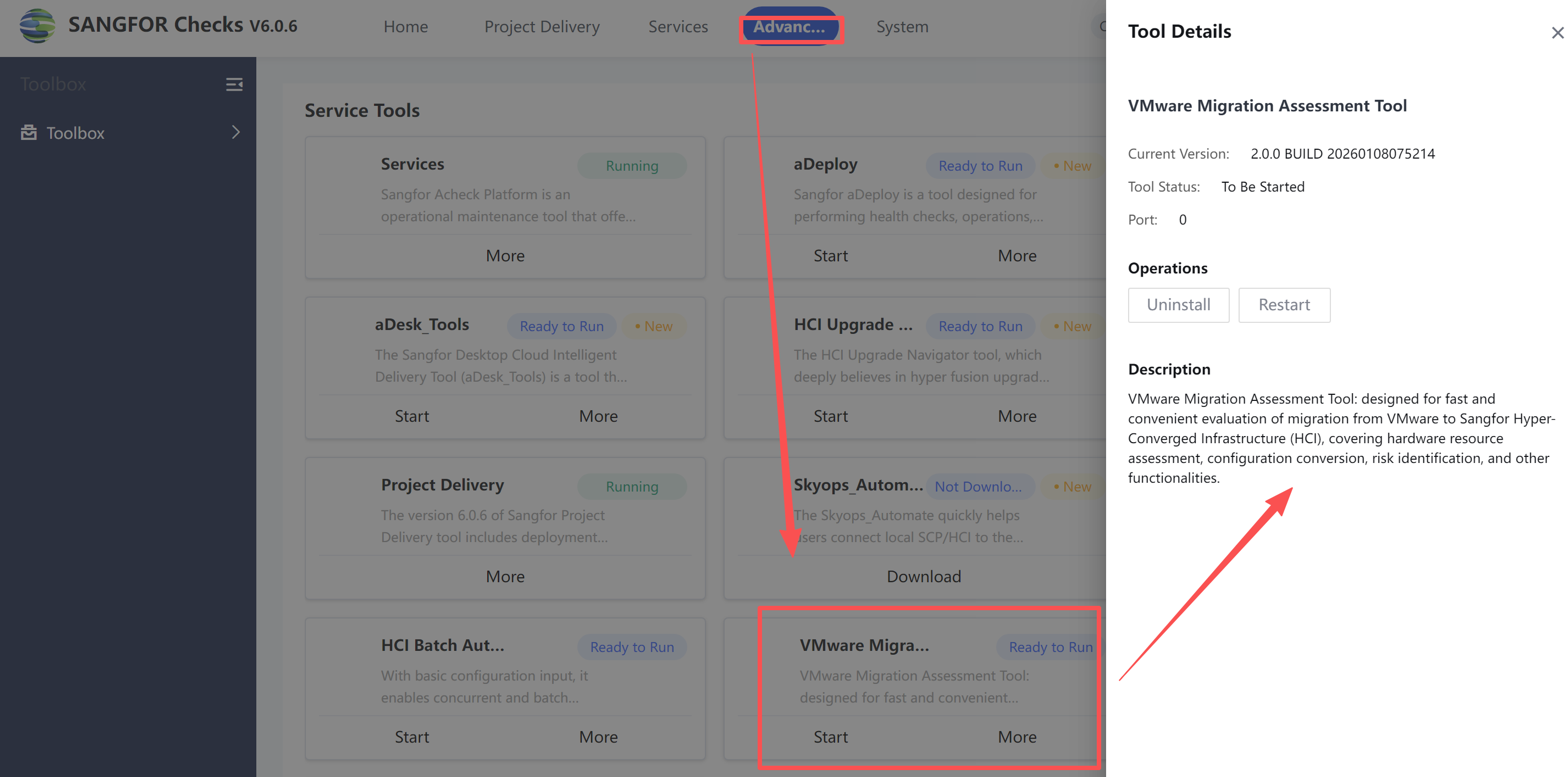
Introducing Sangfor’s VMware Migration Assessment Tool
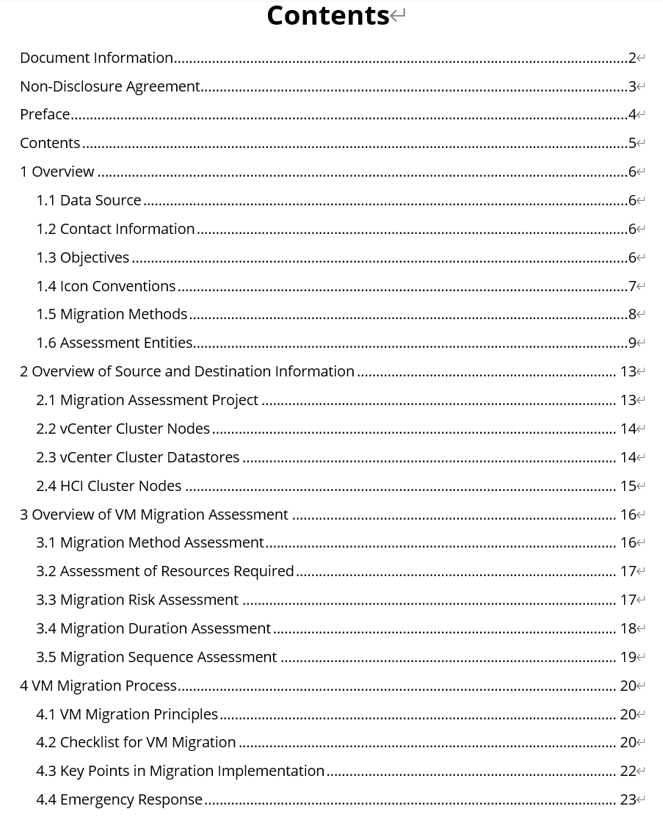
Sangfor Cloud's VMware Migration Assessment Tool is an intelligent assessment platform that automates and standardizes the entire migration evaluation process—from task initialization and data collection to multi-dimensional analysis and detailed reporting. The tool’s core promise is to replace manual, error-prone assessment processes with an automated, rule-based engine that dramatically improves accuracy, speed, and success rates.
Key Capabilities at a Glance
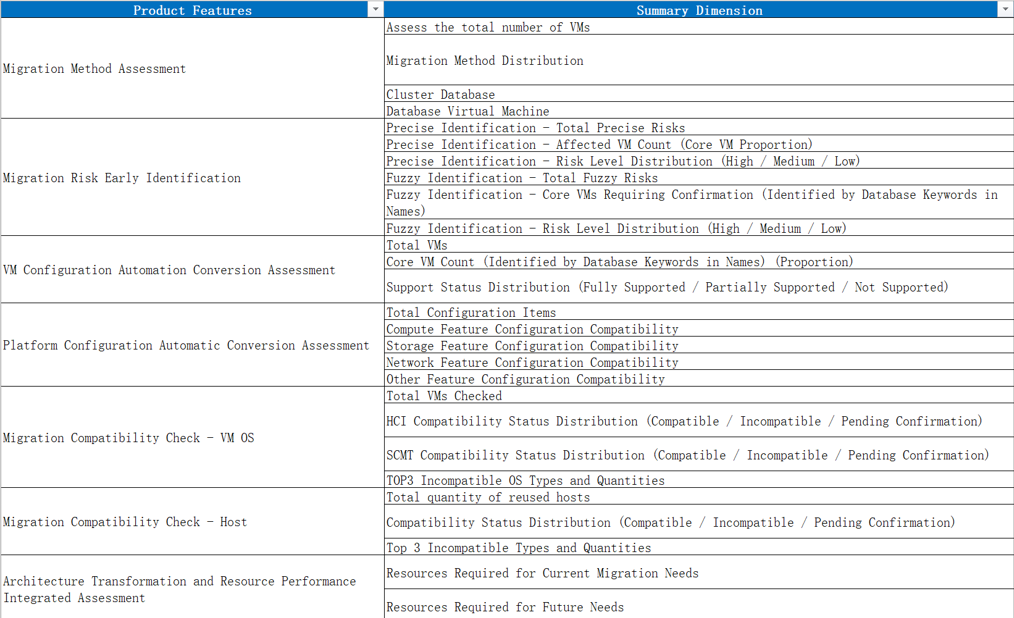
- Full-Dimension Coverage: The tool evaluates seven critical dimensions: migration method matching, risk identification, resource estimation, compatibility validation, migration sequencing, duration forecasting, and configuration mapping.
- Automated Efficiency: In as little as 10 minutes, the system can assess 1,000+ VMs—improving efficiency by over 90% compared to manual surveys.
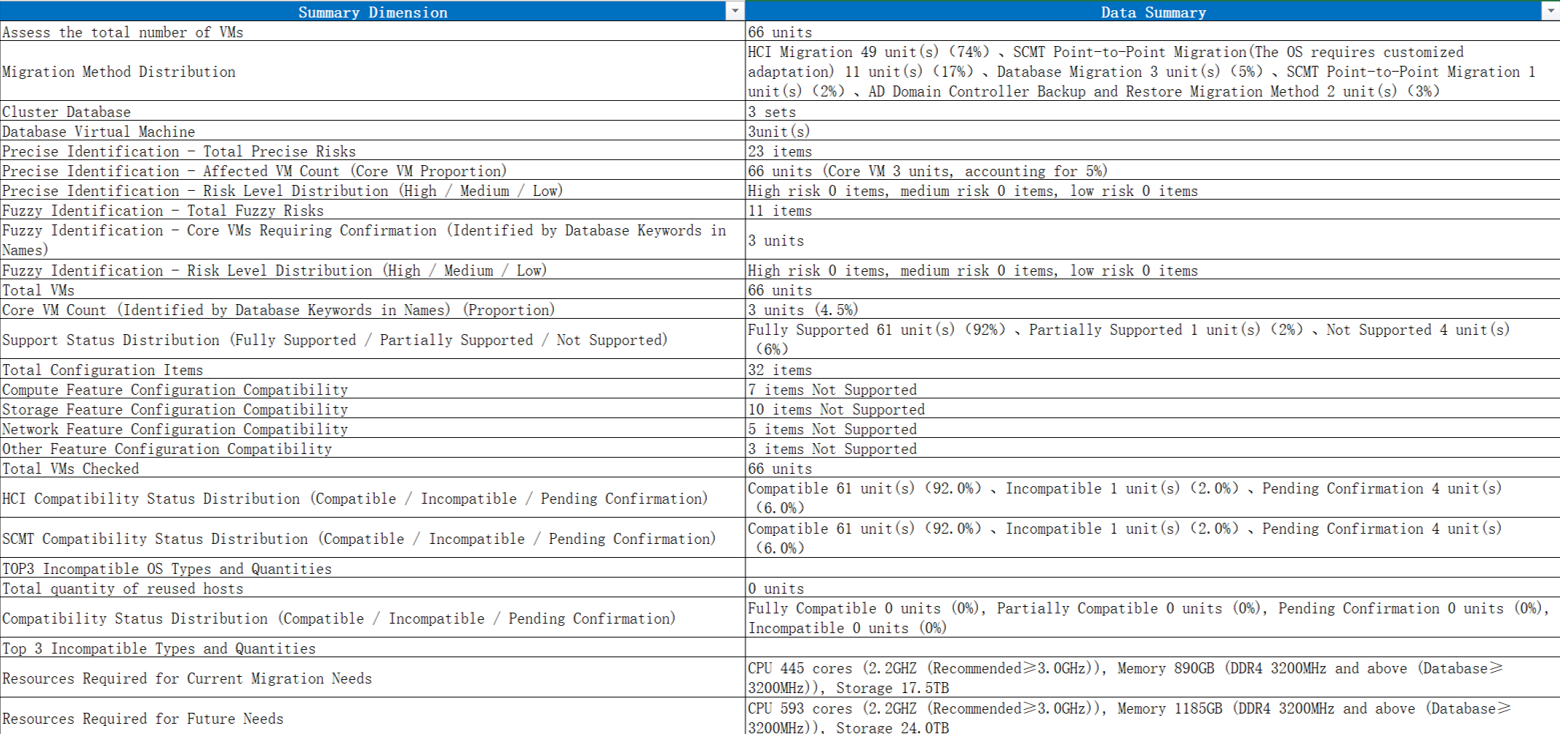
- Standardized Output: Generates structured Word/Excel reports with clear migration plans, risk highlights, capacity projections, and timeframes.
- Enterprise-Grade Scalability: Tailored for medium- to large-scale environments (50–10,000 VMs) and mixed workloads (databases, AD domain controllers, core applications).
Solving the Hard Problems in VMware Migration
1. Predicting Migration Success with Intelligent Method Matching
One of the biggest risks is selecting an inappropriate migration method for a VM, especially for critical workloads like databases or AD controllers. Sangfor VMware Migration Assessment Tool automates this decision with a priority-driven rule engine that evaluates business type, storage configuration, disk size, OS/kernel compatibility, and allowable downtime.
For example:
Database Migration (highest priority) is triggered if a VM is identified as a database (Oracle, MySQL, SQL Server), an Exchange mail database, or has storage features like Raw Device Mapping (RDM) or multi-writer shared disks, typical in Oracle RAC or SQL Server Always On clusters. This prevents data consistency or availability pitfalls that would occur if such VMs were migrated using standard methods.
Agentless Scenarios are accommodated where agent installation is prohibited, ensuring compliance with strict security policies.
2. Proactive Risk Identification Before Migration Day
The tool automatically scans for 20+ risk points across configuration, hardware, and compatibility domains—categorized into success, warning, fail, and info severity levels. Risks like RDM disks, incompatible CPU/memory reservations, USB passthrough devices, and unsupported storage configurations are flagged early, alongside remediation guidance. For example:
- Fail-Level Risk: RDM disks directly block migration and must be converted before moving.
- Warning-Level Risk: USB passthrough may cause functional failures post-migration, requiring re-evaluation or driver compatibility checks.
- This proactive identification can reduce migration failure rates by up to 60% and cut troubleshooting time by 80%.
3. Accurate Capacity Planning Without Guesswork
Rather than relying on static resource allocations, the tool analyzes historical performance data (CPU, memory, storage) and applies intelligent algorithms to forecast real needs.
Key Forecasting Logic:
- Load Analysis: Identifies VMs with >80% CPU or memory usage, recommending capacity expansion [e.g., ceil (original cores × peak usage × 2)].
- Disk Provisioning: For thin-provisioned disks, capacity is calculated using coefficients (1.4 for <70% usage, 2 for ≥70% usage), while thick provisioning uses actual consumed space.
- Cluster-Level Sufficiency Check: The aggregated resource demand (CPU, memory, storage) is compared against target HCI cluster available capacity, adjusted for HA, migration overhead, and snapshot reserves (storage factor = 1.56×).
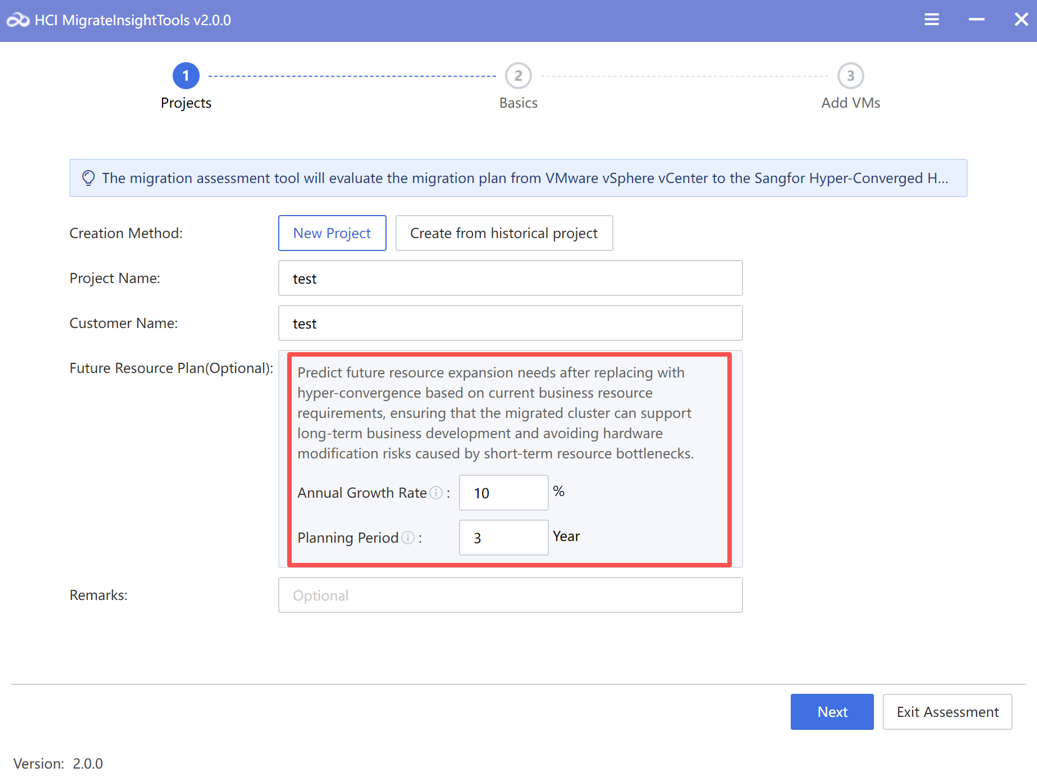
- Future Capacity Planning: Projects 1–3 years of growth using workload-specific growth rates (e.g., 15–20% for database/financial clusters, 8–12% for standard applications).
This data-driven approach ensures that the target environment is right-sized, eliminating post-migration surprises.
4. Simplifying NSX Policy Migration
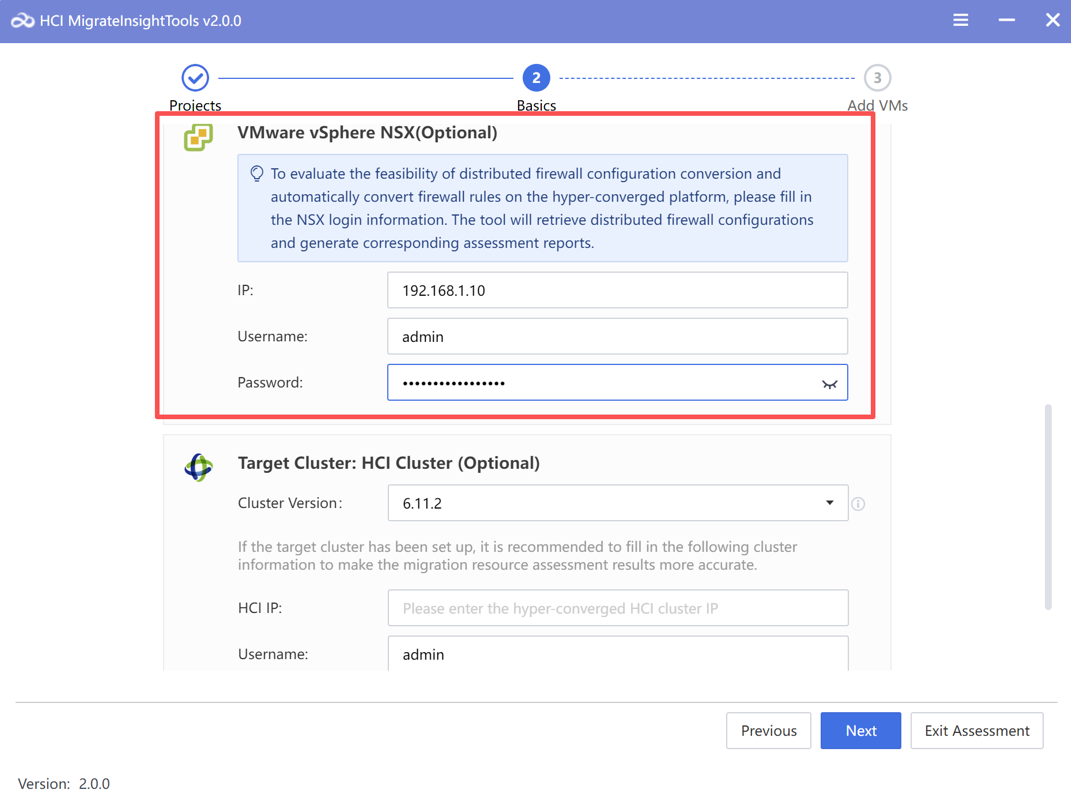
Migrating complex network and security policies—especially NSX firewall rules—is a major hurdle that can take weeks to reconfigure manually. With this tool, even the most extensive migrations of distributed firewall rules can be completed in minutes.
5. Precise Migration Sequencing and Timeline Planning
VMware Migration Assessment Tool calculates migration duration for individual VMs, groups, and entire batches based on disk capacity, network bandwidth, OS type, and business interruption windows. For example:
- Database groups typically use a 2000 Mbps bandwidth and a 3-minute downtime window.
- SCMT point-to-point migration for Windows is allocated 500 Mbps, while Linux gets 1000 Mbps.
The system also optimizes the migration sequence:
- Business Prioritization: Core databases and critical applications are migrated after foundational services to minimize risk.
- Dependency Mapping: Automatically detects and sequences interdependent VMs (e.g., application servers after databases).
- Batch Optimization: Recommends batch sizes based on priority (e.g., ≤20 VMs for high-priority workloads, ≤100 for low-priority).
- This holistic planning prevents resource contention during migration and ensures smooth, phased rollouts.
6. Comprehensive Compatibility & Configuration Validation
The tool checks OS/kernel compatibility, HCI platform constraints, and migration tool prerequisites. For instance, it flags unsupported OS versions (like Windows Server 2008 or older, FreeBSD).
- Validates Linux kernel compatibility against a database of known supported versions.
- Maps VMware configurations (e.g., LSI Logic disk controllers to AHCI, VMXNET3 to HCI-compatible adapters) and highlights incompatibilities (e.g., vGPU passthrough not supported).
- This preemptive validation avoids post-migration boot failures or performance degradation.
How Sangfor Differs from Traditional Cloud Migration Assessment Tools
Traditional VMware migration tools, such as those in Microsoft Azure Migrate, focus heavily on cloud migration scenarios (VMware to Azure). While Azure Migrate provides robust discovery, assessment, and migration orchestration, its scope is cloud-centric and may not address the nuanced requirements of on-premises hyperconverged migrations.
By contrast, Sangfor VMware Migration Assessment Tool is purpose-built for migrating VMware to Sangfor HCI, with deep compatibility checking, configuration transformation, and capacity forecasting tailored to on-premises infrastructure. Its ability to assess large-scale environments (1000+ VMs) in under 10 minutes and generate actionable reports makes it ideal for enterprise replatforming projects that demand speed, precision, and a clear roadmap.
Business Value & Implementation Best Practices
- Accelerated Decision-Making: Instead of weeks of manual assessment, organizations can obtain a comprehensive migration plan in hours, complete with risk profiles, resource forecasts, and timeline estimates.
- Cost Optimization: Right-sizing resources prevents overspending on HCI infrastructure while ensuring performance SLAs are met.
- Minimized Downtime & Risk: Automated dependency mapping and sequenced migration planning minimize business disruption and prevent cross-service outages.
Implementation Tips
- Data Collection: Run detailed collection during low-activity periods and ensure VMware accounts have read-only permissions.
- Risk Remediation: Address high-severity risks (like RDM disks) before finalizing the migration plan.
- Validation: Use the tool’s reports to align stakeholders (operations, network, security) and perform pre-migration pilots on non-critical workloads.
Proven in the Real World
Using this assessment-driven approach, a large Southeast Asian conglomerate spanning retail, banking, and real estate successfully migrated 400 VMs from VMware to Sangfor HCI in under one month, achieving:
- Zero downtime
- 10-second RPO disaster recovery
- Support for mixed OS and critical workloads (Including Windows Server 2008, 2012, 2016, 2019, and 2022, CentOS, Rocky Linux, and SUSE Linux, as well as critical business systems such as SAP and banking databases.)
From Insight to Action
As VMware uncertainty accelerates, organizations cannot afford trial-and-error migrations. Sangfor Cloud’s VMware Migration Assessment Tool provides the data-driven clarity needed to de-risk and streamline the entire migration lifecycle—from initial assessment to post-migration validation. By automating critical tasks like method selection, risk identification, capacity forecasting, and sequence planning, it transforms a traditionally chaotic and uncertain process into a predictable, high-success journey.
For any organization considering a VMware-to-Sangfor HCI migration, investing in a robust assessment tool like VMware Migration Assessment Tool isn’t just a convenience—it’s a strategic necessity to avoid costly failures and achieve a seamless, efficient transition.
Report Sample