
Summarize this article with AI:
 Ask ChatGPT
 Ask Grok
 Ask Perplexity
 Ask Google AI
Key Takeaway
- Sangfor HCI overload protection helps maintain operational stability under high CPU load.
- Dual-plane resource isolation reduces resource contention between management services and business VMs.
- When CPU utilization exceeds 85% for 360 consecutive seconds, Sangfor HCI reserves dedicated CPU cores for management services.
- Tiered priority scheduling and intelligent API control prioritize critical operations during CPU overload.
- Test results show that Sangfor HCI delivers smoother, more predictable business performance after overload protection is enabled.
In mission-critical hyper-converged infrastructure (HCI) environments, unexpected CPU overloads often lead to performance fluctuations, delayed core management operations, and even hidden stability risks. To address these pain points, Sangfor HCI has launched a purpose-built Overload Protection feature, designed to deliver rock-solid operational stability even under high system load. This blog explores how Sangfor HCI’s overload protection works and how it helps maintain service continuity.
Core Architecture: Dual-Plane Resource Isolation
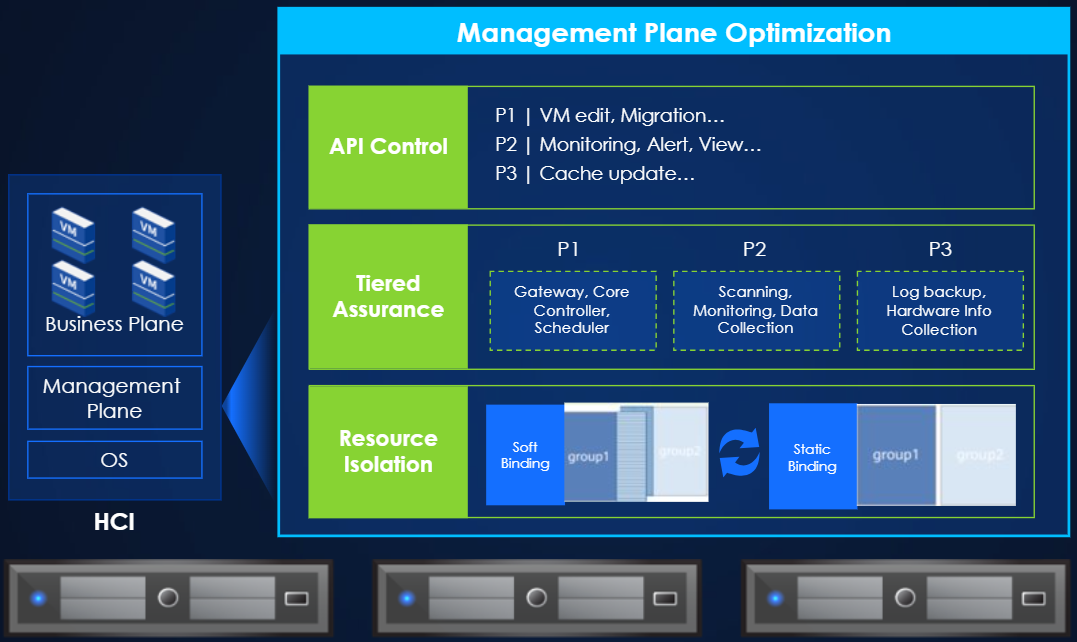
The foundation of Sangfor HCI's overload protection is the strict separation of the Management Plane and the Business Plane running on top of HCI OS, eliminating resource contention between system services and user business VMs at the root:
- All control plane services are bound to a dedicated CPU range, minimizing directly competition for computing resources with business virtual machines.
- By default, the system runs a soft-binding mechanism: idle resources reserved for management plane services are automatically released to business VMs on demand, maximizing resource utilization under normal loads.
- When physical CPU utilization exceeds 85% for 360 consecutive seconds, Sangfor HCI reserves dedicated CPU cores for management services, ensuring that critical system functions remain responsive under heavy load.
Tiered Priority Scheduling to Protect Critical Tasks
To avoid low-value background tasks consuming computing resources that should be allocated to critical operations, Sangfor HCI adopts a cgroup-based tiered assurance mechanism that classifies all management tasks into three priority tiers:
- P1 Tier: Covers core high-priority tasks including VM editing, VM migration, core gateway, controller and scheduler operations
- P2 Tier: Includes monitoring, alerting, resource view query and other day-to-day O&M operations
- P3 Tier: Encompasses non-urgent background tasks such as cache updates, scanning, monitoring data collection, log backup and hardware information collection
This priority-based computing power scheduling ensures that low-priority background tasks can never crowd out critical operations, guaranteeing smooth response for core controls even under heavy load.
Intelligent API Control for Consistent Interaction Experience
Complementing the tiered scheduling system is the built-in intelligent API control capability:
As soon as CPU overload is detected, the system automatically activates API queuing and rate-limiting mechanisms. All incoming API requests are scheduled strictly based on their task priority, which effectively restricts unnecessary resource consumption from non-critical operations. This design ensures that user-facing page operations and core control commands always get fast response, without getting stuck in long queues caused by a flood of low-priority API requests.
Real-World Performance Validation: Smoother, More Predictable Business Operations
The value of this overload protection feature is fully proven under standardized test conditions, which ran on an Intel 6226R CPU configuration with 4 16C Oracle servers, 16 4C4GB virtual machines, and physical CPU utilization pegged at 85%:
| Solution | Average TPS Standard Deviation | TPS Standard Deviation / Average TPS | (Max TPS – Min TPS) / Max TPS | Total TPS | Total TPS Standard Deviation | TPS Standard Deviation / Average TPS |
| Disable Overload Protection on HCI | 9.85 | 2.1% | 12.36% | 1880.9 | 18.2 | 1% |
| Enable Overload Protection on HCI | 8.13 | 1.73% | 9.23% | 1880.76 | 9.31 | 0.5% |
| Enable Overload Protection on VMware | 5.88 | 1.22% | 8.17% | 1927.68 | 7.29 | 0.4% |
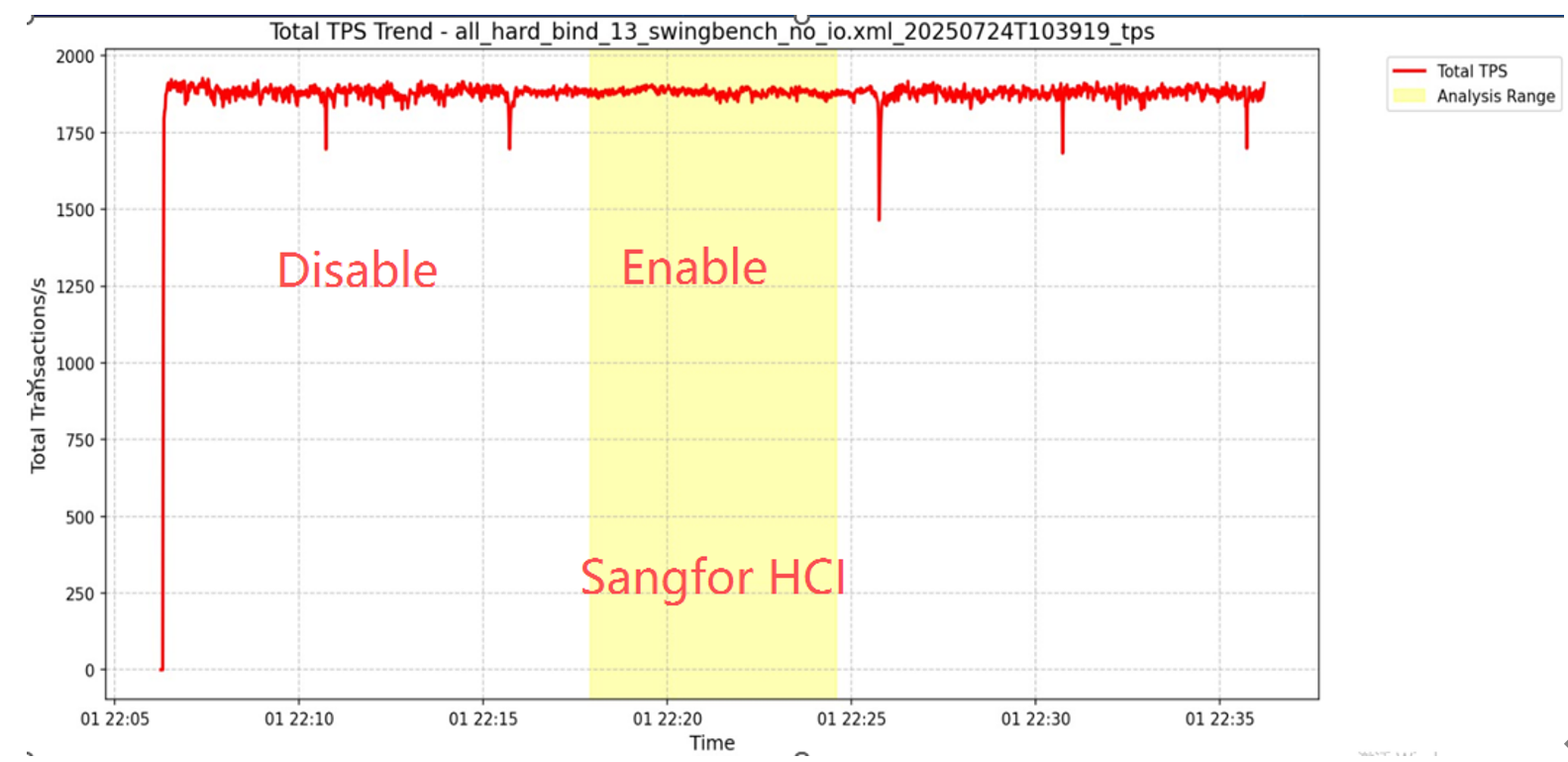
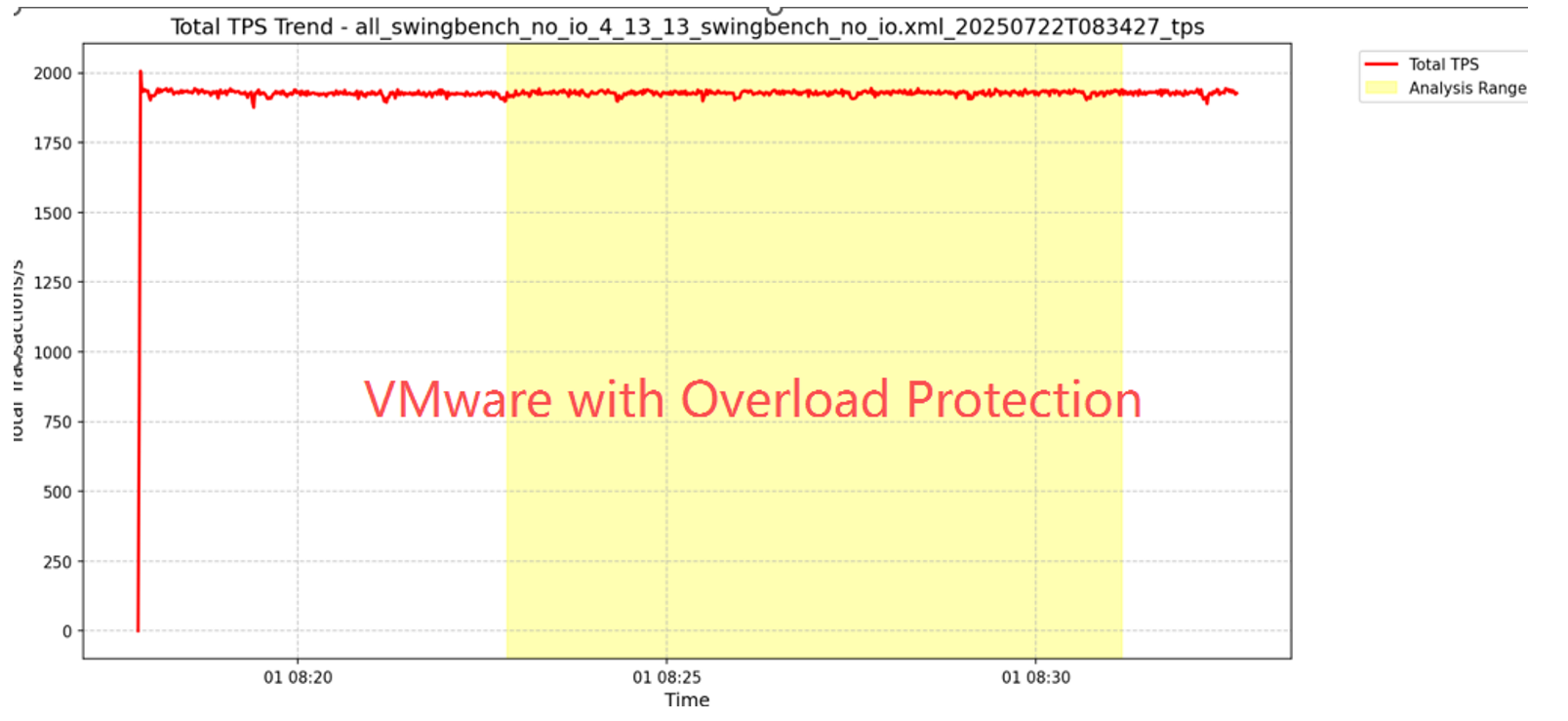
Test results clearly show that after enabling Sangfor HCI's overload protection, the Oracle TPS curve becomes noticeably smoothed, with far fewer performance spikes and dips. The system delivers far more stable and predictable business performance compared to running without overload protection and outperforms generic virtualization platforms when it comes to reducing TPS jitters. Under high CPU load, Sangfor HCI's performance is now very close to that of VMware.
Important Operational Notes
To help users make the most of this feature, we would like to share a few transparent reminders:
- When the system enters the overload state (physical CPU usage ≥ 85%), the management plane CPU resources will be automatically throttled as designed. In rare cases this may cause minor page lag, or slow down the collection of report data.
- After overload protection is triggered, the reduced available resources on the management plane may slightly extend the execution time of operations such as snapshots, backups and CDP, leading to a very minor increase in RPO. This tradeoff is intentionally designed to prioritize the overall long-term stability of both management services and core business VMs.
Sangfor HCI's overload protection feature turns passive fault response into active stability prevention, helping enterprises build a more resilient hyper-converged environment that keeps critical business operations running smoothly even under peak load pressure. For more technical details, you can visit Sangfor official website to explore our full HCI product portfolio.
FAQs on Sangfor HCI Overload Protection
Sangfor HCI’s overload protection is designed to maintain operational stability under high system load. It uses dual-plane resource isolation, tiered priority scheduling, and intelligent API control to help critical system functions remain responsive and keep business operations running smoothly.
Sangfor HCI strictly separates the Management Plane and the Business Plane running on top of HCI OS, reducing resource contention between system services and business VMs. When physical CPU utilization exceeds 85% for 360 consecutive seconds, Sangfor HCI reserves dedicated CPU cores for management services.
Sangfor HCI combines dual-plane resource isolation, cgroup-based tiered priority scheduling, and intelligent API control to maintain stability under high CPU load. It separates management services from business VMs, prioritizes critical management tasks, and uses API queuing and rate limiting to restrict unnecessary resource consumption from non-critical operations.
It can. After overload protection is triggered, the reduced available resources on the Management Plane may slightly extend the execution time of operations such as snapshots, backups, and CDP, leading to a very minor increase in RPO.