
Summarize this blog article with AI:
 Ask ChatGPT
 Ask Grok
 Ask Perplexity
 Ask Claude
 Ask Google AI
For many organizations, VMware vSphere has long been a constant—stable, trusted, and deeply embedded in day-to-day operations. It’s not the kind of platform that demands urgent attention unless something forces the conversation.
Right now, something is.
Not a formal announcement. Not a hard deadline carved in stone. But something arguably just as important: a shrinking window for informed decision-making.
While Broadcom has not officially confirmed an end-of-support (EOS) date for vSphere 8, there is enough visibility, based on historical lifecycle patterns and market dynamics, to suggest that waiting for clarity could come at a cost. However, to most VMware customers, vSphere 8 upgrade to vSphere 9 isn't merely a routine version update; it's a strategic inflection point that forces them to either accept a costly and potentially disruptive upgrade path to vSphere 9 or reconsider their entire virtualization foundation.
A Timeline That’s Clear Enough to Act On
VMware has historically followed a relatively consistent lifecycle model: roughly five years of full support, followed by an additional period of limited technical guidance.
Given that vSphere 8 was released in October 2022, many industry observers and lifecycle trackers project:
- End of General Support (estimated): around October 2027
- Extended/Technical support (estimated): through roughly 2029
Though these are not official commitments, they still matter in practice. Infrastructure strategy doesn’t begin when deadlines are confirmed, it begins well before them.
According to the Gartner® research “The VMware Migration Cost Estimation Playbook”, “the elapsed duration for a full migration can range broadly, with many organizations requiring 18 to 48 months for enterprise-scale efforts”.
So even without a formal EOS announcement, the implication is straightforward:
The runway is shorter than it appears.
Once timelines become official, the downstream effects tend to accelerate quickly:
- Renewal cycles tighten, often with less room to negotiate or reassess direction
- Migration projects shift from strategic initiatives to time-bound execution risks
- Internal alignment (budget, resources, priorities) becomes harder as urgency increases
That’s why many IT leaders are starting to act before the dates are finalized. Not because they need to move immediately, but because they need to:
- Understand their current exposure (workloads, dependencies, constraints)
- Evaluate alternative architecture while time is still on their side
- Build optionality into their roadmap, instead of being locked into a single path later
A Different Way to Approach the Next Phase
For organizations looking at their next step, Sangfor offers a way to rethink not just replace but the existing environment.
Choosing Sangfor HCI as your VMware successor ensures a seamless transition of all critical workloads while introducing significant operational, performance, and economic advantages. Sangfor provides robust, enterprise-grade equivalents to core VMware functionalities: High Availability (HA), comprehensive VM management, robust networking, within a seamlessly integrated stack managed through a single pane of glass.
However, the true value lies in surpassing these basics with transformative features that directly address today's IT pain points.
Core Advantages of Sangfor HCI for Your Migration
-
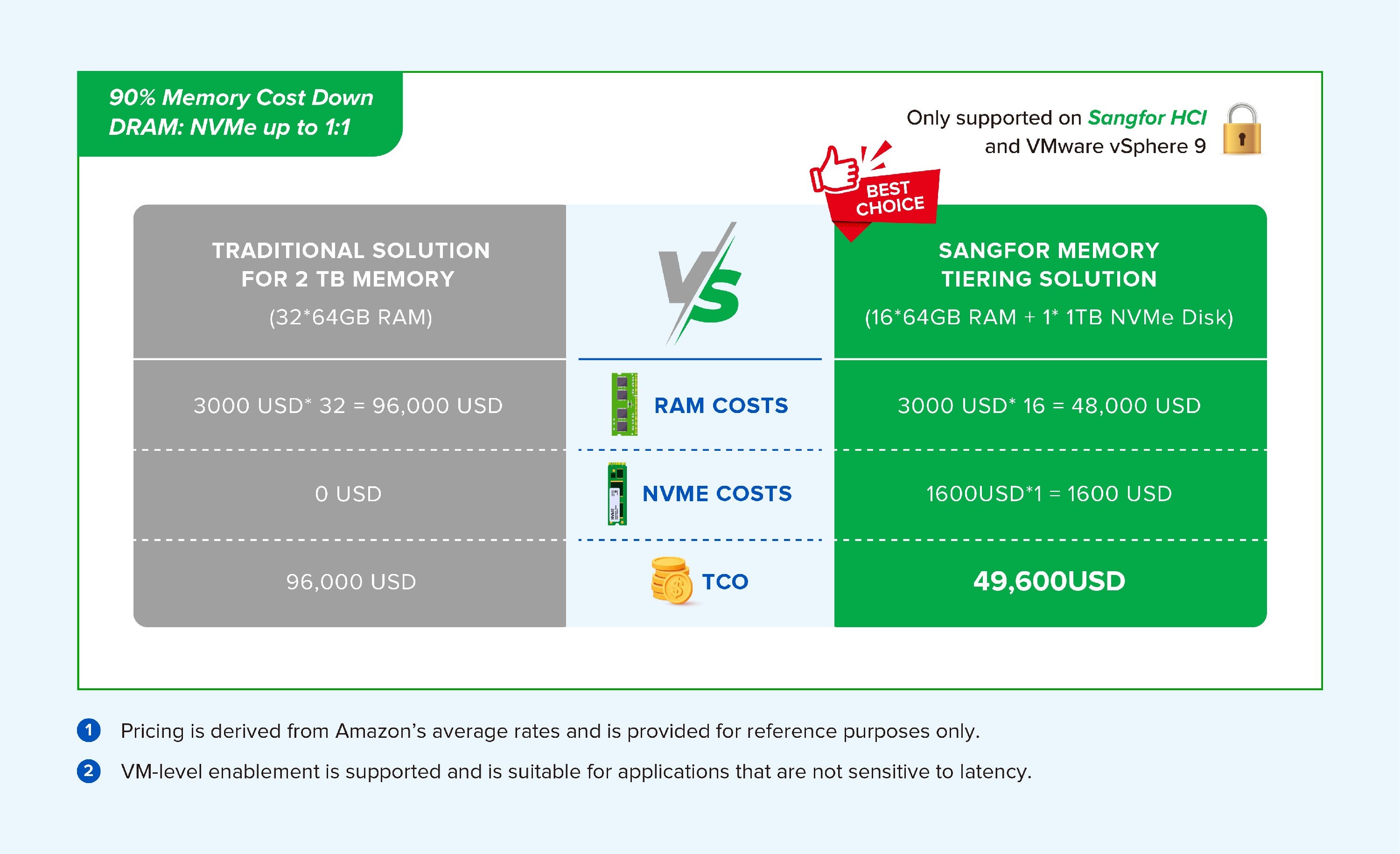
Sangfor Memory Tiering: Optimize Performance and Cost
One of our flagship innovations benchmarking against VMware vSphere 9 without additional license, Memory Tiering, intelligently creates a dynamic memory pool combining high-speed DRAM with more affordable persistent memory (like Intel Optane). This technology automatically places "hot," frequently accessed data in DRAM for maximum performance, while migrating "warm" data to the persistent tier. The result? You can support more memory-intensive applications (Web, ERP, Microservices, Middleware) without the prohibitive cost of populating servers with DRAM alone. This translates directly to higher VM density, better application performance, and a substantially lower TCO compared to traditional architecture, giving you more power for your investment.
-
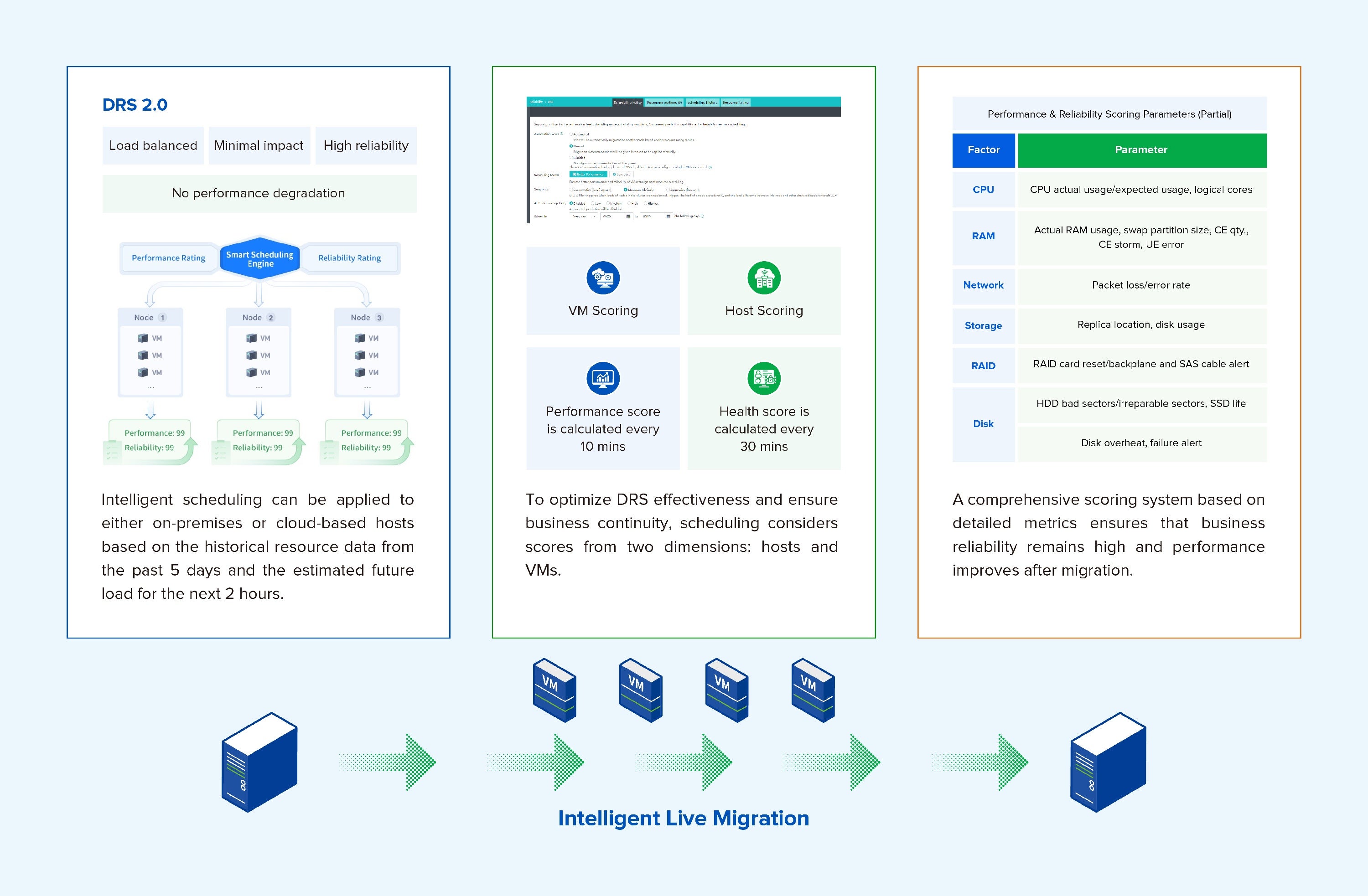
Intelligent DRS 2.0: Proactive and Storage-Aware Load Balancing
In VMware vSphere 8, DRS only implements basic load balancing and does not support advance prediction of post-migration performance; AI analysis was introduced in VMware vSphere 9 to enable intelligent prediction of virtual machine performance after migration. Sangfor's DRS 2.0 is a significantly more advanced system. It is fully storage-aware, factoring in storage I/O load and latency to prevent creating new bottlenecks while solving compute ones. Furthermore, it employs predictive analytics to forecast resource contention before it impacts application performance. This proactive, intelligent rebalancing ensures optimal resource utilization across both compute and storage, delivering consistently high performance and efficiency that reactive systems cannot match.
-
Proactive Hardware Sub-Health Detection: From Reactive to Predictive Operations
Unplanned hardware failures are a primary cause of downtime. Sangfor's Proactive Hardware Sub-Health Detection system moves you from a reactive to a predictive maintenance model. By continuously monitoring key metrics from all critical components (SSDs, HDDs, memory, PSUs, fans), our algorithms can identify early warning signs—such as increasing bad sectors, rising read latency, or correctable memory errors—long before a complete failure occurs. The system provides precise alerts, enabling your IT team to schedule part replacements during maintenance windows, thereby preventing catastrophic outages and ensuring exceptional infrastructure stability and reliability.
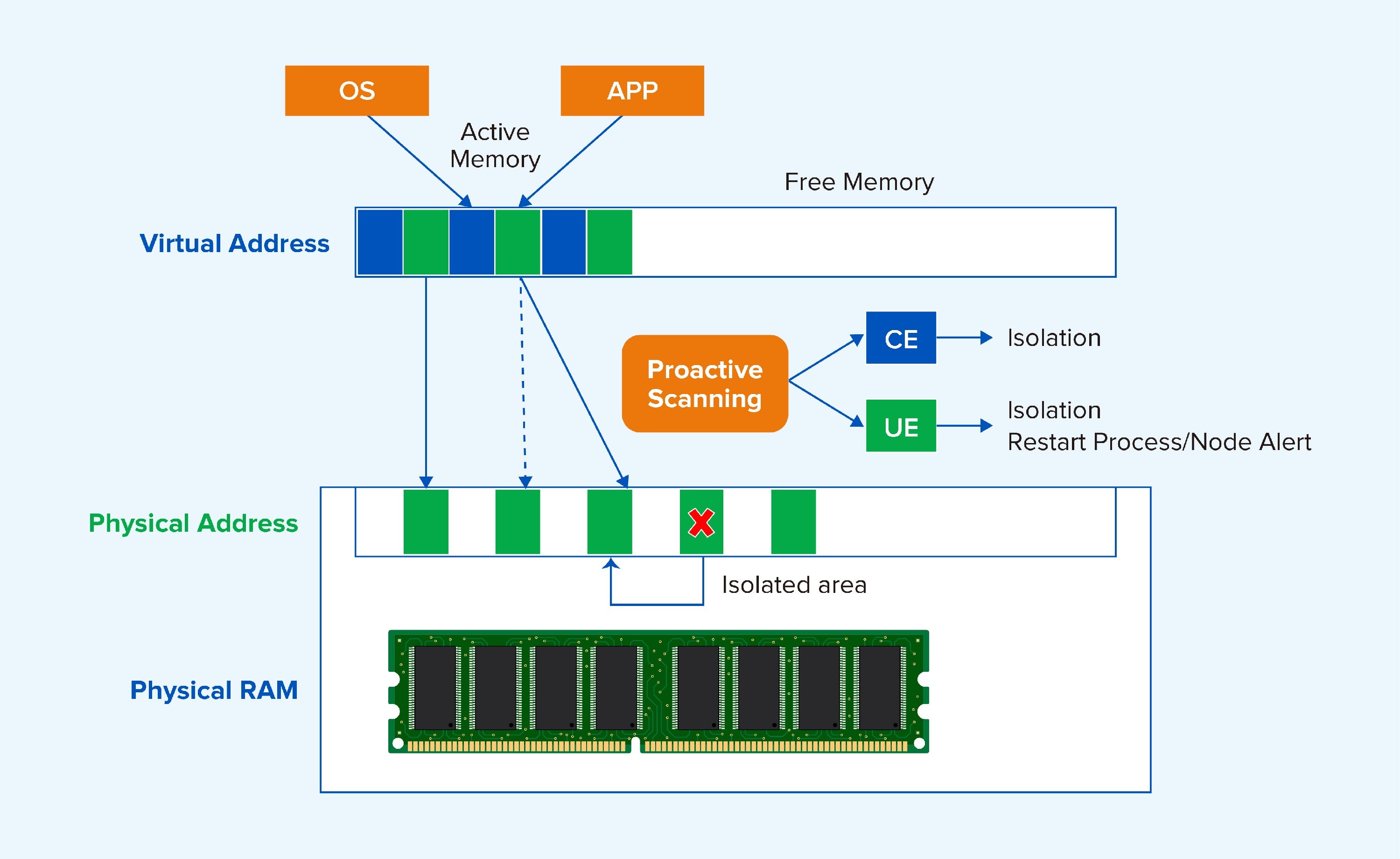
Let’s take memory health detection as an example. VMware uses a monitoring mechanism that listens for error reports regarding interactions between the CPU and memory, while Sangfor employs periodic proactive scans to actively detect CE/UE, enabling earlier problem detection.
After VMware detects a CE or UE, ESXi tracks the cumulative frequency of CEs. If the frequency exceeds a threshold within a specific time window (e.g., ≥4 times per 24 hours), a “Memory Health Alert” is triggered, and the administrator is advised to replace the memory modules to prevent potential hard errors from escalating. Once a UE is detected, ESXi immediately marks the faulty physical memory page as “retired” and forcibly shuts down the virtual machine using that memory page to isolate the fault and prevent a Purple Screen of Death (PSOD) or data corruption on the host. After Sangfor detects a CE/UE, it proactively isolates 2M, ensuring that data always flows through healthy addresses. Compared to simple alerts, Sangfor enables businesses to avoid using abnormal addresses at an earlier stage.
-
Long-term Guest OS Support
vSphere 9 has dropped support for a number of legacy operating systems, such as RHEL 8, CentOS 7, Ubuntu 22.10, and Windows Server 2008 R2. This means that when customers upgrade their platform, they must also upgrade their virtual machines and applications, resulting in significantly higher costs and increased uncertainty. In contrast, when looking at Sangfor HCI, it can still find entries in the official compatibility list showing that the latest version supports very old guest operating systems such as Windows Server 2000/2003 and Red Hat 5. Sangfor is able to provide customers with longer-term and more stable support services.
Final Thought: It’s Not About the Exact Date
The exact EOS date for vSphere 8 may still be unconfirmed. But the direction is clear enough. Staying with the forced VMware upgrade path likely means:
- Significantly increased software licensing and subscription costs.
- Another round of potentially disruptive migration efforts.
- Continued strategic dependence on a single vendor's roadmap.
Choosing Sangfor HCI offers:
- A proven, low-risk migration path with validated tools and methodologies for moving VMware workloads.
- A predictable and often reduced TCO with a transparent licensing model.
- Access to innovative features like Memory Tiering and Predictive DRS 2.0 that deliver immediate performance and efficiency gains.
- A simpler management solution, manage Sangfor HCI clusters, tenants, virtual machines, and even VMware clusters through a single platform. From 3-tier architectures with external storage to hyper-converged architectures with software-defined data centers, to disaster recovery and backup, to multi-cluster heterogeneous environments, Sangfor always provides the optimal solution.
Conclusion: Embrace the Future with Confidence
The VMware transition mandated by Broadcom doesn't have to be a setback. It can be your strategic opportunity to build a more agile, intelligent, and cost-effective IT foundation. Sangfor HCI provides not just feature parity but a clear path to a superior infrastructure, characterized by non-disruptive operations, predictive intelligence, and groundbreaking efficiency.
We invite you to see this for yourself. Let's discuss how your organization can navigate beyond 2027 with confidence. Contact Sangfor today for a detailed technical consultation, a proof-of-concept to test your specific workloads, and a clear roadmap to a future-proof data center powered by innovation.
And the earlier you start, the more of the future stays in your hands.