
Summarize this news article with AI:
 Ask ChatGPT
 Ask Grok
 Ask Perplexity
 Ask Claude
 Ask Google AI
A major Microsoft outage on November 12, 2026, disrupted Outlook, Microsoft 365, and several connected services. Thousands of users struggled to access email and workplace applications throughout Thursday.
Outlook problem reports surged past 130,000 around 1 p.m. Eastern Time (ET), according to Downdetector. Microsoft 365 and Teams also recorded thousands of complaints.
Microsoft confirmed problems involving Exchange Online infrastructure and began moving traffic away from affected servers.
Although reports gradually declined, recovery remained incomplete for several hours.
Microsoft Outage Timeline: What Happened on November 12?
The disruption began before noon on Thursday and continued into Friday, November 13.
The following timeline based on Microsoft's incident records.
All times are US Eastern Standard Time (EST, UTC−5).
| Time | Microsoft Outage Updates |
| 11:17 a.m., Nov. 12 | Microsoft recorded the start of Exchange Online incident EX1550543, involving mailbox connection failures. |
| Around 1:27 p.m. | Outlook problem reports climbed above 130,000, marking the reported peak of the disruption. |
| 1:43 p.m. | Microsoft reported that some servers were becoming unavailable and began redistributing connection traffic across its infrastructure. |
| 2:18 p.m. | Microsoft identified unexpectedly unavailable servers as the cause of increased load on the remaining infrastructure. |
| 2:43 p.m. | Investigators linked server unavailability to failed automated health checks and began testing changes. |
| 3:50 p.m. | Outlook reports had declined to approximately 59,600, although many users remained affected. |
| 4:56 p.m. | Microsoft reported that an alternative health-check method had successfully restored some servers. |
| 5:41 p.m. | Outlook reports fell to just over 37,000, with some users reporting that access had returned. |
| 7:12 p.m. | Nearly 30,000 Outlook reports remained, indicating continued disruption. |
| 7:50 p.m. | Microsoft continued limiting traffic to affected infrastructure after finding that restored servers could become unresponsive again. |
Downdetector Shows Widespread Microsoft Service Disruptions
The outage was not limited to Outlook.
A snapshot of Downdetector's most-reported services showed sharp increases in complaints involving several Microsoft applications.
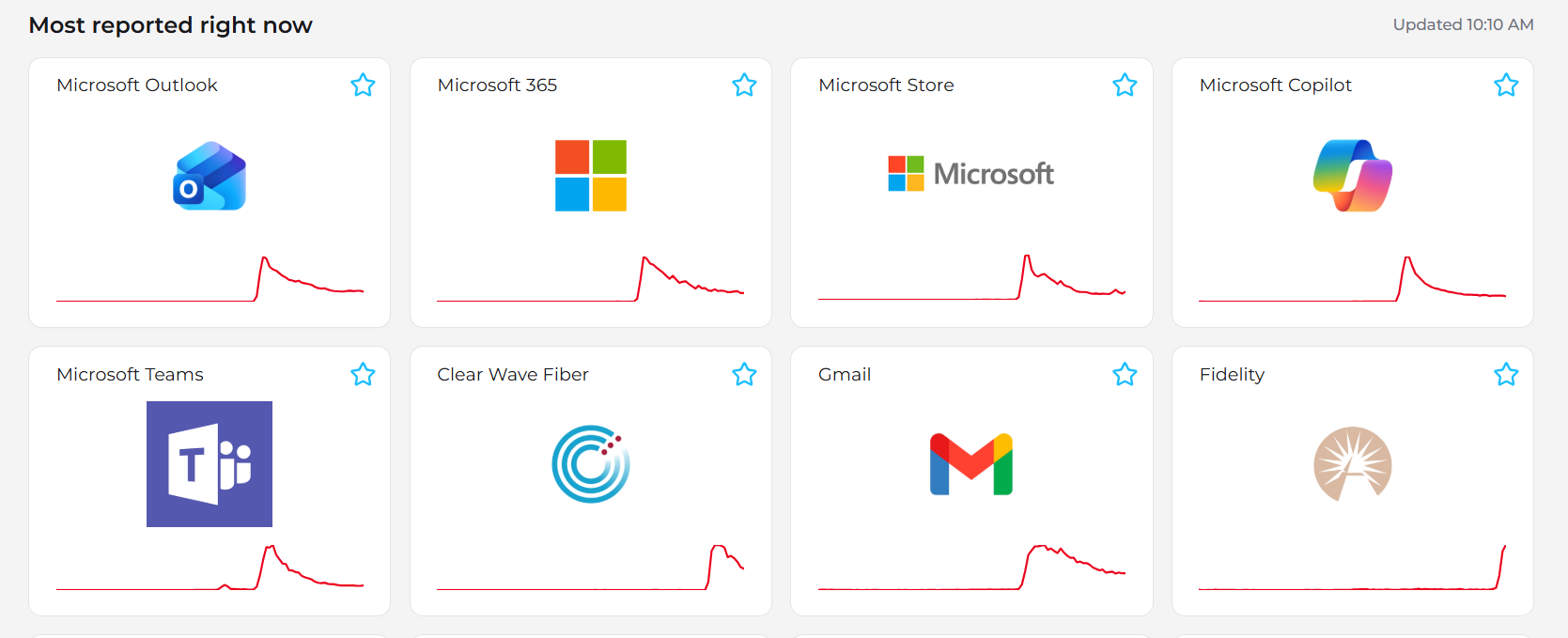
Image: Downdetector's “Most reported right now” dashboard. The supplied screenshot displays an update time of 10:10 AM, without a visible date or time zone. The charts are a historical snapshot, not a live service-status indicator.
The screenshot highlights several services:
- Microsoft Outlook: A sharp spike followed by a gradual decline in reports.
- Microsoft 365: A similar rise and decline in reported problems.
- Microsoft Teams: A shorter surge in complaints.
- Microsoft Copilot: A noticeable increase before reports fell.
- Microsoft Store: A spike in reports during the same broad period.
Other services also appear on the dashboard. Their presence does not necessarily mean they were affected by the Microsoft outage.
These trends show how users experienced the disruption across applications. However, they do not independently establish the cause, total number of affected customers, or complete service restoration.
Which Microsoft 365 Services Were Affected?
Microsoft identified disruptions affecting Exchange Online and several connected services.
Reported problems included Outlook mailbox access, Teams calendars and meeting scheduling, Microsoft 365 Copilot features, and certain SharePoint Online and Defender functions.
The company tracked the disruption under incident IDs EX1550543 and MO1550821.
The impact varied by application, region, and feature. Some services remained available even while others experienced connection failures.
What Caused the Microsoft Outage?
Microsoft initially detected unusually high loads across its cloud infrastructure. Further investigation showed that the problem was not caused by a general increase in user traffic. Instead, many servers had unexpectedly become unavailable. This forced the remaining servers to handle additional requests.
They also identified failures involving automated server health checks. Engineers tested configuration changes, restarted affected servers, and redistributed traffic to restore access. However, some servers became unresponsive again when traffic returned.
Microsoft continued investigating the underlying cause. A definitive root cause had not been confirmed in the updates reviewed.
Microsoft Outage Updates: Is Outlook Back Up?
By Thursday evening, Outlook problem reports had fallen substantially from their afternoon peak.
Some users reported that their mailboxes were working again. However, Microsoft continued investigating failures affecting previously restored servers.
As of the incident information reviewed through November 13 at 01:45 UTC, complete restoration had not been confirmed.
Users should check the official Microsoft 365 Service Health dashboard for the latest information.
How Did the Microsoft Outage Affect Businesses?
The disruption affected more than email access.
Employees experienced communication delays, meeting scheduling problems, and difficulty using connected workplace applications.
The incident also showed how failures in one cloud service can affect several dependent applications.
Businesses can reduce operational disruption through clear incident response procedures, alternative communication channels, and business continuity planning.
Appropriate disaster recovery solutions can help protect infrastructure organizations control, although they cannot directly restore a third-party SaaS platform during a provider-side outage.
What Should Users Do During a Microsoft Outage?
Users should first check official service health information before changing Outlook settings or reinstalling applications.
IT teams should monitor incident updates, inform employees about affected services, and activate approved alternative communication methods.
After recovery, businesses should verify email delivery, scheduled workflows, and connected applications.
Additional reporting and verification
- Reuters — Microsoft 365 and Outlook Outage
- Associated Press — Widespread Outlook and Microsoft 365 Disruption
- Microsoft Incident Reports — EX1550543 and MO1550821
FAQ
The November 12 outage involved unavailable Exchange Online servers and failed automated health checks. Microsoft continued investigating the underlying cause.
Partial recovery was reported, but complete restoration had not been confirmed in the incident updates reviewed. Check Microsoft's official service health dashboard.
Yes. Some Teams features, particularly those depending on Exchange Online, experienced disruptions.
Check Microsoft's official service health dashboard or your organization's Microsoft 365 admin center. User-reporting platforms can provide additional context but do not confirm outages independently.