
Summarize this glossary article with AI:
 Ask ChatGPT
  Ask Grok
  Ask Perplexity
  Ask Claude
  Ask Google AI
 Enterprise infrastructure is entering a period of significant change, and companies need to keep up or get swept away. With VMware licensing restructuring, rising infrastructure costs, and public cloud repatriation, alongside hardware refresh cycles and growing AI requirements, more organizations are being forced to reconsider where their workloads run and how they are managed. For many enterprises, 2026 is becoming a pivotal year for infrastructure decisions that will shape IT operations for years to come.
However, the challenge isn’t as simple as moving virtual machines from one environment to another. Every workload has different performance requirements, dependencies, security considerations, and business consequences if something goes wrong. A migration plan armed with only a technical checklist can quickly become a business continuity issue if applications lose connectivity, backups fail, or users experience unexpected downtime. This is why workload migration should be treated as a strategic business decision, not just a technical project.
Today, organizations that react to immediate cost pressures without assessing their wider infrastructure needs are at risk of simply replacing one set of operational challenges with another. Consider the difference between VM migration and workload migration. While VM migration moves a virtual machine between hosts, data centers, or platforms, workload migration takes a broader view, focusing on whether the application should move at all, which environment best supports it, and what changes are necessary to operate it successfully afterward.
For some workloads, staying on an existing platform remains the right decision. However, others may benefit from an alternative hypervisor, private cloud, public cloud, or modern Hyperconverged Infrastructure (HCI). The goal is not to move everything, but to make deliberate choices based on business value. This guide explores the forces driving workload migration in 2026, creating a practical framework for deciding where workloads belong, uncovering the risks of VMware workload migration, and seeing how enterprises can modernize infrastructure while maintaining operational stability. So, let’s get some basic concepts out of the way first.
What Is Workload Migration?
Workload migration is the process of moving an application and its supporting resources from one infrastructure environment to another while preserving functionality, security, and required service levels. These resources typically include compute, storage, networking, operating systems, application configurations, identity services, and backup arrangements. Depending on the application, they may also include databases, middleware, integrations, and external services.
Therefore, a workload is more than just a VM. Simply moving a server successfully cannot guarantee that the application running on it will work correctly. Its database might remain inaccessible, its firewall rules might not transfer, or its scheduled backup jobs may no longer operate. Effective application migration, on the other hand, accounts for these dependencies long before the actual move begins. There are generally three main workload migration approaches, plus a fourth option for applications that no longer need to be migrated at all: retiring or replacing them.
- Lift-and-Shift: Moving an existing workload to a new environment with minimal changes and accelerating migration when the application is stable and well understood. This method may, however, carry existing inefficiencies onto the target platform.
- Re-Platforming: Making targeted changes to use the capabilities of the destination environment. For example, an enterprise could move a database VM to a new environment and adopt a managed database service, or adjust the application’s storage and resource configuration to take advantage of the target platform. Moving a VM from VMware to another hypervisor with minimal change is usually a lift-and-shift.
- Re-Architecting: Redesigning an application for a different environment, such as containers, microservices, or cloud-native services. This can unlock longer-term flexibility but generally requires more time, testing, investment, and application expertise.
Ultimately, the best workload migration strategy matches the approach to the application's business importance, technical condition, and future requirements. Not every legacy application needs a complete redesign, and not every application should be moved unchanged. Now, let’s look at why workload migration is taking center stage today.
The 2026 Workload Migration Landscape: What's Driving the Wave?
Today, there are many real market forces that are changing how enterprises approach workload placement. Each represents a significant shift in practices or mindsets across the industry at large. Understanding these factors is key to understanding why workload migration should be a priority concern for enterprises.
VMware Licensing Restructuring
Broadcom's acquisition of VMware has changed the company’s product portfolio and licensing model, including a shift from perpetual license sales to subscriptions. This move has prompted several organizations to reassess their renewal commitments, infrastructure economics, and long-term dependence on a single virtualization ecosystem. For many organizations, the increase in VMware renewal costs has become a catalyst for a broader workload migration strategy, prompting companies to reevaluate which workloads should stay on VMware, which should move to alternative hypervisors like Sangfor HCI, and which should move to the cloud.
Cloud Repatriation
Public cloud remains essential for many organizations, but cloud adoption has also exposed the importance of matching infrastructure costs to workload behavior. As a result, many organizations are moving workloads from public clouds to private infrastructure. According to Broadcom’s Private Cloud Outlook 2026 research, around 83% of enterprises are now considering workload repatriation to private clouds. This applies especially to workloads with predictable demands, high data-transfer requirements, strict latency needs, or specific data residency obligations. Conversely, applications with highly variable demand or a strong dependence on managed cloud services may remain better suited to public cloud.
AI Infrastructure Demands
The rise of AI adds another dimension to workload migration. Inference, model development, analytics, and data preparation are placing new demands on compute, storage, and networking. IDC reported that worldwide AI infrastructure spending reached $318 billion in 2025 and forecast $487 billion for 2026, illustrating the scale of investment reshaping infrastructure planning.
For some enterprises, a modern HCI or private cloud platform with GPU support, NVMe storage and high-bandwidth networking can provide a practical foundation for AI workloads, although the right design depends on model size, data location and performance requirements.
Hardware End-of-Life
Many servers purchased in the mid-to-late 2010s are now at or beyond their vendor warranty or end-of-support dates, creating pressure to refresh hardware while maintaining application availability. Migrating onto replacement infrastructure provides an opportunity to reconsider virtualization, storage, network design, and disaster recovery.
Now, the practical approach to workload migration would be to coordinate each method’s initiatives while controlling their scope. Start by validating the target platform, establishing hardware compatibility, and then migrating workloads in manageable waves. But for a more detailed path, let’s look at how to decide which workload should go where.
The Workload Migration Decision Framework: Where Should Each Workload Go?
At the end of the day, the most effective workload migration strategy treats each application as an individual business decision within a wider infrastructure plan. The following four-step framework will help technical teams and business leaders make those decisions consistently and effectively.
Step 1: Classify Workloads by Migration Profile
Your migration plan will need a strong foundation to start on, and that can only be achieved by understanding what each workload does and how it can be optimized. Begin by assessing every workload against these four criteria:
| Criterion | Key question | What to assess |
| Business Criticality | What happens if the application becomes unavailable? | Revenue impact, operational disruption, recovery requirements |
| Technical Complexity | How difficult is the application to move? | Dependencies, integrations, operating system, database, and network requirements |
| Change Sensitivity | How much migration risk can the application tolerate? | Maintenance windows, performance tolerances, regulatory obligations |
This assessment should include application owners, infrastructure teams, security specialists, and finance representatives. Technical teams understand dependencies, while business stakeholders clarify the cost of downtime and the consequences of changing application behavior.
Step 2: Match Workloads To the Right Migration Pattern
Once your workloads have been classified, select an appropriate migration approach.
Lift-and-Shift: Best for stable workloads that are compatible with the target platform and need to move with minimal application changes. It can shorten migration timelines, but performance and resource allocation should still be validated.
Re-Platforming: Ideal when targeted changes can improve how a workload uses the destination infrastructure. For example, a VMware VM moved to Sangfor HCI may benefit from appropriately configured aSAN storage policies and revised resource allocations, subject to workload compatibility and validation.
Re-architecting: Useful when the existing design limits scalability, maintainability, or business agility. Containerization or application redesign may be justified, but it should have a clear business case rather than being a default requirement for every migration.
Retire or Replace: Best for redundant, obsolete, or low-value applications that can be safely decommissioned or replaced by an appropriate SaaS service.
Step 3: Sequence Migrations According To Risk
To avoid moving all workloads simultaneously and creating workflow obstructions, start with a pilot group of low-complexity applications to test your migration tools, operating procedures, network configuration, and backup integration. Use the lessons learned to refine the process before moving more demanding applications.
Try to group subsequent waves by application dependencies, business function, maintenance windows, and rollback requirements. For large enterprises, the program may span multiple quarters or years. A 12- to 36-month planning horizon can be a useful starting point for a substantial estate, but the actual schedule depends on workload volume, contractual deadlines, available staff, and application complexity.
Step 4: Define Success Before Moving Anything
The workload is not successfully migrated just because its VM boots on the destination hypervisor. You need to first define measurable acceptance criteria in advance. This can include:
- Application response times and resource utilization compared with established baselines.
- Availability, recovery time objectives (RTOs), and recovery point objectives (RPOs).
- Successful backup and restore tests on the destination platform.
- Network connectivity, identity integration, access controls, and security monitoring.
- Application-owner approval and end-user validation.
- A documented rollback decision point and process.
This final step turns workload migration from a series of infrastructure changes into a controlled business transformation. Now, let’s focus on how VMware migration became such a crucial point of order in 2026.
VMware Workload Migration: The Enterprise Priority in 2026
For companies with substantial VMware estates, migration is often a portfolio-level program rather than a single technical exercise. An organization running hundreds or thousands of VMs must manage platform selection, dependencies, testing, licensing, organizational readiness, and service continuity together. However, it’s important to understand your workflows and the alternatives at hand before diving into VMware migration.
Evaluate the Destination Before Starting VMware Migration
Before committing to a VMware replacement, assess four areas:
- Workload Compatibility: Can the application and guest operating system operate on the target hypervisor without substantial redesign? Test the actual workload rather than relying solely on general compatibility statements.
- Operational Familiarity: Can the infrastructure team manage provisioning, monitoring, troubleshooting, security, and recovery effectively? Consider training and changes to operating procedures.
- Total Cost of Ownership: Compare three-to-five-year costs, including licenses, support, hardware, migration services, retraining, backup, disaster recovery, and ongoing administration.
- Ecosystem Maturity: Verify integrations with backup, monitoring, security, automation, and disaster recovery tools. Confirm support for the exact versions and deployment configurations involved.
This assessment should include both business and technical stakeholders. A platform that appears attractive on licensing costs alone may not deliver the best outcome if it requires extensive retraining or introduces unsupported dependencies.
Key Technical Considerations When Migrating From VMware
There are also several technical elements that your company needs to assess before starting its VMware migration campaign. These include:
- Disk Format Conversion: VMware virtual machines commonly use VMDK virtual disk files. Moving to a different hypervisor may require conversion or importing to a supported disk format. Confirm which formats the target platform accepts and whether the selected migration tool performs conversion automatically.
- Guest Tools and Drivers: VMware Tools provide guest operating system integration and management functions. Depending on the target platform and operating system, VMware Tools may need to be removed or replaced with supported guest agents and drivers. Plan this change carefully, particularly for systems with specialized network or storage configurations.
- Network Reconstruction: Virtual switches, distributed switch settings, VLANs, firewall policies, and NSX-dependent configurations cannot simply be assumed to transfer unchanged to a different platform. Map the source network design, reproduce the necessary controls on the destination, and test connectivity and segmentation before production cutover.
- Backup Continuity: Backup integrations designed around VMware's vSphere APIs for Data Protection (VADP) may not protect workloads after they leave VMware. Establish and test backup coverage on the destination before decommissioning the source environment. Confirm retention policies, restore procedures, and disaster recovery compatibility.
- Application Dependencies and Rollback: Document connections to databases, authentication systems, external services, and scheduled jobs. For each migration wave, define how the team will identify failures, restore service, and decide whether to proceed or roll back.
Managing Large-Scale VMware Replacement Programs
Now, when it comes to complex enterprise estates, a phased approach is important to prevent latency, workflow interruptions, or other problems. Each wave should have a defined workload scope, responsible owners, a change window, acceptance criteria, and an escalation path. Try to keep source workloads available until the target application has passed its acceptance checks and the rollback period has ended, where the architecture and operational requirements permit.
It’s also critical that your source and destination systems do not operate concurrently in ways that could cause duplicate transactions or data inconsistency. While VMware licensing deadlines may push you for a faster approach, an accelerated timeline is useful only if the destination environment, people, tools, and recovery processes are prepared. The main objective is not simply to leave VMware; it’s to establish an infrastructure model that supports the enterprise's future requirements with an acceptable level of cost, complexity, and risk. So, let’s look at how Sangfor fits in to streamline your workflow migration plans.
How Sangfor Supports Enterprise Workload Migration
Sangfor Technologies is a global multinational provider of AI-enabled cloud infrastructure and cybersecurity solutions, serving mid-market and large enterprises across APAC, the Middle East, Europe and Latin America. Sangfor offers both a full-stack HCI platform and a standalone hypervisor, giving organizations evaluating VMware alternatives flexibility in how they modernize.
For enterprises seeking a VMware Replacement, Sangfor’s Hyperconverged Infrastructure (HCI) brings compute, storage, networking, and security capabilities into an integrated infrastructure platform. Its architecture allows organizations to evaluate infrastructure modernization as part of a broader workload migration strategy, rather than treating compute, storage, and networking as entirely separate projects.
Sangfor understands that the best starting point is a workload assessment that establishes which applications are suitable for migration, which dependencies require attention, and what the destination environment must support. So, let’s see how Sangfor elevates and optimizes workload migration on a larger scale:
Sangfor HCI: An integrated migration destination
Sangfor HCI combines several infrastructure capabilities, including aSV compute virtualization, which provides the hypervisor foundation for running virtualized workloads. Sangfor aSAN is a fully integrated, distributed software-defined storage layer, allowing storage capacity, performance and resilience settings to be planned together with compute during migration. Sangfor aNET provides built-in virtual networking with visualized management, while aSEC adds security capabilities for virtualized workloads.
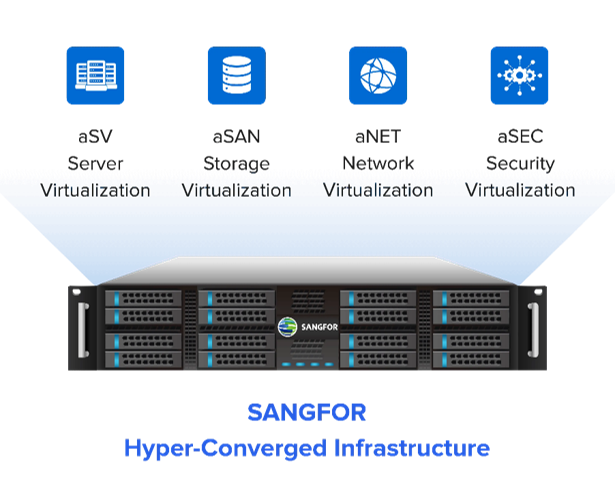
Sangfor’s Cloud Platform provides centralized management of the virtualized environment, giving administrators a common interface for provisioning, monitoring and operations, comparable in role to VMware vCenter Server. Together, these components give enterprises a platform to evaluate workload consolidation and infrastructure modernization. The business case should be based on validated workload compatibility, operational requirements, resilience, and lifecycle costs, not on the assumption that all applications will benefit equally from the same destination.
Sangfor’s Compatibility with the VMware Ecosystem
Enterprise evaluations should compare equivalent functions when choosing the ideal VMware alternative for their business. Fortunately, Sangfor aSV supports migration of VMware virtual machines, including common guest operating systems, which can reduce the need for re-architecture. Compatibility should still be validated for each workload, guest OS version and configuration. The aSV is also available as a standalone hypervisor for enterprises that want to migrate compute before committing to full HCI adoption.
Migration Tooling and Execution
Workload migration tools can reduce manual effort, but their capabilities vary by source platform, target version, guest operating system, and migration method. Sangfor provides migration tools that help automate key steps in VMware-to-aSV migrations, such as disk format conversion and guest tool replacement. Network and security policy mapping should still be reviewed and tested before cutover.
Protecting Backup and Recovery Throughout Migration
Backup continuity is a critical part of any VMware replacement program. A workload that operates successfully after migration is not fully production-ready if its new environment lacks tested backup and recovery coverage. Through its ecosystem partnerships, Sangfor helps enterprises plan backup and recovery from the start of a migration. Veeam supports backup, recovery and DR orchestration for Sangfor environments, while Cohesity, following its merger with Veritas, supports data resilience, management and security. Backup jobs and restore procedures should still be tested on the target platform before the source environment is decommissioned.
Managing Visibility and Migration Governance
During migration, SCP provides centralized management of the Sangfor HCI target environment, including VM status and resource utilization, while teams continue to monitor the VMware source environment with their existing tools. Where organizations operate VMware and Sangfor environments concurrently, visibility across the transition is especially important.
Sangfor's global professional services organization also provides migration planning, wave execution support, and post-migration validation for enterprises managing large VMware replacement programs, alongside regional and enterprise-scale support for complex migrations. Ultimately, the right infrastructure partner is one that can support the enterprise throughout the full migration lifecycle—from assessment and testing to production cutover, recovery validation, and ongoing operations.
Conclusion
Workload migration in 2026 is an opportunity for enterprises to do more than replace aging infrastructure or simply respond to VMware licensing changes. It’s a chance to reassess application requirements, optimize workload placement, strengthen resilience, and build an infrastructure strategy that supports future business priorities. The key is to make informed decisions about which workloads to move, where they should run, and how they will be managed after migration.
A successful workload migration strategy combines careful assessment, phased execution, validated compatibility, and uninterrupted backup and recovery coverage. Whether the destination is public cloud, private cloud, or Hyperconverged Infrastructure, each migration should deliver measurable business and operational value.
For enterprises exploring VMware Alternatives, Sangfor provides an enterprise-grade option for modernizing cloud infrastructure. With aSV, aSAN, aNET, aSEC and centralized management through Sangfor Cloud Platform, Sangfor HCI offers an integrated, enterprise-grade platform for organizations replacing VMware and building toward private and hybrid cloud.
Ultimately, the goal isn’t simply to move workloads, but to put them on the right foundation for what comes next. Enterprises that approach migration strategically can reduce unnecessary complexity, improve operational confidence, and build greater flexibility into their infrastructure decisions.
FAQ
The process of moving an application and its supporting infrastructure from one environment to another while preserving functionality, security, and required service levels.
VM migration focuses on moving a virtual machine between hosts or platforms, while workload migration considers the complete application, its dependencies, business requirements, destination environment, and post-migration operating model.
Lift-and-shift, re-platforming, re-architecting, or retiring. The right approach depends on application complexity, business criticality, compatibility, cost, and long-term objectives.
Start by inventorying workloads and dependencies, selecting a compatible target hypervisor, and testing a representative pilot. Plan disk conversion, guest tools, network configuration, security controls, backup coverage, and rollback procedures before migrating production workloads in controlled waves.
Application incompatibility, unexpected downtime, network misconfiguration, data inconsistency, gaps in backup coverage, and insufficient staff readiness. A phased migration plan with workload-specific acceptance criteria, tested recovery procedures, and clear ownership helps reduce these risks.