
Summarize this blog article with AI:
 Ask ChatGPT
 Ask Grok
 Ask Perplexity
 Ask Claude
 Ask Google AI
Key Takeaways
A solid state drive (SSD) is a storage device that uses NAND flash memory to store digital data. It keeps data even when the power is turned off. Unlike a hard disk drive (HDD), an SSD has no moving mechanical parts. This design allows an SSD to access data with lower latency and provide faster performance for many workloads. An SSD typically includes NAND flash memory and a controller that manages how the drive stores and retrieves data.
SSDs are widely used in personal computers, servers, virtual machines, and enterprise infrastructure. They also play an important role in cloud infrastructure and hyper-converged infrastructure (HCI). In these environments, SSDs can provide fast storage for virtual machines, databases, and other applications that require frequent data access.
Simple Explanation
Think of a solid state drive as a digital storage cabinet for your computer.
Instead of storing data on spinning disks, an SSD stores data electronically in NAND flash memory. When you save a file, the SSD writes the data to its flash memory. When you open that file later, the SSD retrieves the stored data and sends it back to the computer.
The word "solid state" means that the drive has no moving mechanical parts. This is one of the main differences between an SSD and a traditional HDD.
In simple terms, an SSD stores your data and keeps it safe even when you turn off your computer.
What Is a Solid State Drive?
A solid state drive (SSD) is a type of non-volatile storage device. It stores digital information in NAND flash memory and retains that information when the device is not receiving power.
The term non-volatile is important. RAM is a type of memory that loses its data when the power is turned off. An SSD, however, keeps your data after the computer shuts down.
SSDs store operating systems, applications, documents, databases, virtual machines, and other digital data. You can find them in laptops, desktop computers, servers, and enterprise storage systems.
An SSD uses NAND flash memory to store data. An SSD controller manages communication between the computer and the flash memory. It also manages how the SSD reads and writes data.
Unlike an HDD, an SSD has no spinning disks or moving read/write heads. It can access data electronically without waiting for mechanical parts to move.
How Does a Solid State Drive Work?
An SSD stores data in NAND flash memory and uses a controller to manage how that data is read, written, and organized.
NAND Flash Stores Data
NAND flash memory is the primary storage medium inside an SSD. Its memory cells store data by maintaining different electrical states. Because NAND flash is non-volatile, it retains data even when the power is turned off.
Different NAND types, such as SLC, MLC, TLC, and QLC, store different amounts of data per cell. This affects factors such as storage density, performance, endurance, and cost.
The SSD Controller Manages Data
The SSD controller acts as the main management component of the drive. It controls communication between the host system and NAND flash memory and manages several important storage operations.
These can include:
- Reading and writing data
- Mapping logical addresses to physical flash locations
- Error correction
- Wear leveling
- Garbage collection
For example, wear leveling spreads write operations across the flash memory to prevent the same memory cells from being used too often.
How Data Is Read and Written
When the computer requests data, the controller locates the required information in NAND flash and sends it back to the system. When data is written, the controller determines where to store it and manages the writing process.
Because an SSD accesses data electronically without moving mechanical parts, it generally provides much lower latency than an HDD.
What Are the Different Types of Solid State Drives?
SSDs can be classified by their interface, protocol, and physical form factor. Each term describes a different aspect of an SSD, so they are not the same thing.
| SSD Type / Form Factor | Key Characteristic | Common Use |
| SATA SSD | Uses the SATA interface and is commonly available in a 2.5-inch form factor | PCs, laptops, and systems designed for SATA storage |
| NVMe SSD | Uses the NVMe protocol, commonly over PCIe, for high-performance storage | High-performance PCs, servers, and enterprise workloads |
| M.2 SSD | A compact physical form factor that can support different interfaces and protocols | Laptops, desktops, and compact systems |
One important distinction is that M.2 and NVMe describe different things. M.2 refers to a physical form factor, while NVMe is a storage protocol. An M.2 SSD can use NVMe over PCIe, but M.2 itself does not automatically mean NVMe.
What Is the Difference Between a Solid State Drive and an HDD?
The main difference is how the two technologies store and access data.
| Feature | SSD | HDD |
| Storage technology | NAND flash memory | Magnetic storage |
| Moving parts | No | Yes |
| Data access | Electronic | Mechanical |
| Access latency | Generally lower | Generally higher |
| Mechanical noise | None | Possible |
| Typical performance | High I/O performance | Lower I/O performance |
Why Does an SSD Usually Perform Better?
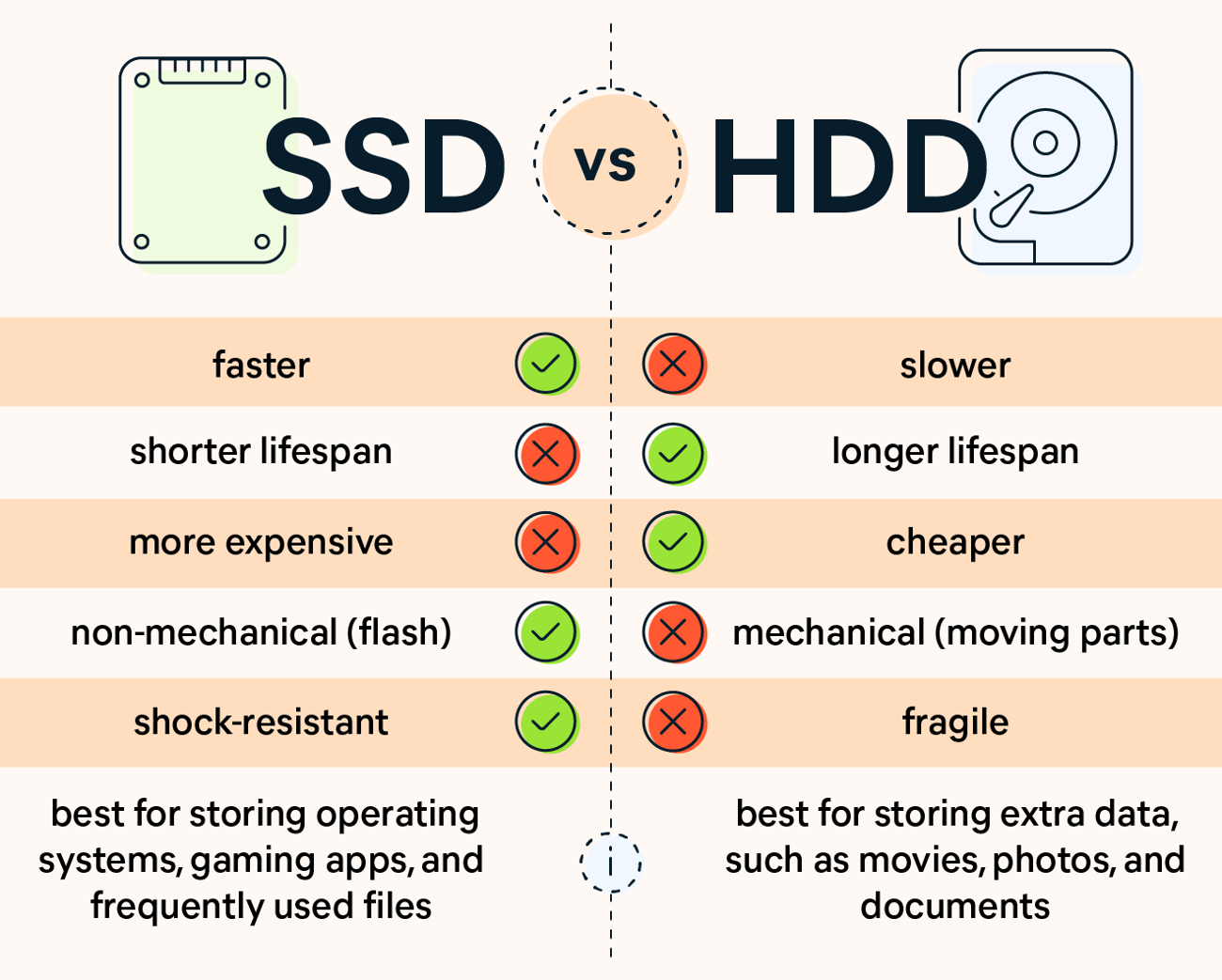
Because SSDs do not need to wait for a disk platter to rotate or a mechanical head to move into position, they can access data with much lower latency.
This is particularly useful for workloads involving frequent or random data access. Operating systems, applications, databases, and virtual machines can all benefit from faster storage access.
However, SSD performance depends on factors such as the drive's controller, NAND type, interface, workload, and system configuration. Therefore, it is more accurate to say that SSDs generally provide lower latency and higher I/O performance than HDDs, rather than assuming every SSD will outperform every HDD in every situation.
What Are the Use Cases of a Solid State Drive?
SSDs are used wherever fast, reliable access to stored data is important, from personal computing to enterprise infrastructure.
Personal Computing
In desktops and laptops, SSDs are commonly used for operating systems, applications, games, and personal files. Using an SSD as the system drive can improve overall responsiveness, including boot times and application loading.
Servers and Enterprise Applications
Enterprise environments often use SSDs for workloads that require frequent data access, including databases, virtualization, and business applications.
Lower storage latency can help applications respond more quickly, while strong I/O performance can support workloads that generate many concurrent read and write operations.
Solid State Drives in Cloud Infrastructure
SSDs are also an important storage technology in modern cloud infrastructure. In platforms like Sangfor HCI, SSD-based storage is fully integrated into the distributed storage layer (Sangfor aSAN), unlike some competing platforms such as VMware, where software-defined storage (vSAN) is offered as a separate, additionally licensed component. Sangfor also works with data resilience partners such as Veeam and Cohesity to extend SSD-based storage environments with backup, recovery, and disaster recovery orchestration capabilities.
In hyperconverged infrastructure, SSDs typically serve as the primary storage medium within a distributed software defined storage (SDS) layer, allowing compute and storage resources to scale together. For example, Sangfor aSAN, the fully integrated, distributed storage layer built into Sangfor HCI, pools SSD resources across nodes to deliver high performance, resilient storage for virtual machines and applications, without requiring a separate storage appliance or add on licensing.
Conclusion: Why SSDs Matter
Solid state drives have become a widely used storage technology because they provide fast access to data without the mechanical parts found in HDDs. SSDs combine NAND flash memory with a controller to deliver low latency and strong input/output (I/O) performance across a wide range of workloads. This makes them useful not only in personal computers, but also in servers, virtualization environments, HCI, and cloud infrastructure.
In enterprise HCI environments, SSDs can also contribute to the performance of distributed storage architectures. For example, Sangfor aSAN provides distributed storage within Sangfor HCI and includes technologies for managing storage performance, data distribution, and SSD-based storage resources. For more technical information, see the Sangfor aSAN documentation.
Understanding how SSDs store and access data therefore provides a useful foundation for understanding modern enterprise storage, virtualization, and cloud infrastructure.
Frequently Asked Questions About Solid State Drives
A solid state drive (SSD) is a non-volatile storage device that uses NAND flash memory to store and retain digital data. Unlike an HDD, an SSD has no spinning platters or moving read/write heads. This allows SSDs to provide low access latency and strong I/O performance for many workloads.
A solid state drive stores data in NAND flash memory and uses an SSD controller to manage read and write operations. The controller maps logical data locations to physical flash locations and also handles functions such as error correction, wear leveling, and garbage collection. Because the SSD accesses flash memory electronically rather than using moving mechanical components, it can retrieve data with lower latency than a traditional HDD.
No. SSD describes the storage device, while NVMe is a protocol designed for accessing non-volatile memory storage. NVMe SSDs commonly communicate with a computer through PCIe, allowing them to support high-performance storage workloads.
An SSD's usable lifespan depends on factors such as its NAND type, capacity, workload, and design. Flash memory can only handle a limited number of program and erase cycles. However, SSD controllers use techniques such as wear leveling and error management to help extend the drive’s usable life.