
Summarize this blog article with AI:
 Ask ChatGPT
 Ask Grok
 Ask Perplexity
 Ask Claude
 Ask Google AI
Key Takeaways
KVM (Kernel-Based Virtual Machine) is an open-source virtualization technology inside the Linux kernel. It turns a physical server into a bare-metal hypervisor. By using built-in CPU hardware extensions, KVM runs multiple isolated virtual machines (VMs) efficiently on a single host. While raw KVM provides a powerful core engine, enterprise environments usually require integrated management, security, and high-availability tools to support business-critical workloads.
Simple Explanation
Think of a physical server as an apartment building. Without virtualization, only one tenant can occupy the entire building, leaving most rooms empty.
KVM acts as the master building management system. It neatly divides the server into distinct, private apartments (Virtual Machines). Each VM gets its own keys, private space, and utility meters for CPU and memory. This allows multiple tenants to live independently on the same server without disturbing one another.
A Brief History of KVM and Modern Adoption
Avi Kivity created KVM in 2006 at Qumranet. Over the past two decades, KVM grew from an open-source tool into a global standard for hypervisors.
Today, top enterprise platforms rely on KVM technology. Leading hypervisor vendors, such as Sangfor, Red Hat, Proxmox and Nutanix, all use KVM to power fast, secure, and scalable virtual environments for business workloads.
What Is KVM?
KVM (Kernel-Based Virtual Machine) is an open-source virtualization module integrated directly into the Linux operating system kernel. It allows a Linux server to function as a hypervisor. This software layer creates and manages virtual machines by sharing the server's hardware.
In a KVM environment, each virtual machine acts as an independent computer. Each VM runs its own operating system, such as Linux or Windows. To make this work, KVM assigns each VM virtual representations of physical server resources:
- vCPU & vRAM: Processing power and memory pools reserved for the VM's active tasks.
- Virtual Storage & vNIC: Virtualized hard drives and network adapters connecting the VM to external networks.
Because each VM runs in strict isolation, a system error or software failure inside one VM will never impact others on the same host.
How Does KVM Work?
Instead of building a hypervisor from scratch, KVM turns the Linux kernel itself into a bare-metal hypervisor. When loaded, KVM manages virtual hardware using two core mechanisms:
- CPU Hardware Acceleration: Modern server processors include built-in virtualization features. KVM uses these features so guest VMs can execute instructions directly on the physical CPU with minimal overhead.
- Virtual Device Emulation: KVM handles core CPU and memory access. At the same time, helper tools emulate peripheral devices like graphics cards, disk controllers, and network interfaces.
By running virtual machines as standard Linux processes, KVM automatically inherits Linux's advanced memory management, stability, and security policies.
Is KVM a Type 1 or Type 2 Hypervisor?
Hypervisors are traditionally categorized into two types:
| Category | Architecture | Performance |
| Type 1 (Bare-Metal) | Runs directly on physical server hardware without a host operating system. | High performance, low latency, enterprise-grade. |
| Type 2 (Hosted) | Installs as an application on top of an existing host operating system. | Slower performance due to extra software layers. |
Where Does KVM Fit?
KVM loads onto a Linux system, but it operates inside the core kernel rather than as an application. It communicates directly with physical hardware without OS delays. Because of this, Experts classify KVM as a Type 1 (bare-metal) hypervisor with near-native performance.
Key Features and Benefits of KVM Virtualization
- Near-Native Speed: Processor-level hardware acceleration minimizes virtualization overhead, keeping workloads fast.
- Strong Security: Built-in Linux security tools enforce strict boundary checks around each VM, protecting data across virtual boundaries.
- Live Migration: Administrators can move running VMs between physical hosts with zero downtime for hardware maintenance or load balancing.
- Vendor Freedom: As part of Linux, KVM supports a wide range of hardware, storage, and operating systems. This helps organizations avoid vendor lock-in.
Managing KVM in Enterprise Environments
Bare-metal KVM provides a strong core engine. However, managing raw virtual machines with basic command-line tools becomes difficult at scale.
Enterprise data centers require comprehensive platforms that go beyond basic virtualization to deliver:
- Centralized Dashboards: Visual consoles to manage servers, storage, and virtual networks across the organization.
- High Availability (HA): Automatic failover to restart VMs on healthy secondary hosts if a physical server fails.
- Data Protection: Built-in scheduling for system backups, snapshots, and disaster recovery.
Enterprise Hypervisors with KVM
While raw KVM supplies an efficient core virtualization engine, building an easy-to-use cloud infrastructure requires a complete hypervisor solution. Enterprise environments need more than basic hypervisor tasks; they require unified management, hypervisor-level security, and automated continuous uptime.
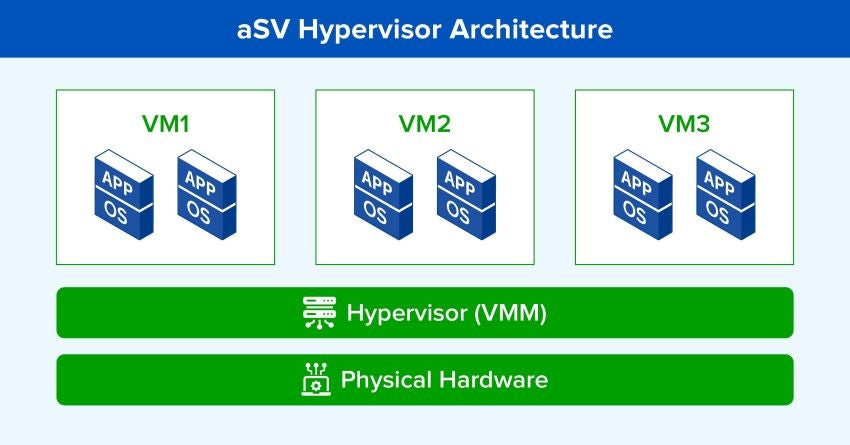
Solutions like Sangfor aSV build upon bare-metal hypervisor technology to deliver a complete hypervisor platform. Sangfor aSV transforms raw virtualization into a secure, reliable foundation for enterprise data centers. It delivers an intuitive graphical console, built-in security, dynamic resource optimization, and automated business continuity.
FAQ About KVM
KVM is an open-source virtualization module built directly into the Linux kernel. It turns a Linux server into a bare-metal hypervisor so you can run multiple isolated virtual machines.
Traditional hypervisors run as separate software layers, but KVM is built directly into the Linux kernel. This allows KVM to use native Linux memory management, security controls, and process scheduling. By using CPU hardware acceleration, it delivers near-native performance.
KVM requires a 64-bit Linux server with hardware virtualization extensions enabled. You also need enough RAM and disk storage to run your guest VMs smoothly.
KVM provides a powerful core engine, but production environments need more. To run at scale, enterprises require centralized graphical management, automated high availability (HA), hypervisor-level security, and built-in backup tools.