
Summarize this blog article with AI:
 Ask ChatGPT
 Ask Grok
 Ask Perplexity
 Ask Claude
 Ask Google AI
1. Introduction
The VMware licensing landscape has changed dramatically over the past two years, driven by Broadcom’s acquisition of VMware (completed late 2023) and the resulting restructuring of business units, product bundles, and licensing models.
By 2026, VMware licensing has become one of the most discussed IT topics globally, especially among medium and large enterprises facing steep cost increases, forced subscription bundles, reduced flexibility, and a rapidly shrinking partner ecosystem.
This article explains what VMware licensing will look like in 2026 and why enterprises are struggling with the new model. It also discusses how licensing changes impact disaster recovery, storage, virtualization, and security. Furthermore, it explores the alternatives available, highlighting why many organizations are shifting to unified HCI platforms and why Sangfor HCI stands out as one of the best VMware alternatives for organizations affected by these licensing changes.
This guide is neutral, analytical, and enterprise-focused, with selective strong positioning where supported by user feedback, G2 data, and analyst recognition.
2. VMware Licensing in 2026: What Changed Under Broadcom
Since Broadcom acquired VMware, several major licensing changes have reshaped the virtualization market. Below are the key changes:
2.1 Perpetual Licenses Discontinued & Transition to Subscription Model
Broadcom officially ended VMware’s perpetual licenses and renewals, forcing all customers to transition to subscription models. This change, which affects businesses of all sizes, included the removal of the Essentials and Essentials Plus kits that were popular among small businesses. VMware customers are now required to subscribe to annual or multi-year plans, often in large bundles like VMware Cloud Foundation or vSphere Foundation, with mandatory support tied to these subscriptions.
2.2 Bundling and Stack Consolidation
After Broadcom’s acquisition, VMware consolidated its product lineup into large bundles, such as VMware Cloud Foundation and vSphere Foundation. Customers must now purchase entire bundles, even if they only need specific components, limiting flexibility and driving up costs.
| Quick Comparison of VMware Licensing 2024 vs 2025 | ||
| Feature | 2024 (Pre-Broadcom) | 2025 (Broadcom Era) |
| Licensing Model | Perpetual licenses + some subscriptions | Subscription-only (term-based for all products) |
| License Metric | Per CPU (1 license per socket, up to 32 cores) | Per Core (licenses sold in 32-core packs; 16-core min per CPU) |
| Product Options | Modular – could buy individual products (vSphere, vSAN, etc.) | Bundled – core products only sold in suites (VCF or vSphere Foundation) |
| Audit / Compliance | Limited enforcement, trust-based usage reporting | Active monitoring (telemetry-enabled, frequent compliance checks) |
| Cost Predictability | Moderate – perpetual + maintenance was stable year-to-year | Lower predictability – higher annual costs and mandatory renewals to maintain access |
Resource: Broadcom’s acquisition of VMware: effects on licensing, products, and cloud strategy
2.3 Increase in Hardware Requirements: Minimum Cluster Limit
VMware Cloud Foundation (VCF) requires a minimum of 7 physical nodes to set up a basic production environment with redundancy. This includes 4 nodes for the management domain and 3 nodes for the workload domain, both using vSAN storage.
2.4 Decrease in number of VMware Partners
By early 2024, Broadcom had already decimated VMware's partner ecosystem by thousands. This impacted the availability of certified engineers and service coverage, increasing reliance on Broadcom’s internal support. Recently, Broadcom announced plans to cut off the smallest, lowest-revenue VMware partners to focus on its most profitable ones. This strategic shift, as explained by Brian Moats, Senior Vice President of Global Commercial Sales and Partners, has fundamentally reshaped VMware’s partner network.
3. VMware Licensing Models Explained: The "All-or-Nothing" Subscription
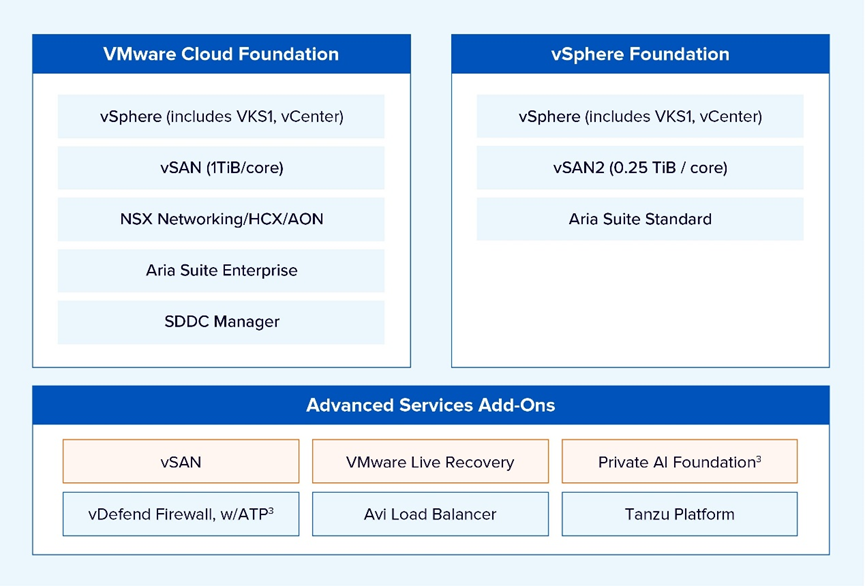
Since the Broadcom takeover, VMware has removed almost all flexible buying options. Customers are now forced to choose between only two main subscription "bundles." To understand why this is a problem for your budget, let’s look at these two examples:
3.1 VMware Cloud Foundation (VCF): The "Expensive Suite"
VCF is VMware’s top-tier bundle. They force you to pay for a "full stack" regardless of your actual needs.
- The "Pay-for-Everything" Trap: You must pay for Compute (vSphere), Storage (vSAN), Networking (NSX) and the Aria management suite. Even if you don't use VMware's networking, you still pay for it.
- The "4-Host Tax": Official VCF design requires you to set aside a minimum of 16 cores charged per CPU socket, regardless of the actual core count. Furthermore, industry advisory reports indicate that Broadcom has set a general minimum purchase requirement of 72 cores for new orders. This is a waste of hardware that could be running your actual business apps.
- The Storage Cap: It includes 1 TiB of storage for each VCF core purchased. Once you exceed this, the extra fees are very high.
3.2 VMware vSphere Foundation (VVF): The "Starter" Trap
VVF looks cheaper, but it is a "bare-bones" version designed to force you into buying more later.
- Missing Security Essentials: VVF leaves out the advanced security and networking that most modern businesses need.
- The Storage Limit: Despite Broadcom's 2024 increase of the per-core vSAN entitlement to 0.25 TiB, it remains a key constraint. A standard 32-core server's ~8 TB included capacity is quickly exhausted, forcing immediate purchases of expensive vSAN Capacity Add-On licenses.
3.3 The "Hidden Costs" (Add-Ons)
VMware uses a "Base + Add-on" model that makes your bill unpredictable:
- The "Storage Tax": They charge you for every TiB of data. If you buy bigger hard drives, VMware charges you more money just for having that capacity.
- The Kill Switch: If you stop paying your yearly subscription, the software stops working completely.
3.4 Support Licensing: The "Mandatory Link"
In the past, you could buy a license and choose your support level. That is over.
- No Independence: Support is now fully tied to the subscription. You cannot buy the software and the support separately.
- Forced Renewals: If you want to keep your support active, you must renew the entire expensive bundle. You can no longer "cherry-pick" what you want to support, giving the customer zero bargaining power during renewals.
4. Licensing Impact on Enterprise Workloads & Operations
The article discusses the significant challenges enterprises are facing with VMware licensing since Broadcom’s acquisition. These challenges include rising costs, increased complexity, and other operational issues. Here's a breakdown of the key points:
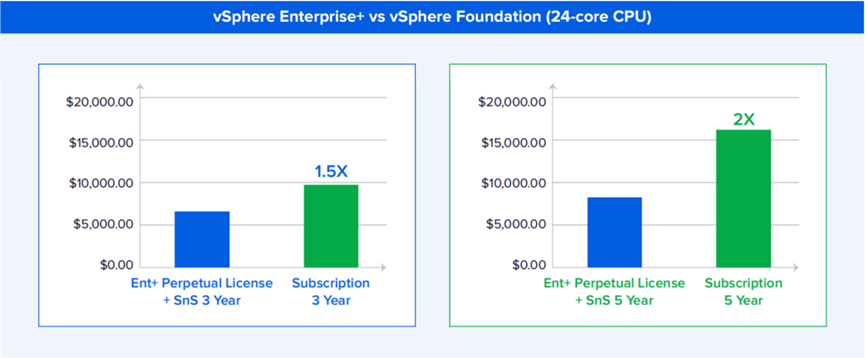
4.1 Soaring Licensing Costs: After Broadcom took over VMware, the cost of licensing has skyrocketed. Organizations are now stuck with expensive multi-year subscription models with limited customization options. According to a Gartner report, by 2028, most enterprises will move half of their virtual workloads due to these mounting costs. This has led to significant price hikes, with some customers experiencing increases of up to 700%. Many businesses are now forced to pay for unnecessary features or risk losing support for their virtualized environments.
4.2 Complex Licensing Models: VMware's licensing has become increasingly complicated. Essentials+ has been removed, and many features that were once bundled are now available only as separate purchases. This has made it harder for organizations to manage and understand their licenses.
4.3 Penalties on Renewals: VMware's renewal policies have become stricter. If a renewal is missed, companies face immediate late fees and retroactive penalties. This creates an extra burden on organizations with complex procurement cycles.
4.4 Challenging Day-2 Operations: Once VMware is deployed, maintaining and managing updates, patches, and scaling becomes cumbersome. If the team spends too much time on these tasks instead of focusing on innovation, it's a clear sign that a change is needed.
4.5 Limited Security Access: Security in VMware environments often requires additional third-party tools, especially in the lower-tier editions like vSphere Standard and Enterprise+. This makes it difficult for organizations that need robust, cloud-native security to access the protection they need.
4.6 Feeling Trapped by Changes: VMware’s changes to its partner programs have left many small businesses and their trusted local resellers feeling abandoned. The support quality has declined, and many smaller clients are feeling neglected.
4.7 Scaling Challenges: As businesses grow, scaling their VMware environment becomes more complicated and costly. If performance bottlenecks or resource limitations arise, it’s an indication that the infrastructure needs an upgrade.
5. Enterprise Buying Checklist: Evaluating VMware Licensing & Alternatives
Use the following checklist to assess whether your organization should consider migrating away from VMware.
| Is VMware licensing becoming unpredictable? |
| Are forced bundles increasing costs? |
| Do DR/security tools require additional licensing? |
| Are multi-year subscriptions difficult to justify? |
| Would unified licensing reduce TCO (Total Cost of Ownership)? |
| Do alternatives offer built-in DR & security? |
| Does your organization require multi-site DR or large VM clusters? |
| Would licensing simplification improve operational control? |
6. Migration Considerations for Organizations Facing VMware Licensing Challenges
When considering a migration away from VMware, organizations typically follow a structured process, which includes the following stages:
6.1 Assessment
- Inventory VMs: Identify all virtual machines to plan the migration.
- Determine DR (Disaster Recovery) needs: Understand the organization's disaster recovery requirements.
- Calculate projected VMware licensing cost: Assess the financial impact of VMware’s escalating licensing fees to understand how much the organization could save by switching to a new platform.
6.2 PoC and Pilot Deployment
- Test performance: Conduct tests to measure the performance of alternative platforms.
- Validate workload compatibility: Ensure that all workloads are compatible with the new platform.
6.3 Phased Migration
- Non-critical workloads first: Begin with less critical workloads to minimize risk.
- Critical services after validation: Migrate mission-critical workloads only after confirming that the new platform is stable and reliable.
6.4 Licensing Transition
- End VMware subscriptions: Cease VMware subscriptions once migration to a new platform is complete.
- Transition to unified licensing under HCI platform: Move to a more predictable, cost-effective licensing model under a unified HCI platform.
7. Why Sangfor Is a Strong VMware Alternative
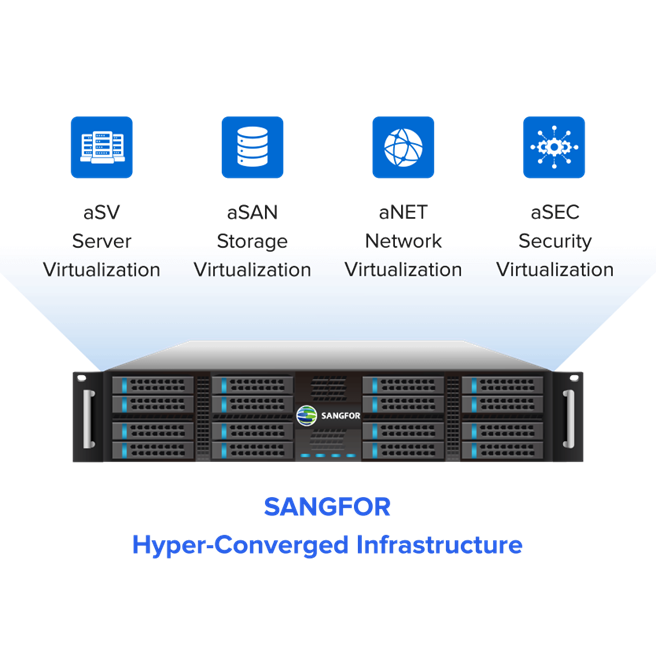
Sangfor Virtualization Solution (Sangfor aSV and HCI) offers a modern, integrated solution that addresses many of the pain points VMware users face today.
- Lower TCO: Sangfor offers all-in-one licensing with no hidden fees, reducing both upfront and ongoing costs by up to 40%.
- Simplified Management: A unified interface and centralized control make operations easier and more efficient.
- Built-In Security: With integrated NGFW, WAF, IPS, and endpoint protection, Sangfor delivers enterprise-grade security out of the box.
- Flexible Licensing: Choose between subscription or perpetual models—whatever fits your business best.
- Smooth Migration: Tools and support for migrating from VMware make the transition seamless.
*Availability of licensing options may vary by region.
7.1 Virtualization: Sangfor aSV vs. VMware vSphere
At the heart of hyperconverged infrastructure lies the hypervisor, which plays a pivotal role in performance, scalability, and management. VMware presents vSphere in multiple editions, namely Standard and Enterprise Plus. In contrast, Sangfor offers aSV, its proprietary hypervisor, specifically designed for seamless HCI deployment.
- Sangfor aSV: Delivers a range of enterprise-grade virtualization functionalities that surpass VMware vSphere Standard and rival those of Enterprise Plus. It supports high virtual machine (VM) density, efficient resource allocation, and effortless scalability, all managed through a user-friendly interface that minimizes complexity.
- VMware vSphere: While the Enterprise Plus edition offers an extensive set of features, such as DRS, vMotion, and distributed switching, it comes at a significant premium. On the other hand, the Standard edition lacks many key features, requiring costly upgrades for enterprise-level functionality.
Key Takeaway: Sangfor aSV offers virtualization capabilities similar to VMware vSphere Enterprise Plus but with simplified licensing and a significantly lower total cost of ownership. For organizations seeking enhanced performance, scalability, and operational simplicity, Sangfor provides an effective alternative to traditional hypervisor solutions.
7.2 Networking: Sangfor aNet vs. VMware NSX
Networking is another critical area where Sangfor provides greater value and differentiation.
- Sangfor aNet: A native network virtualization platform that allows for the creation of distributed switches and routers. Its intuitive, diagram-based design approach, similar to tools like Cisco Packet Tracer, enables easy network topology design, modification, and management.
- VMware NSX: A robust and feature-rich networking solution, but it requires additional licensing and considerable expertise to deploy effectively. The deployment process is often more complex and costly.
Key Takeaway: Sangfor simplifies networking tasks for IT teams of all skill levels, while VMware NSX requires higher investment and specialized knowledge.
7.3 Storage: Sangfor aSAN vs. VMware vSAN
Data storage is critical to application performance and business continuity. Here’s how Sangfor and VMware compare in this domain:
- Sangfor aSAN: A fully distributed, software-defined storage solution that integrates seamlessly with Sangfor HCI. It offers high availability, scalability, and performance optimization at no extra charge.
- VMware vSAN: A well-known storage solution, but it requires additional licensing and integration efforts, which increase the overall cost.
Key Takeaway: Sangfor’s built-in storage simplifies deployment and reduces both cost and complexity compared to VMware’s add-on model.
7.4 Integrated Security: A Key Advantage for Sangfor
Sangfor sets itself apart by offering comprehensive, integrated security features. Unlike VMware, which often relies on third-party security tools, Sangfor HCI incorporates a complete suite of security solutions directly into its platform:
- Virtual Next-Gen Firewall (with WAF, IPS, and Vulnerability Scanning)
- Virtual Internet Access Gateway (including bandwidth shaping, traffic management, and auditing)
- Virtual Network Detection & Response (NDR)
- Virtual Load Balancer
- Cloud Native Endpoint Security – aSec
Key Takeaway: Sangfor’s native security solutions offer superior protection and eliminate the need for external security appliances, streamlining security management and reducing costs.
7.5 Licensing & Cost Structure
- Sangfor: Offers both perpetual and subscription-based licensing models, with pricing based on CPU socket. This flexible approach helps organizations better align IT expenses with financial planning needs.
- VMware: Operates exclusively on a subscription basis. The overall cost is generally higher, particularly when additional components like NSX or vSAN are bundled.
Key Takeaway: Sangfor provides greater flexibility and cost efficiency in licensing, while VMware often requires larger, ongoing financial investments.
7.6 Cloud Integration Strategy
Both vendors support hybrid cloud capabilities, but their strategies differ significantly:
- Sangfor: Built with hybrid-cloud integration in mind, enabling effortless connection with public cloud providers. Additionally, Sangfor offers its own cloud service, Sangfor Cloud.
- VMware: Boasts a robust hybrid and multi-cloud ecosystem, particularly through VMware Cloud Foundation and VMware Cloud on AWS. However, implementation can be more complex and costly.
Key Takeaway: While VMware excels in multi-cloud capabilities, Sangfor offers a more cost-efficient and seamless hybrid cloud integration experience.
| Comparison of Sangfor HCI vs. VMware vSphere / vSAN / NSX | ||
| Feature | Sangfor HCI | VMware vSphere / vSAN / NSX |
| Hypervisor | aSV – Enterprise features near vSphere Enterprise Plus | vSphere Standard (limited) or Enterprise Plus (costly) |
| Networking | aNet – Built-in, visualized, easy-to-use | NSX – Advanced but requires extra licensing & expertise |
| Storage | aSAN – Fully integrated, distributed SDS | vSAN – Add-on, extra licensing required |
| Security | aSec – Built-in NGFW, WAF, IPS, Vulnerability Scan, NDR, etc. | Third-party appliances required |
| Licensing | Flexible – Perpetual or subscription* | Subscription-only, higher overall cost |
| Cloud | Hybrid-ready, Sangfor Cloud integration | Broad multi-cloud ecosystem, higher TCO |
8. Transform Your IT: Seamless VMware Migration with Sangfor HCI
Break free from escalating costs with Sangfor HCI, a proven solution for modernizing enterprise infrastructure. From the Malaysia Ministry of Communications cutting costs and boosting performance to Berca Hardayaperkasa driving digital transformation in Indonesia, global leaders are choosing Sangfor Cloud Solutions for a smarter, more efficient path forward.
Our performance is validated by both users and experts. Highlighting rapid migration and ease of use, Sangfor earned Highest Ratings in the Gartner® Peer Insights™ ‘Voice of the Customer’ and is recognized as a Representative Vendor in the 2025 Gartner® Market Guide for Server Virtualization Platforms.
Ready to move beyond VMware? Sangfor HCI offers a mature, secure, and seamless transition. Connect with us today. Fill out the form to request your Sangfor HCI demo, and we will get back to you shortly.
9. Frequently Asked Questions (FAQs)
Under Broadcom, VMware has eliminated all perpetual licenses in favor of a subscription-only model. Products are now sold in large, mandatory bundles (VCF or VVF). Additionally, the licensing metric has shifted from "Per CPU" to a "Per Core" model with high minimum purchase requirements.
Costs are driven by forced bundling (paying for components like NSX even if unused), storage taxes on vSAN capacity, and strict renewal policies that include a 20% penalty for late renewals with zero grace period.
Sangfor offers more flexibility with both perpetual and subscription options and an all-in-one licensing model. By including native networking, storage, and security features without hidden "add-on" fees, Sangfor can reduce overall TCO by up to 40%.
No. Sangfor follows a structured migration process: starting with a comprehensive assessment and PoC, followed by a phased migration (non-critical workloads first). This ensures the platform is validated as stable before mission-critical services are moved.
Unlike VMware, which often requires expensive third-party tools or high-tier NSX licenses, Sangfor HCI has built-in enterprise security. It includes a Next-Gen Firewall (NGFW), WAF, and Endpoint Security (aSec) directly in the platform, offering cloud-native protection out of the box.