
Summarize this blog article with AI:
 Ask ChatGPT
 Ask Grok
 Ask Perplexity
 Ask Claude
 Ask Google AI
VMware administrators face rising costs, licensing complexity, and ecosystem challenges following Broadcom’s changes. Sangfor Virtualization aSV (the enterprise hypervisor at the core of Sangfor HCI) delivers a high-fidelity vSphere alternative with ~95% feature parity, familiar operations, strong performance, and flexible deployment options—including seamless integration with existing 3-tier server + SAN storage infrastructure.
Before you make the leap, here are the 10 most important things to consider. Let’s check those major technical considerations in migration smoothness, performance, operational habits, ecosystem compatibility, and 3-tier transitions, plus Sangfor’s updated best practices.
1. Licensing & Cost Structure Has Fundamentally Changed
Obstacle: Escalating VMware subscription costs and bundle complexity.
Key Insight: Sangfor Virtualization offers simpler, predictable licensing with core enterprise features included. Many organizations achieve significant TCO reduction while retaining or improving capabilities.
Sangfor Best Practices: VMware administrators should perform a comprehensive TCO assessment covering licensing, operations, power, and support costs, and begin with a hybrid coexistence approach.
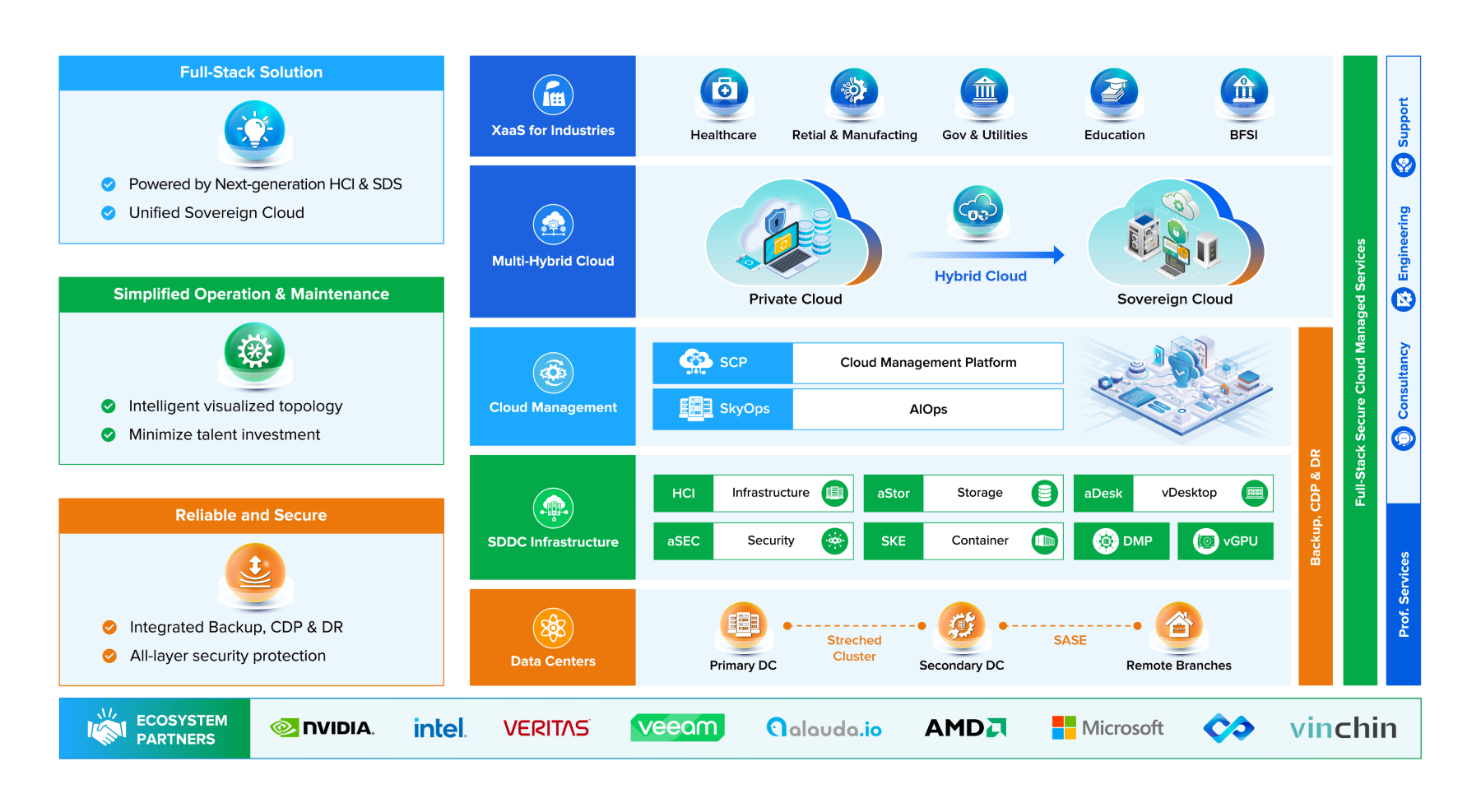
2. 3-Tier Infrastructure Compatibility – No Forced HCI Rip-and-Replace
Obstacle: Many VMware environments rely on a traditional 3-tier infrastructure (compute servers, Fibre Channel switches, and dedicated SAN storage).
What Admins Must Know: Sangfor Virtualization aSV is fully optimized for classic 3-tier architectures. You can replace only the vSphere hypervisor layer while retaining existing external block/file storage (FC, iSCSI, NFS, CIFS) and networking.
Sangfor Best Practices (New/Phased Approach):
- Phase 1: Deploy aSV on new or existing servers, connect to current SAN via standard protocols (including shared disks, ATS locking).
- Phase 2: Keep 3-tier investments intact initially.
- Phase 3: Optionally converge to full HCI (aSV + aSAN) as hardware refreshes occur. This protects CapEx and enables smooth virtualization-layer modernization.
Adopt a phased modernization approach. You can start by replacing the ESXi hypervisor with Sangfor Virtualization aSV while keeping your existing external block and file storage intact (compatible with standard storage protocols like FC, iSCSI, NFS, and CIFS).

Once an existing T1 SAN storage reaches its limits (Capacity, Performance, EOL…), you can seamlessly migrate to Sangfor aSAN, which is perfect as T0 vSAN Storage with an entire VM local copy at the running node to eliminate any latency for Disk IO over storage network.
3. Migration Smoothness & Minimal Downtime
Obstacle: Fear of production outages, VMDK conversion issues, or large-scale cutover risks.
Key Insight: Sangfor provides multiple low-risk paths — agentless point-to-point via SCMT (Sangfor Cloud Migration Tool), vCenter-managed migration, hot migration, and snapshot-based transfers. Concurrent VM migrations can reach high throughput.
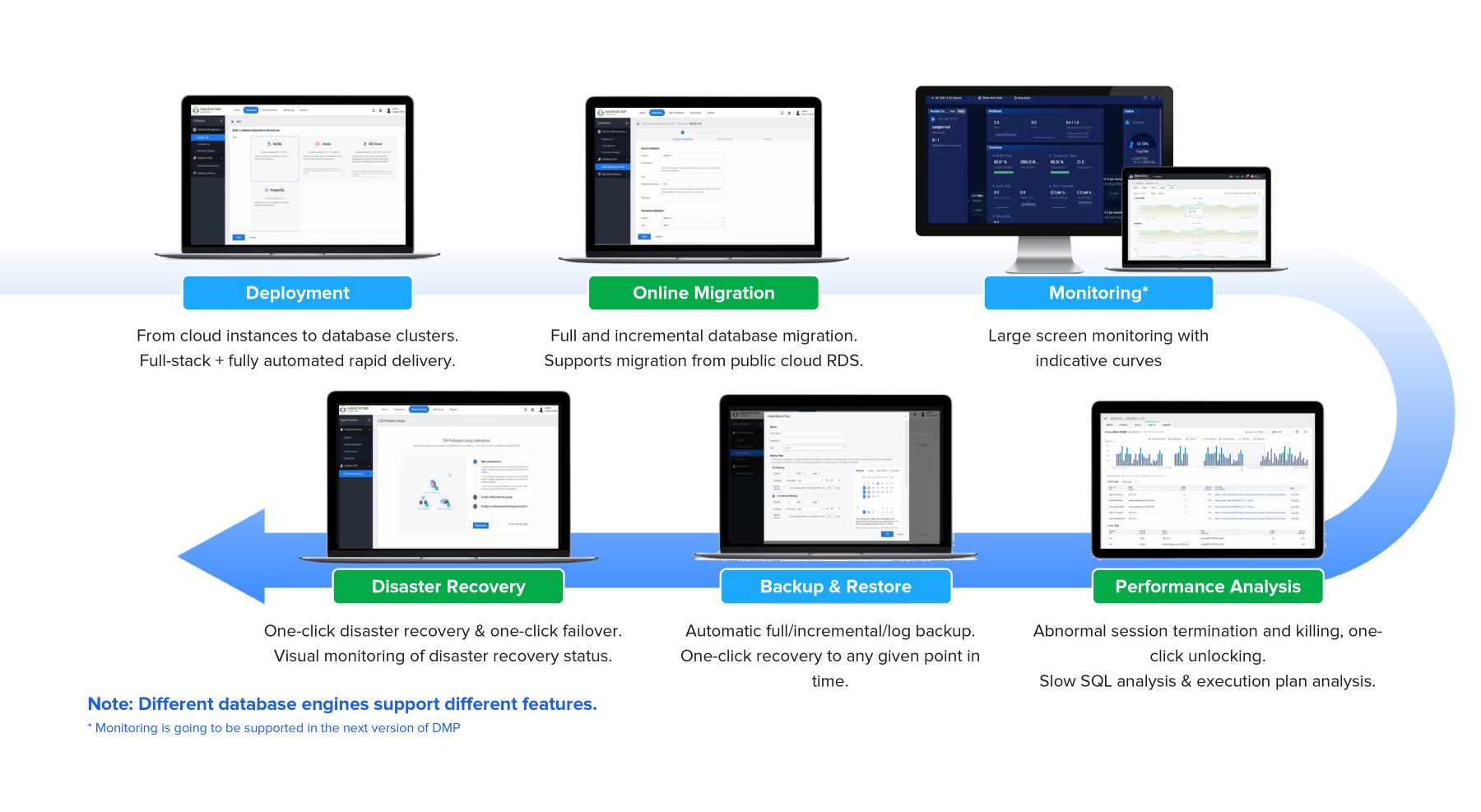
Sangfor DMP (Database Management Platform) provides DB Clusters (Oracle RAC, MSSQL AAG, MySQL, PostrgSQL) lifecycle management, including DB level Migration from various source (VMWare or others like Public Cloud RDS), or Backup, Monitoring, DR with Native DB eco-systems.
Sangfor Best Practices:
- Use hybrid coexistence (VMware + Sangfor aSV running in parallel).
- Pilot non-critical workloads first.
- Leverage automated assessment, risk checks, and configuration conversion.
- Many enterprises report near zero downtime for live migrations and successful large-scale moves (hundreds of VMs).
- Assisting DBA and Owners to identify critical systems for SLOs and OS/App/DB level migration approaches.
4. Performance Expectations (Especially Databases & High I/O)
Obstacle: Concerns that HCI or new hypervisors underperform dedicated SAN for latency-sensitive workloads.
Key Insight: Sangfor Virtualization aSV delivers performance on par with VMware (1:1 in many benchmarks). Optimizations like Adaptive NUMA scheduling, memory tiering, and data locality deliver measurable gains in database TPS/QPS (e.g., significant tpmC improvements).
Sangfor Best Practices:
- Enable NUMA-aware scheduling for memory-sensitive apps.
- Use DRAM-to-tiering ratios (e.g., 1:1) for balanced performance/memory expansion.
- Benchmark critical workloads (ERP, databases) during PoC on your 3-tier storage.
- Sangfor aSV + external SAN often maintains or improves I/O behavior.
5. Operational Habits & Admin Experience
Obstacle: Retraining teams and rewriting automation/scripts.
Key Insight: Sangfor Virtualization aSV provides a highly familiar web-based console (vCenter-like workflows for VM management, clustering, migration) plus VMware-compatible PowerCLI (over 230 equivalent commands) and APIs.
Sangfor Best Practices:
- Minimal skills gap — admins are productive quickly.
- Reuse existing scripts with minor adjustments.
- Leverage SkyOps for intelligent monitoring and diagnostics.
- Start with standard operations (HA, live migration, resource scheduling) that mirror DRS/vMotion behavior.
6. Ecosystem & Tooling Compatibility
Obstacle: Breakage with backup, monitoring, orchestration, and third-party tools.
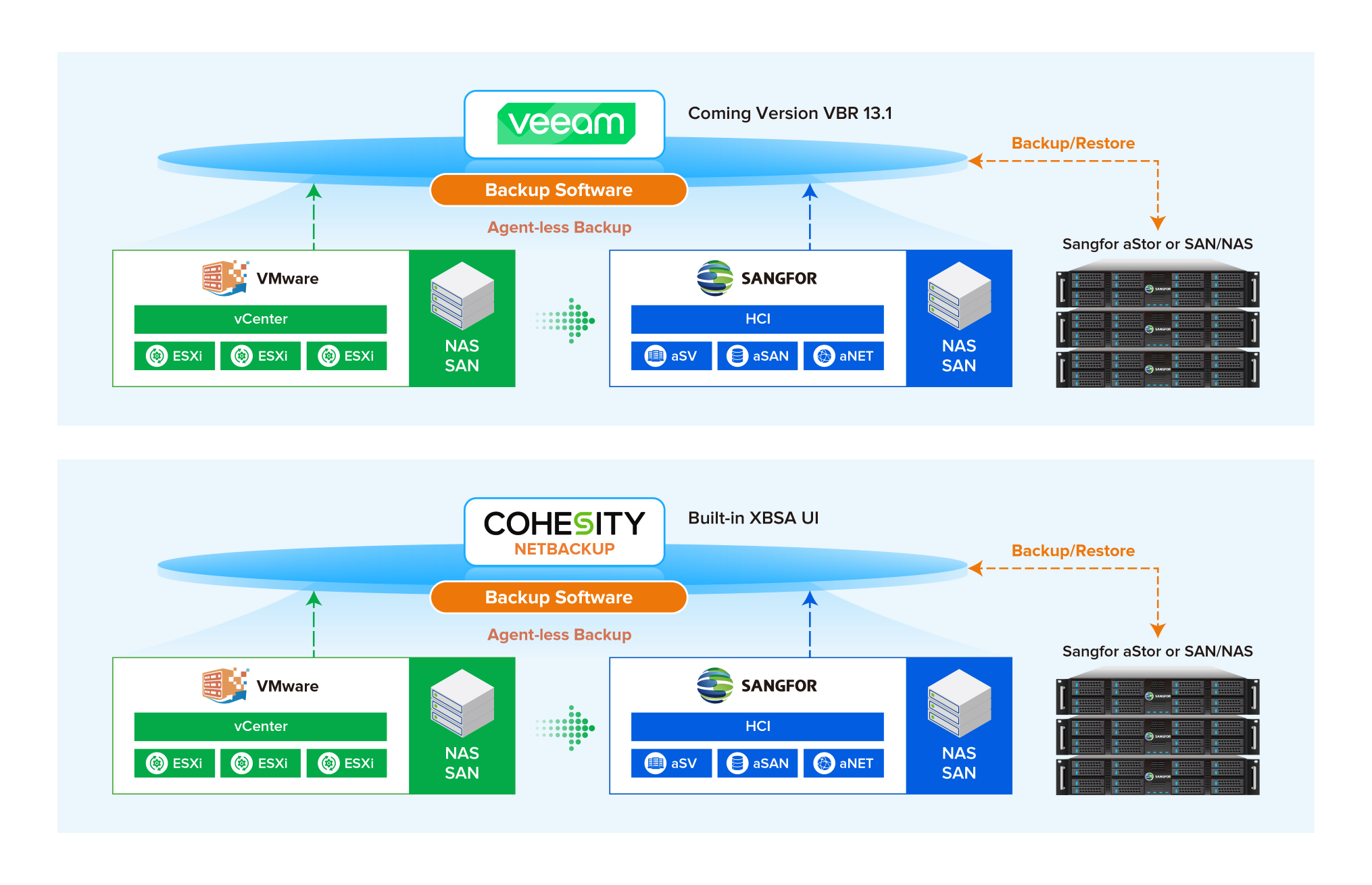
Key Insight: Sangfor Virtualization aSV delivers strong compatibility with mainstream tools. it supports agentless backups (Veeam/Veritas support coming/enhanced), Red Hat and SUSE certification, and common enterprise applications.
Sangfor Best Practices:
- Validate key tools (backups, monitoring) in PoC.
- Use Sangfor’s migration tools that integrate with vCenter.
- Maintain hybrid management during transition.
- Sangfor aSV works well in mixed environments without forcing full stack replacement.
7. High Availability, Clustering & Live Migration
Obstacle: Losing robust HA/DRS/vMotion equivalents.
Key Insight: Sangfor Virtualization aSV offers proactive HA, intelligent dynamic resource scheduling (DRS-like), live migration with minimal impact, and full clustering.
Sangfor Best Practices: Configure clusters early and validate failover scenarios using your existing storage environment.
8. Security & Networking in Transition
Obstacle: Replicating NSX-level capabilities or maintaining micro-segmentation from vDefend (and bundled in VCF only).
Key Insight: Sangfor built-in and aSEC security and aNet virtualization modules simplify advanced networking without specialized expertise. Works alongside existing physical networks.
Sangfor Best Practices: Implement security policies in a phased manner, initially leveraging hybrid mode to ensure a smooth transition.
9. Skills Transition & Change Management
Obstacle: Team resistance or productivity dips.
Key Insight: To ease the transition, Sangfor's web-based management console is designed to mimic the logical workflow of vCenter. Concepts like cluster management, VM creation, and vSwitches are exactly where you expect them to be. Furthermore, the API and CLI structures are remarkably similar, allowing DevOps teams to adapt existing scripts with minimal friction.
Sangfor Best Practices: Leverage Sangfor training, documentation, and professional services, operate parallel environments, and prioritize non-production or new workloads initially to build confidence.
10. Long-Term Strategy: Future-Proofing & Hybrid Readiness
Obstacle: Vendor lock-in fears or uncertain scalability.
Key Insight: Sangfor Virtualization aSV serves as foundation for private cloud, SDDC, and gradual convergence to HCI while supporting hybrid/multi-cloud.
Sangfor Best Practices: Adopt a Cloud-Smart strategy by planning phased modernization, from hypervisor consolidation to storage convergence and ultimately a full SDDC, and engage Sangfor early for joint architecture workshops tailored to your existing three-tier assets.
Conclusion
Switching to Sangfor Virtualization aSV allows VMware admins to modernize without the pain of a full infrastructure overhaul. By supporting existing 3-tier SAN setups, delivering familiar operations, robust migration tools, and competitive performance, aSV minimizes risk while unlocking lower TCO and simplified management.
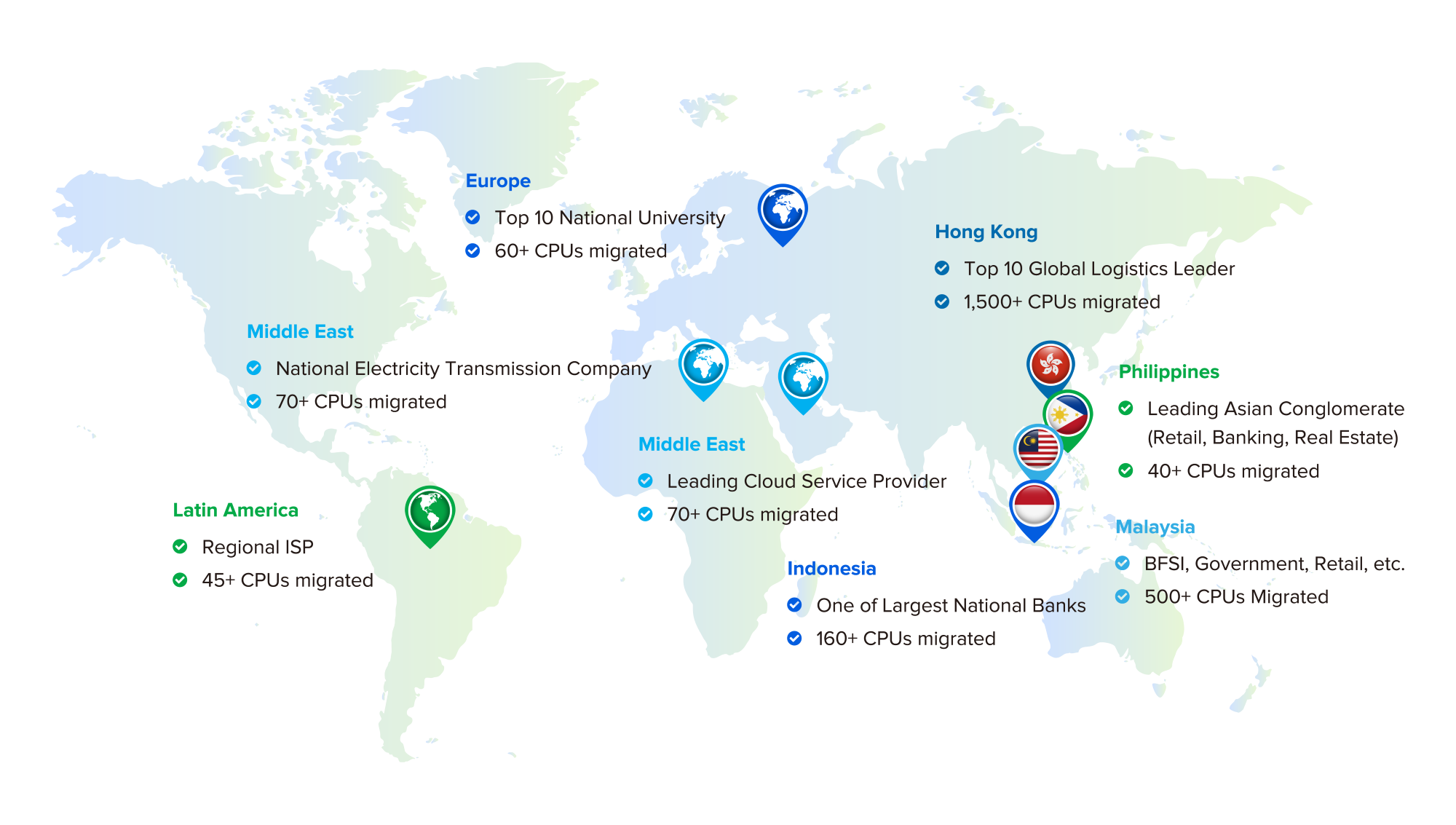
Real-world deployments across retail, manufacturing, and large enterprises demonstrate smooth transitions with tangible benefits.
Ready to start?
Request a customized PoC or architecture workshop focused on your current 3-tier environment. Sangfor’s team specializes in low-risk VMware exits.