
Summarize this blog article with AI:
 Ask ChatGPT
 Ask Grok
 Ask Perplexity
 Ask Claude
 Ask Google AI
From video meetings and cloud-based workspaces to SaaS apps and AI services, much of modern work now depends on the internet. That dependence makes reliable internet connectivity increasingly important, and businesses often use multiple internet links to improve resilience and increase available capacity.
But having a second or third link does not automatically mean every application will perform well consistently. A Zoom call may start breaking up, edits to a shared document may take several seconds to sync, and ChatGPT may take unusually long to generate a response. Yet when IT checks the network, every internet link is still online, and there is bandwidth to spare.
The problem may not be the availability or capacity of the links themselves. It may be the quality of the network path to the application or service being accessed. To understand why, it helps to look at how traffic is assigned across multiple internet links in the first place.
Common Multi-WAN Traffic Management Approaches
Businesses with multiple internet links need a way to determine how traffic uses those available links. Common approaches use preset rules for routing, load balancing, and failover.
| Common Approach | How It Works |
| Primary and backup failover | Uses a backup link when the primary link becomes unavailable |
| Round-robin load balancing | Distributes traffic flows or sessions across links in turn |
| Bandwidth-weighted load balancing | Distributes traffic according to configured weights or link capacity |
| Fixed routing policies | Directs matching traffic through a designated link |
What these approaches have in common is that, in their basic forms, they rely on predefined logic. What they don’t necessarily consider is how well the path through the selected link is performing at that moment.
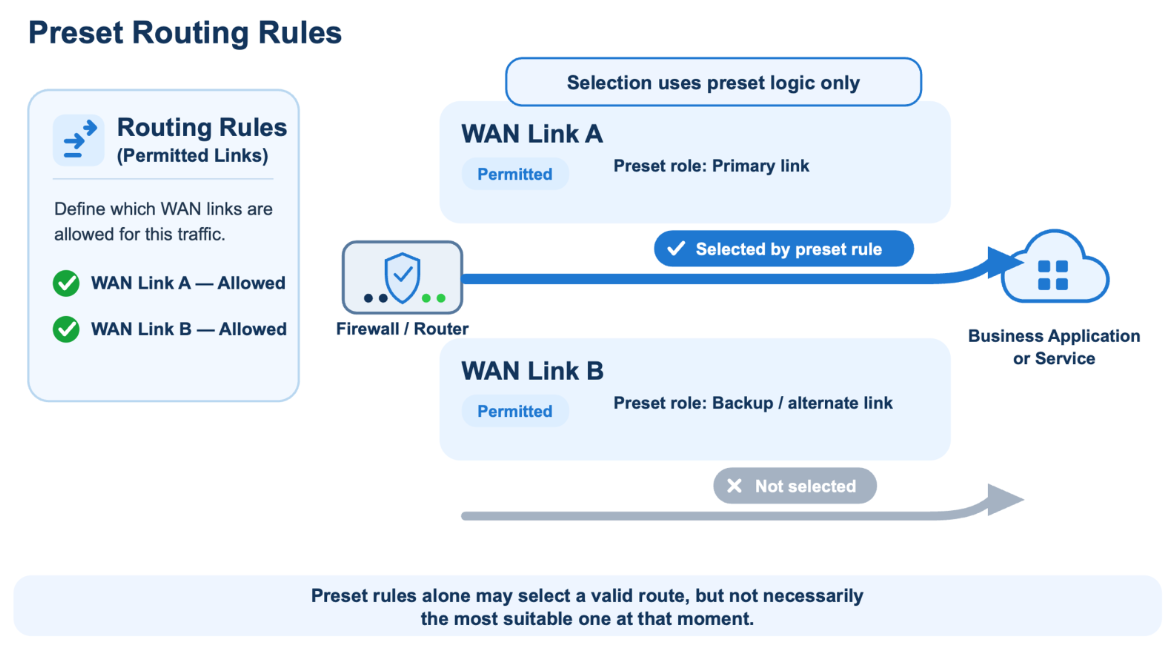
Think of a navigation system with routes and preferences configured in advance, such as taking the shortest route or avoiding toll roads, but with no live traffic information. It can follow those preset rules, but without current road conditions, it may choose a permitted route that is not the most suitable one at that moment.
SLA-based path selection addresses this limitation by adding current path quality to the routing decision.
How SLA-Based Path Selection Works
Service Level Agreement (SLA)-based path selection—also known as SLA-based path steering or application-aware routing—adds measured path quality to existing routing rules. In this context, the SLA defines the quality requirements a path should meet for a particular service or application, rather than necessarily referring to an internet provider's contractual service commitment.
Path quality is typically assessed using three key measurements:
- Latency — how long data takes to travel across the path
- Jitter — how much that travel time varies
- Packet loss — data that is sent but never reaches its destination
Administrators define which internet links the traffic is permitted to use and what levels of latency, jitter, and packet loss are acceptable.
Returning to the navigation system example, the route settings still define which routes are allowed, but live traffic information adds current road conditions to the decision. This helps the system select the most suitable route within those existing settings.
SLA-based path selection applies the same principle to internet traffic. Existing routing rules determine which links can be used, while current measurements of latency, jitter, and packet loss help determine which permitted path should be selected for the traffic.
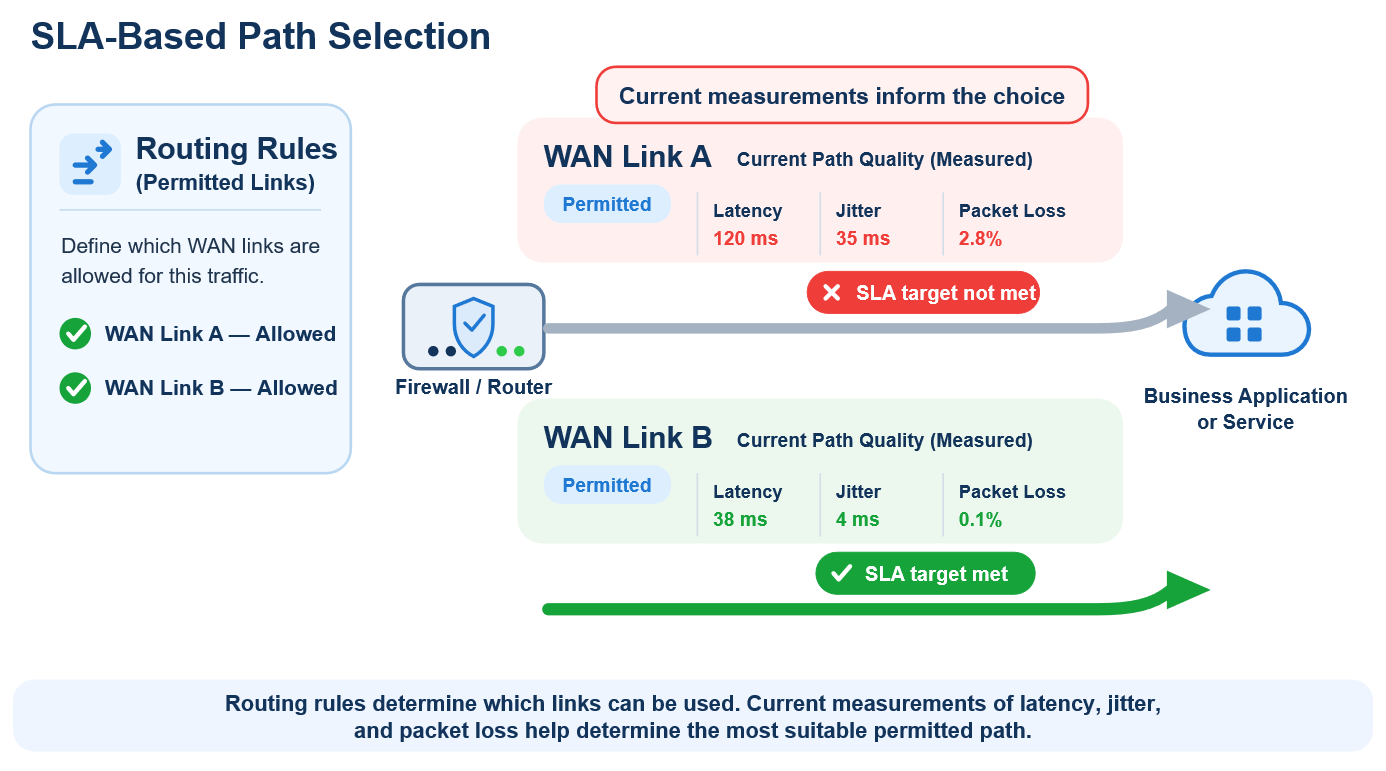
For example, both internet links at a branch office may be online and have available bandwidth. However, the path through Link A to a video meeting service may exceed the configured latency or packet-loss threshold, while the path through Link B remains within it. Because both links are permitted by the routing policy, SLA-based path selection can select Link B for traffic that needs to reach that service.
When Is SLA-Based Path Selection Most Useful?
SLA-based path selection is particularly useful when an organization already has multiple internet links but still experiences inconsistent application performance.
Video Meetings and Unified Communications: Services such as Zoom, Microsoft Teams, Webex, and cloud calling are particularly sensitive to latency, jitter, and packet loss, which can result in frozen video, distorted audio, or delayed conversation.
SaaS and Cloud Productivity Applications: Services such as Microsoft 365, Google Workspace, Salesforce, and other web-based business applications may suffer from slow page loads, delayed synchronization, or sluggish response times when path quality deteriorates.
AI and GenAI Services: Microsoft Copilot, ChatGPT, Gemini, and cloud-hosted AI applications depend on frequent exchanges with remote services. Poor path quality can lead to slow responses, interrupted file uploads, or failed requests during tasks such as generating content, analyzing documents, and summarizing information.
How Sangfor Athena NGFW Applies SLA-Based Path Selection
Sangfor Athena NGFW applies SLA-based path selection through its Quality Detection capability. IT teams can configure a Quality Detection object for selected interfaces, define acceptable quality thresholds, and use ICMP or DNS probes to measure path quality. A load balancing route can then use those results when selecting among available links.
IT teams can also review link-quality trends alongside application performance to determine whether a routing change improved the experience or whether further investigation with the internet service provider may be needed. If users report slow or unreliable application access while multiple internet links remain online and bandwidth is available, comparing the quality of the paths through those links can help identify the cause.
When the link is up and bandwidth is available but application performance remains poor, the path—not the link itself—may be the problem.
Does your organization experience inconsistent application performance despite using multiple internet links? See how Sangfor Athena NGFW’s SLA-based path selection can help make better use of your available connectivity.
Explore Sangfor Athena NGFW Discuss your requirements with us