1. Summary
| Vulnerability Name | 5400 RPM OEM Hard Drive Denial-of-Service Vulnerability (CVE-2022-38392) |
|---|---|
| Component Name | 5400 RPM Hard Drives |
| Affected Versions | N/A |
| Vulnerability Type | Denial-of-Service |
| Severity | CVSS v3 Base Score 5.3 (Medium) |
| Exploitability | Attack Vector: Physical Attack Complexity: Low Privileges Required: None User Interaction: None |
| Impact | Confidentiality Impact: None Integrity Impact: None Availability Impact: High |
2. About CVE-2022-38392
2.1 Introduction
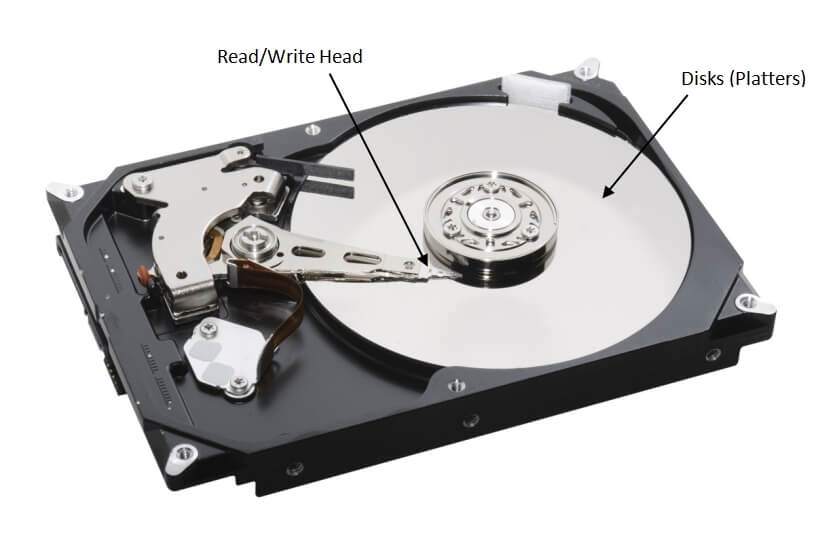
RPM stands for revolutions per minute, which measures the rotational speed of the motor's spindle. The most common RPM rate for hard drives in laptops and PCs is between 5,400 and 7,200 RPM. The higher the RPM, the faster the data can be read from the disks (platters), which increases overall performance.
2.2 Summary
Certain 5400 RPM hard drives in laptops and PCs from approximately 2005 and later crashed when the music video of “Rhythm Nation” by Jacket Jackson was played on the Laptop or PC. An investigation found that laptops using affected hard drives also crashed when they were only exposed to the song.1 This vulnerability would allow a physically proximate attacker to cause a denial of service (device malfunction and system crash).
It has been revealed that the song contains certain natural frequencies that resonate with the discs (platters) inside certain 5400 RPM hard drives, causing the discs to vibrate. The read/write head produces errors, which leads to a system crash.
3. Affected Versions
Certain 5400 RPM hard drives in laptops and PCs from approximately 2005 and later. A reported product is Seagate STDT4000100 763649053447.2
4. Solutions
4.1 Remediation Solutions
4.1.1 Check the Hard Drive Information
Option 1: Check the label on the hard drive
Open the cover to the hard drive and check the label for its RPM.
Option 2: Google the hard drive model
- Find the hard drive model
- Method 1: Find the hard drive model in Device Manager.
- Open Device Manager
- Expand Disk drives and find the model of the hard drive.
- Method 2: Find the hard drive model in System Information.
- Open System Information.
- Expand Components > Storage > Disks to find the model of the hard drive.
- Method 1: Find the hard drive model in Device Manager.
- Google the hard drive model and find the RPM in the specifications.
4.1.2 Workaround
The vulnerability could be worked around by adding a custom filter in the audio pipeline.
5. Reference
- https://devblogs.microsoft.com/oldnewthing/20220816-00/?p=106994
- https://nvd.nist.gov/vuln/detail/CVE-2022-38392#match-8274830
6. Learn More
Sangfor FarSight Labs researches the latest cyberthreats and unknown zero-day vulnerabilities, alerting customers to potential dangers to their organizations, and providing real-time solutions with actionable intelligence. Sangfor FarSight Labs works with other security vendors and the security community at large to identify and verify global cyberthreats, providing fast and easy protection for customers.