
Summarize this blog article with AI:
 Ask ChatGPT
 Ask Grok
 Ask Perplexity
 Ask Claude
 Ask Google AI
Picture a library with millions of books dating back decades. All of a sudden, you're asked to move this large, delicate collection to a new state-of-the-art facility across the country. You have to carefully catalog, pack, and unpack the books without losing a single page. It feels daunting but rewarding, and that's really how it feels migrating a company’s on-premise data to the cloud.
Enterprises are rapidly shifting from on-premise infrastructure that requires hands-on management to cloud servers that are easier to manage. The benefits are clear, with cloud servers requiring less manual work, having lower costs, and being easily scalable. However, there are risks involved that require careful oversight to curtail. This guide explains how cloud migration works, its benefits, risks, and how to migrate successfully with near-zero downtime.
What is cloud migration, and how does modern infrastructure scale?

Cloud migration is the delicate process of transferring a company’s digital assets from on-premise servers to externally-hosted servers that can be accessed remotely. When digital assets are transferred to cloud platforms, employees can access them securely from anywhere, and the burden of constantly monitoring on-premise servers is relieved.
Defining what cloud migration is and its key architectural types
Migration isn’t a mere “copy-paste” of files from on-premise to cloud servers. Rather, it’s a broad re-architecturing of an organization’s digital assets. These are some typical cloud migration scenarios:
Sometimes, digital assets are moved completely from on-premise servers to public cloud platforms like AWS or Google Cloud, i.e., datacenter migration. It could also be hybrid, where some assets are retained on local servers while others are moved to the cloud, getting the benefits of both models.
Data can also be moved from one public cloud platform to another, particularly for companies adopting multiple platforms to avoid vendor lock-in. Likewise, apps and databases hosted on legacy on-premise systems can be modified to utilize cloud capabilities.
Why migrate to the cloud? And choosing cloud migration services
Businesses migrate to the cloud for economic and technical reasons. It’s more cost-effective to use cloud infrastructure and pay as you go, and avoid the high expenses of buying physical servers. It’s highly flexible and scalable, as IT teams can instantly add computing resources to handle increasing needs. Cloud platforms also provide access to sophisticated AI features without complex local maintenance.
Strategic benefits and why migrate to the cloud today?
The benefits of migrating to the cloud are clear. It removes the need to spend much on servers upfront, and this sizable capital expenditure (CapEx) can be devolved to other parts of the business.
When technical infrastructure needs grow, there’s no need to obtain more physical servers. You can quickly request more cloud storage space and pay as you go.
Cloud platforms are highly redundant, with data duplicated across several regions. If one data center fails temporarily, enterprises still retain access to their data. On the other hand, on-premise systems experiencing temporary failures often mean organization-wide downtime
Cloud providers also offer sophisticated security features like automated patches, identity access management, automated backups, and AI-based threat protection, so companies don't have to spend many resources implementing these systems themselves.
These benefits have driven companies across diverse industries to migrate to the cloud, such that the cloud migration services market is projected to grow from $380 billion in 2026 to $1.3 trillion by 2031, according to Mordor Intelligence. Cloud service migration providers help businesses move seamlessly from on-premise to cloud infrastructure, and selecting the right one affects how smooth the transition will be.
Spotify, the popular streaming app, is a notable cloud migration case study. For over a decade after its founding, Spotify relied on in-house servers to stream music directly to millions of concurrent users globally. However, as its user base rapidly expanded, the in-house infrastructure posed serious bottlenecks, particularly for an app where a single minute of downtime draws major attention.
In 2020, Spotify successfully migrated 2,000 services, 20,000 daily data pipeline runs, and more than 100 Petabytes of data from in-house servers to the cloud, highlighting the effectiveness of cloud migration even with massive technical complexities.
In 2016, Spotify began migrating its backend infrastructure and data systems to Google Cloud. It invested two years in preparing for the migration, helped by a dedicated Google Cloud team. The migration was split into two parts, services and data, and each took a year to complete. Ultimately, Spotify migrated over 100 petabytes of data (100,000 terabytes) to Google Cloud by 2020, with minimal disruption.
Another example is Vision Technology Services (VTS), a prominent IT firm based in Turkey. VTS partnered with Sangfor to migrate part of its IT infrastructure from physical data centers to the cloud. The stakes were high, given the sensitivity of VTS’s systems maintained for both private and government clients.
VTS needed a solution that enabled centralized cloud management, lower costs, embedded firewalling, and compliance-level protection, and Sangfor delivered. With Sangfor's Cloud Platform and HCI, VTS quickly deployed scalable cloud resources to be used by its clients. By the company’s own admission, transitioning to the cloud lowered capital and recurring expenditure by 40%, representing major cost savings, even as performance improved.
Designing robust cloud migration solutions across six critical stages
Successful cloud migration demands a structured approach, not an ad-hoc one. Transition failures can occur from any source, but a structured approach helps prevent this failure.
Firstly, map the on-premise system and note any dependencies between nodes. For example, an application could depend on a specific database storing user information, and if that database isn't migrated properly, the app won't work.
Companies often first move non-critical applications to the cloud before the most critical ones, allowing migration teams to test the procedures without affecting sensitive systems.
Deploying secure cloud migration solutions and service models
Cloud migration is usually done in six stages, with this industry standard enabling enterprises to migrate efficiently.
First, clearly define the business justifications for migrating to the cloud, often centered on cost savings. Set a target return on investment (ROI) from your cloud infrastructure and the key performance indicators (KPIs) to measure migration success.
Then, in the planning stage, deeply inspect your on-premise inventory, noting all servers and the workloads running on them. Analyze dependencies between hardware and software nodes in the system, ensuring that these systems will be migrated without disrupting workflows.
Configure the cloud storage buckets, networks, and landing zones through which data will be stored and retrieved properly.
After the configuration, your company can begin transferring workloads from on-premise servers to cloud servers. When each asset gets transferred, validate that it works properly on the cloud platform as it does on the on-premise server.
Sangfor helps companies save considerable time during cloud migration. The cloud platform is compatible with a variety of physical hardware, making it easy to port applications. It features a built-in security module to protect data with fault monitoring and self-healing capabilities, ensuring reliable operation. Migration complexity is reduced by following standardized, process-oriented frameworks.
With workloads transferred, set policies that’ll govern cloud use henceforth at your company. Standard policies include mandatory multi-factor authentication for all employees, mandatory encryption of sensitive data both at rest and in transit, GDPR compliance (for businesses operating in the European Union), budget thresholds with alarms, auditing frequency, and a list of approved cloud services.
After completing the process, monitor the migration closely, noting any disruptions and quickly alerting the IT team. Track cloud usage to ensure teams use right-sized virtual machines and don't spend money on unnecessary resources (it’s kind of easy to do this on cloud platforms). Cloud infrastructure should be optimized to deliver the most for the minimum cost.
When migrating to the cloud, you may choose the Infrastructure as a Service (IaaS) model, where the cloud platform provides the virtual servers and networking systems, and you're responsible for building and maintaining the software systems on top. Think of it as renting an empty plot of land and building your property on it from scratch.
But in the Platform as a Service (PaaS) model, the cloud provider offers virtual servers and networking systems, plus the operating systems to run the software. It’s akin to getting an unfurnished house and building the interior.
In the software as a Service (SaaS) model, the cloud provider offers both the backend hardware and software systems, and you quickly spin up any needed software application. It’s like checking into a fully furnished hotel room with everything provided for you.
The role of the hypervisor in accelerating virtual machine portability
A hypervisor is a specialized software layer that runs virtual machines. It detaches a cloud server's operating system from its physical hardware, allowing the server to run multiple operating systems (virtual machines) at once.
Hypervisors pool CPU resources from the underlying server and distribute them fairly to each virtual machine. They are the foundation of modern, efficient cloud computing.
A hypervisor is the middle layer between a server and the virtual machines hosted on that server.
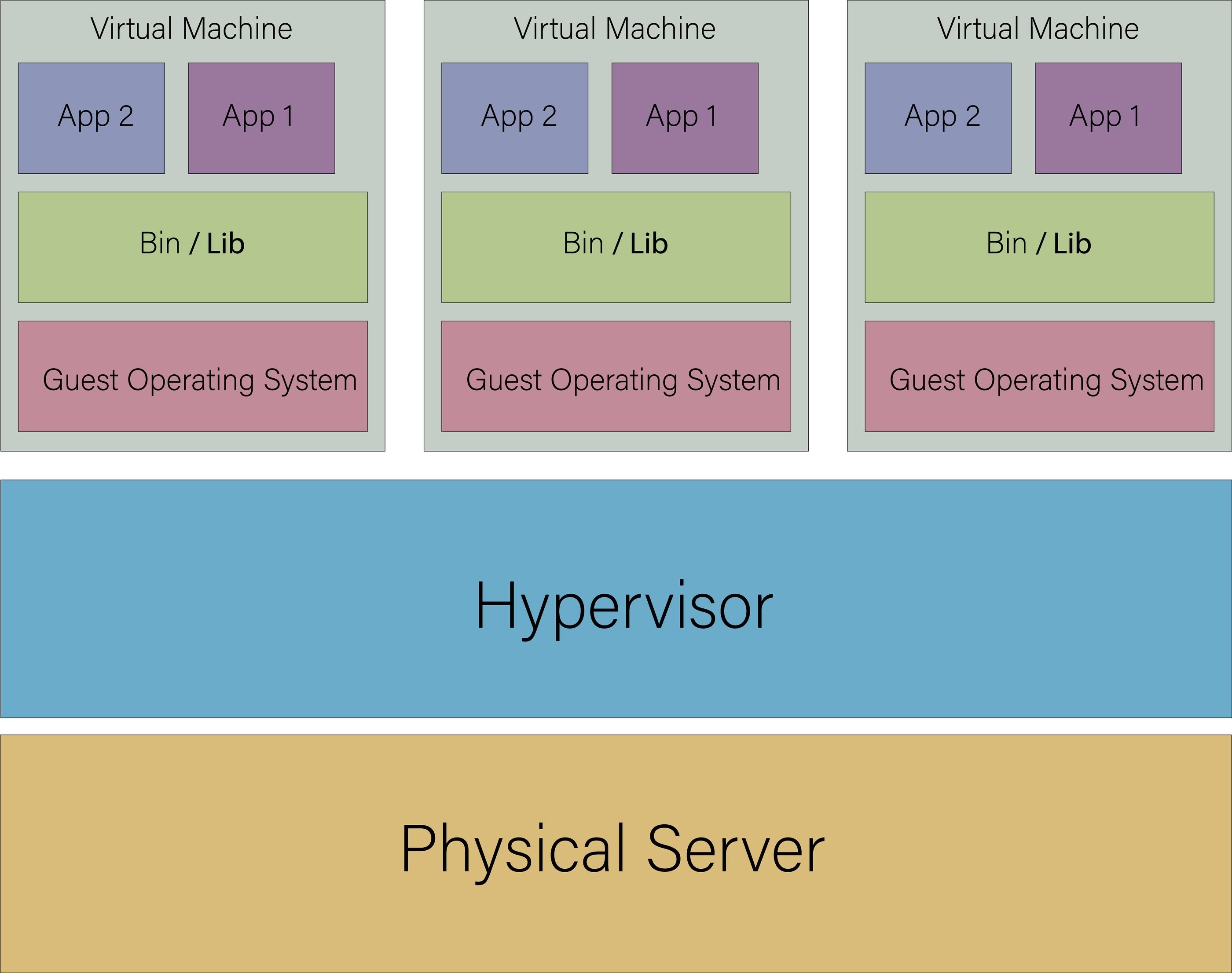
How a modern hypervisor decouples virtualized workloads
Picture an apartment building with 50 units. Every unit shares a common utility mains for water, electricity, and gas. However, units have different needs at every moment. One could be drawing a lot of water, and another drawing no water at all. A unit could be running heavy appliances, consuming much electricity, while another consumes very little. The building manager is responsible for ensuring each apartment gets its fair share without crashing the whole system. That’s how a hypervisor works, but for virtual machines (the apartment units) running under the same server (the whole apartment building).
A hypervisor is a middle control layer between a physical server and its operating systems. It virtualizes operating systems, allowing you to run multiple cloud instances on the same hardware. Then, you can port any cloud instance from one server to another easily.
For example, you can quickly transfer an application from one cloud provider to another, without recoding the app’s architecture for the new server. Contrast this to transferring an app from an on-premise server to a cloud server, which requires a broad code rewrite to make it compatible with the new cloud infrastructure.
Managing operational risks during a complex VMware migration
Above, we mentioned how hypervisors make it easy to transfer a virtual machine from one cloud platform to another, or from a physical server to a cloud platform. Yet, this process comes with its own risks. Disruptions can occur from any little file not being configured properly before migration, so the risks have to be carefully managed.
There’s a noticeable trend in the cloud market as of late. Proprietary cloud providers are increasingly adjusting licensing terms and raising prices. Earlier, we mentioned companies using multiple cloud providers to avoid vendor lock-in and having to absorb any price increase. That’s another operational risk to mitigate against, and companies are doing that by migrating their VMware virtual machines off proprietary cloud platforms to public platforms like Sangfor HCI.
Minimizing cutover risks and navigating a VMware migration
Compatibility is a major challenge that companies face during VMware migration. Companies often have to redesign storage systems, rebuild automation, and reconfigure app monitoring systems after a migration, and these are costly, hectic processes.
Sangfor helps solve the compatibility problem in several ways. It allows IT admins to adapt existing automation scripts after migration instead of rebuilding them from scratch. Virtual machines are automatically adapted during the transition process, and operating systems are supported with optimized drivers.
SCMT integrates seamlessly with VMware's interface to extract VM data, sync the data to the target HCI, and automatically injects the proper performance drivers to ensure immediate bootability. Pre-migration evaluations are carried out to identify potential incompatibilities early, so teams can mitigate risks before the process begins. Choosing Sangfor is a reliable way to minimize cutover risks and ensure a smooth VMware migration process.
Achieving near-zero downtime with Sangfor Cloud Migration Tool (SCMT)
When discussing cloud migration solutions, the Sangfor Cloud Migration Tool (SCMT) is a highlight. This software integrates directly with VMware's API, enabling enterprises to migrate virtual machines from one cloud platform to another, or on-premise data to cloud platforms, without stress. It simplifies physical-to-virtual or virtual-to-virtual migration, able to continuously migrate data while source VMs are running, meaning minimal cutover downtime.
Accelerating enterprise transitions with the Sangfor Cloud Migration Tool (SCMT)
SCMT removes the usual technical barriers companies face during cloud migration. Businesses get the highest standards of reliability, enabling them to migrate mission-critical workloads with minimal disruption. Sangfor notably commits to providing assistance for clients migrating key workloads to the cloud.
Transitioning to the cloud gets faster for organizations using SCMT, which features a next-generation hypervisor that delivers a secure, high-performing foundation for compute virtualization. This hypervisor enables simplified visual management of virtual machines, with enhanced security and resource management. IT teams can spin up or shut down virtual machines on the go, with each getting the required resources to perform key technical tasks.
SCMT’s migration interface is similar to what IT teams are already familiar with from using VMware. This translates to a reduced learning curve and easy adoption. IT teams can monitor all migration processes from a central interface, with an on-screen wizard to guide them through each module.
Businesses don’t have to migrate workloads all at once. With SCMT, IT teams can migrate specific workloads at the onset, then migrate more over time. Clients are assured of first-rate support throughout the migration process.
Conclusion
Why migrate to the cloud? It's cost-efficient and offers better scalability, security, and redundancy. These clear benefits have driven many companies to migrate to the cloud, and you can too. It’s a structured process, not ad hoc, and requires understanding the key stages and risk mitigation strategies. We’ve provided this information in detail.
Ready to migrate to the cloud without risking costly operational downtime? Read our comprehensive Guide to VMware Data Migration: Minimizing Downtime Transfers to learn expert cutover strategies. Speak with a Sangfor cloud migration specialist today to assess your legacy architecture and customize a zero-friction migration path.
FAQs
Cloud migration is the process of moving digital assets from on-premise servers to cloud-based servers. It can also refer to transferring data from one cloud platform to another. All relevant data is moved over a secure network connection in a process designed to minimize downtime. Cloud migration solutions, like SCMT, help facilitate this process.
Cloud migration eliminates the high upfront costs of physical servers. It provides better scalability, as businesses can easily add or reduce cloud computing resources on the go. Cloud infrastructure requires less active maintenance, and employees can access data securely from anywhere.
It starts with defining the migration strategy and business justifications. This is followed by deeply inspecting on-premise servers and mapping dependencies, configuring the cloud instances, and finally transferring the workloads. Post-transfer, set clear policies governing organizational cloud use and monitor the data for discrepancies.
SCMT continuously syncs data in the background even as the source virtual machine stays active. Data is migrated by continuous replication, and the VM only needs to be briefly powered off at the end of the process to complete the migration. This model reduces downtime to a minimum (only during the brief switchover process).