
Summarize this blog article with AI:
 Ask ChatGPT
 Ask Grok
 Ask Perplexity
 Ask Claude
 Ask Google AI
As more organizations move business-critical workloads onto virtualized, hyperconverged, and cloud infrastructure, performance under high concurrency has become a top priority. For teams evaluating a VMware replacement, the question is not simply whether another platform can provide similar functionality, but whether it can sustain the latency, throughput, and stability required by core business systems.
This challenge is especially visible in memory-intensive applications, including high-frequency trading and risk management in financial services, electronic health record systems in healthcare, and warehouse management systems in logistics. Their growing memory-access requirements are closely related to backend components such as Redis, Apache Spark, SAP HANA, and AI engines or models. Redis, for example, is an in-memory database whose performance is directly affected by memory-access speed.
NUMA is now a mainstream server CPU architecture. Improving memory-access efficiency under NUMA is therefore an important aspect of virtualization performance optimization. This article explains Sangfor NUMA optimization technologies and how they help virtualization platforms support highly concurrent, business-critical workloads during VMware replacement.
PART 1. NUMA Architecture Background
Early computer systems typically used a single processor for all computing tasks. As applications became more complex and demanding, a single processor could no longer satisfy high-performance computing requirements, and systems gradually evolved toward multi-core architectures.
Traditional multi-core systems commonly used symmetric multiprocessing (SMP). Under SMP, all processors have equal status and the same access rights to memory. Any thread can run on any processor, enabling effective load balancing and improving overall performance and throughput. However, because multiple cores share the same bus to access memory, the bus can become a bottleneck as core counts increase, limiting scalability and performance.
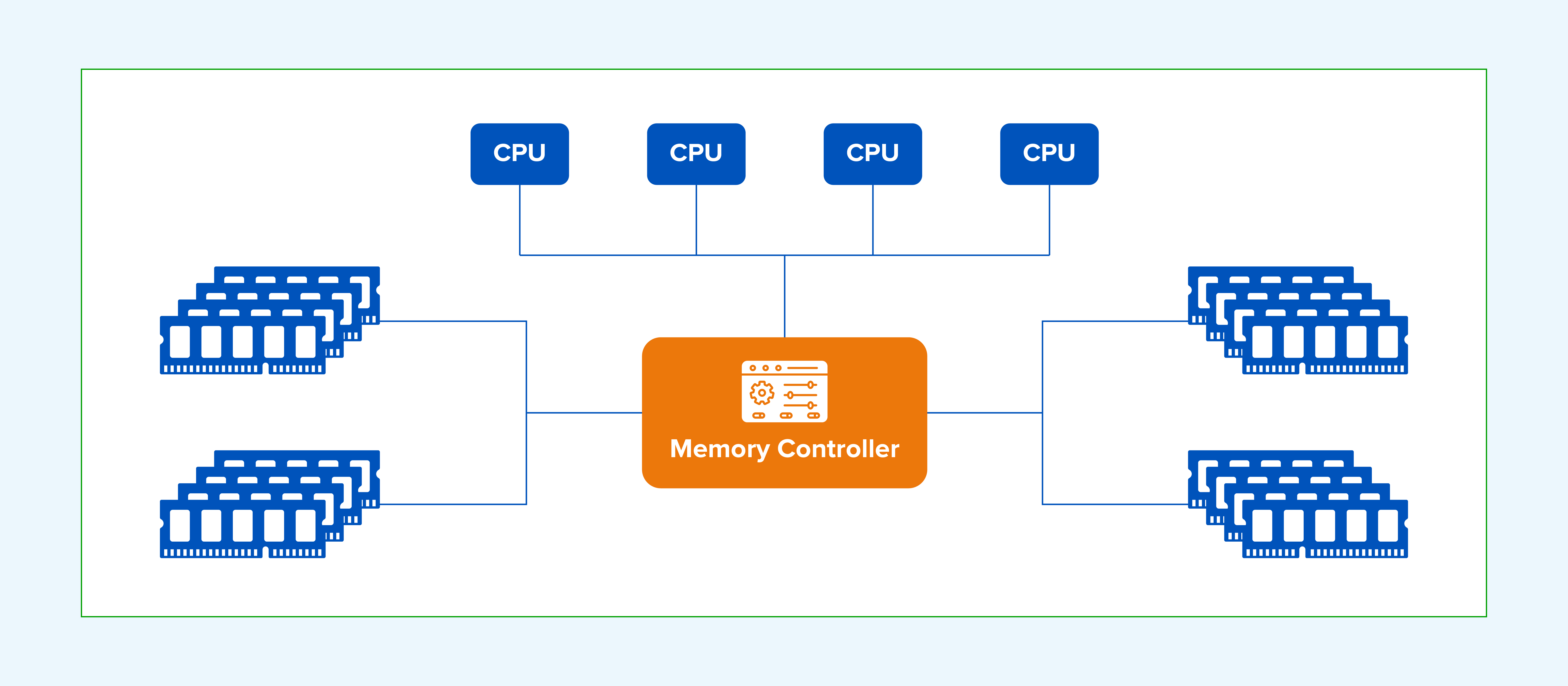
Figure 1: Shared-bus memory access bottleneck in traditional SMP architectures.
NUMA addresses the memory-access bottleneck of SMP. In a NUMA architecture, the system is divided into multiple nodes, each containing one or more processors, local memory, and I/O devices. Nodes communicate over high-speed interconnects—such as AMD HyperTransport or Intel QuickPath Interconnect (QPI)—allowing processors to access local memory first, which reduces memory-access latency and improves multiprocessor system performance.
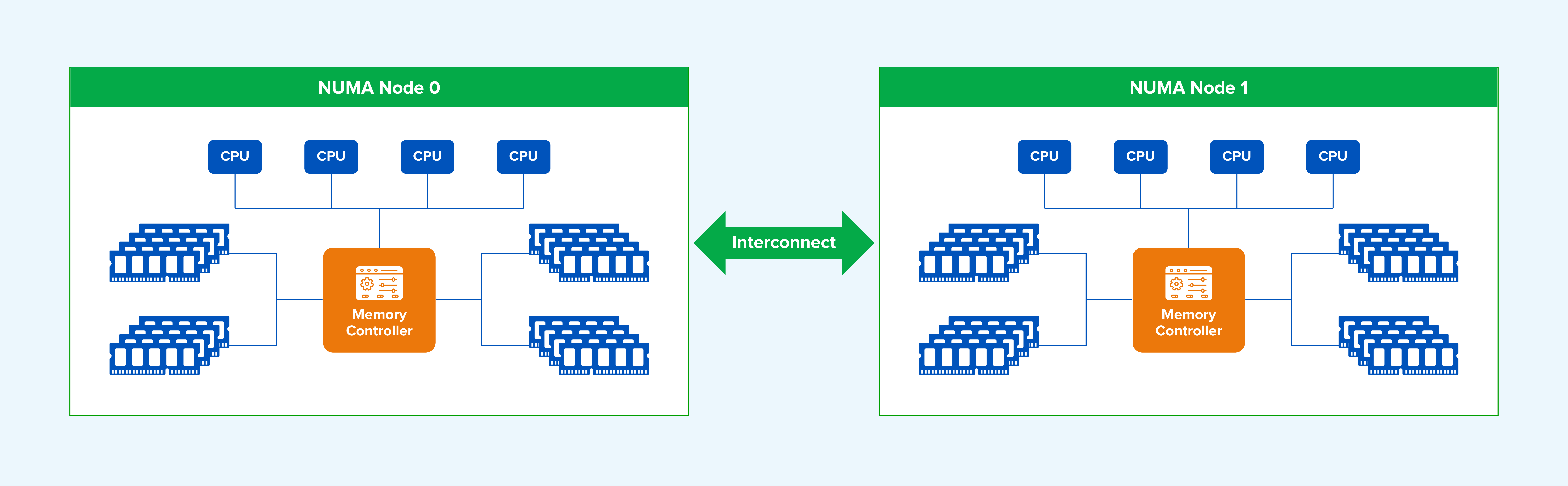
Figure 2: Multi-node NUMA architecture featuring node-local CPU and memory allocations.
A NUMA system contains three node types:
- Local node: For the CPUs within a given node, that node is the local node.
- Neighboring node: A node adjacent to the local node.
- Remote node: A node that is neither local nor neighboring.
CPU access speed differs by node type. Local memory is the fastest to access, while remote memory is the slowest. In general, memory access becomes slower as the topological distance increases.
In “NUMA: An Overview,” Dr. Christoph Lameter noted that, on a high-end two-node server in 2013, random local-memory access latency was approximately 100 ns, while remote-memory access added about 50% more latency.
PART 2. Challenges Introduced by NUMA
In Linux, a thread is the basic unit of CPU scheduling and corresponds to a task on a CPU run queue. The kernel selects a relatively idle CPU for each task. Because CPU load changes dynamically, the kernel uses load balancing to migrate tasks to less-busy CPUs. By default, a task may therefore move between CPUs.
Under NUMA, a task may move from a CPU on Node 1 to a CPU on Node 2 while continuing to access memory allocated on Node 1, resulting in cross-node access. Linux NUMA balancing periodically migrates tasks or memory pages toward the local node, but it cannot eliminate all remote-memory access.
In a virtualized environment, each VM vCPU corresponds to a host operating-system thread. If multiple vCPU threads run on different NUMA nodes while sharing memory, or migrate between nodes, the VM may access memory across NUMA nodes and experience higher latency.
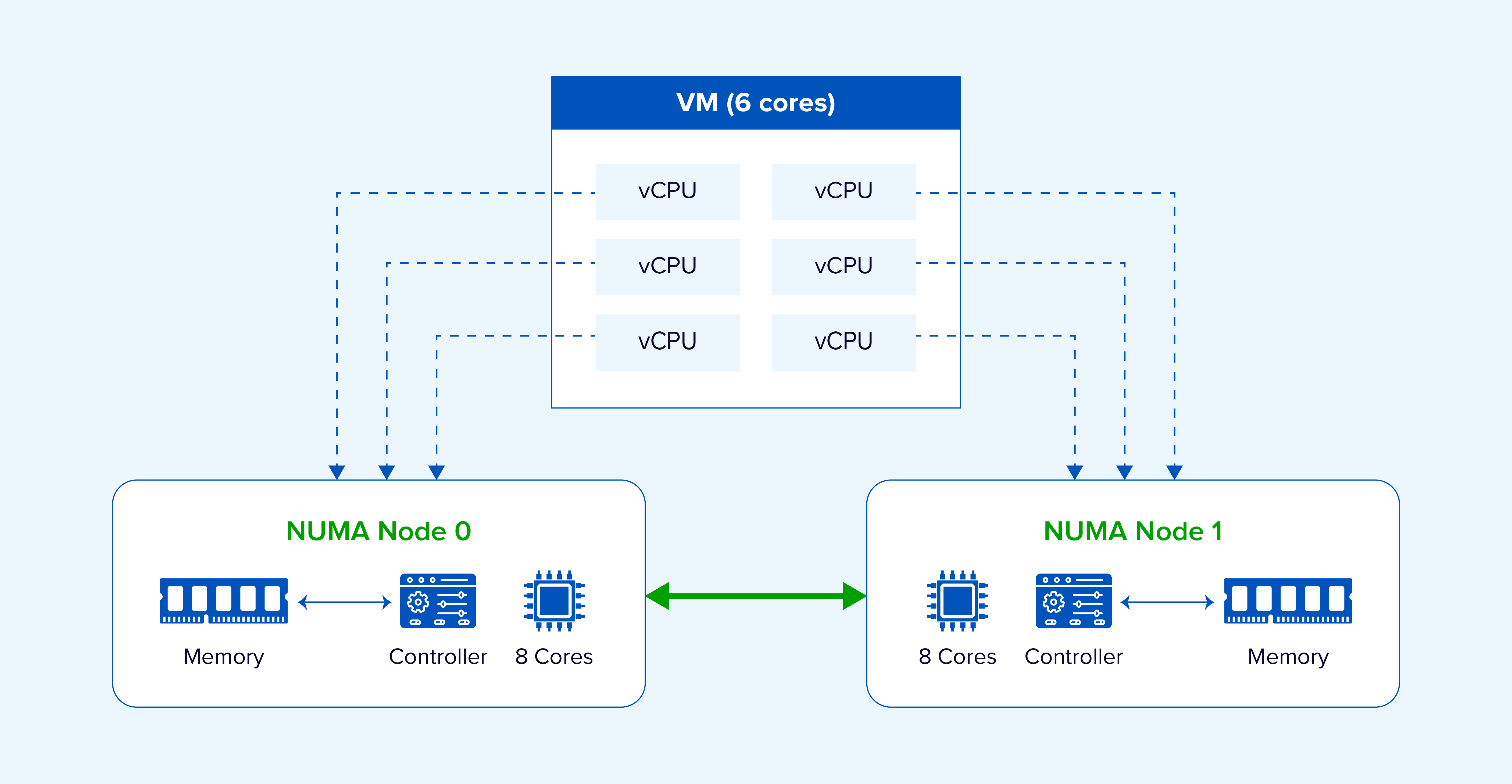
Figure 3:Cross-node execution can increase remote-memory access for a virtual machine.
PART 3. Common NUMA Scheduling Approaches
The industry commonly uses the following approaches:
Approach 1: Pin vCPUs to Physical Cores
Administrators manually configure vCPUs pinning so that VM resources preferentially run within the same physical NUMA node.
Approach 2: Specify the Number of NUMA Nodes Assigned to a VM
Administrators manually configure the number of NUMA nodes and distribute vCPU and memory resources evenly across them.
Approach 3: Adaptively Allocate NUMA Nodes
The scheduler automatically assigns suitable NUMA nodes to a VM. VM CPUs are constrained to those nodes and preferentially use local memory to improve locality. If the VM has more vCPUs than a single NUMA node can accommodate, it is distributed across multiple nodes. The NUMA topology can be exposed to the guest operating system for topology-aware decisions, while VMs can be migrated between nodes to maintain load balance.
Approaches 1 and 2 impose more restrictions, require careful VM CPU sizing, and may create imbalance between NUMA nodes because of static binding. Adaptive allocation is therefore more practical for dynamic production environments.
PART 4. Sangfor NUMA Scheduling in Detail
Sangfor HCI primarily uses adaptive NUMA scheduling. It balances utilization across NUMA nodes while reducing remote-memory access by VM vCPUs, improving overall performance.
Adaptive NUMA scheduling delivers clear optimization benefits across different application types, especially middleware with frequent in-memory operations. Sangfor deployed DM8, Redis, and Memcached in VMs and benchmarked them with NUMA scheduling enabled and disabled. The results showed clear middleware performance improvements with NUMA scheduling enabled.
Database Workloads: Dameng DB (DM8) with BenchmarkSQL
BenchmarkSQL is a relational database benchmark that runs a TPC-C-style transaction mix, including new orders, payments, order-status queries, delivery, and stock-level queries. The resulting tpmC metric represents the number of new-order transactions processed per minute, with a higher value indicating better performance. BenchmarkSQL 5.0 was used to test the DM8 database. The following chart shows relative performance, with the NUMA-disabled tpmC result normalized to 100%.
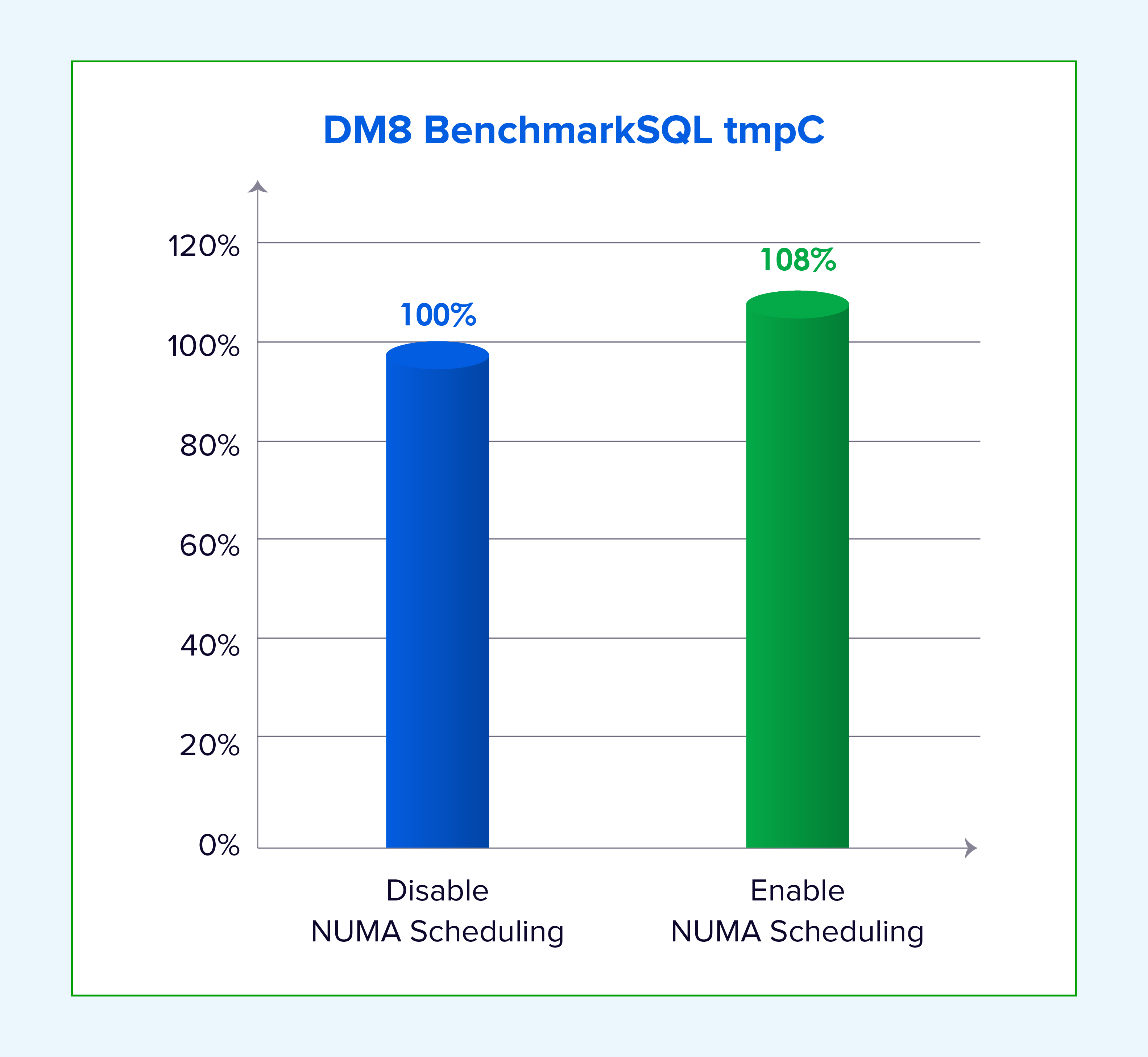
Figure 4: Relative DM8 transaction throughput with NUMA scheduling enabled vs. disabled.
In-Memory Caching: Redis 7.2.5
redis-benchmark is the official Redis performance testing tool. Sangfor used it to test GET and SET QPS for 1 KB values with NUMA scheduling disabled and enabled. QPS represents the number of read or write operations per second.
redis-benchmark -t get -d 16 -c 100 -n 6000000 -r 60000000
redis-benchmark -t set -d 16 -c 100 -n 6000000 -r 60000000
The following chart shows relative performance, with the NUMA-disabled QPS result normalized to 100%.
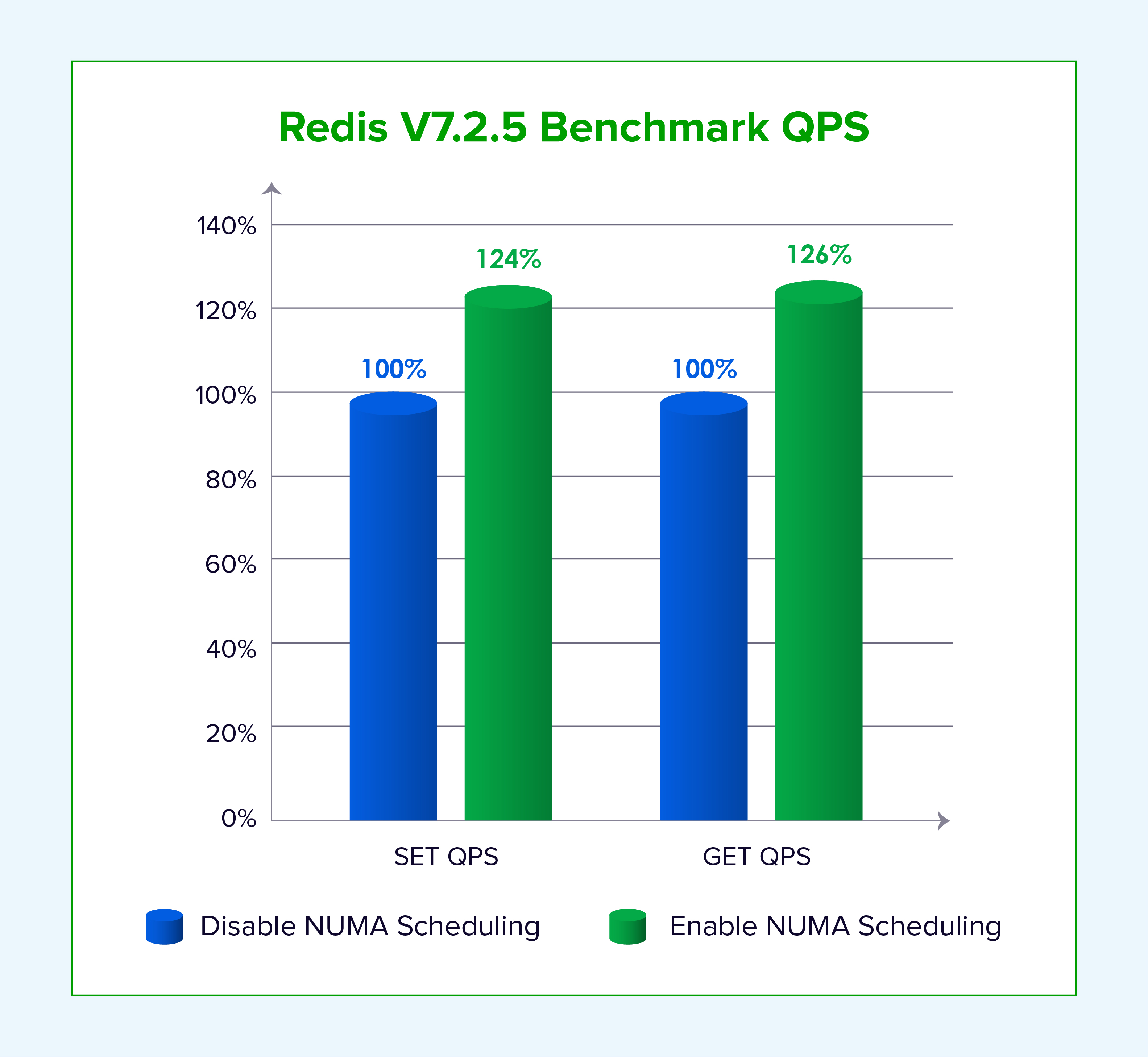
Figure 5: Relative Redis read/write QPS performance gains with NUMA scheduling enabled.
Key-Value Caching: Memcached 6.27
memaslap is a performance testing tool included with Memcached. Sangfor used it to test TPS for 1 KB values with NUMA scheduling disabled and enabled. TPS represents transactions per second.
memaslap -s 127.0.0.1:11211 -t 300s -T 8
The following chart shows relative performance, with the NUMA-disabled TPS result normalized to 100%.
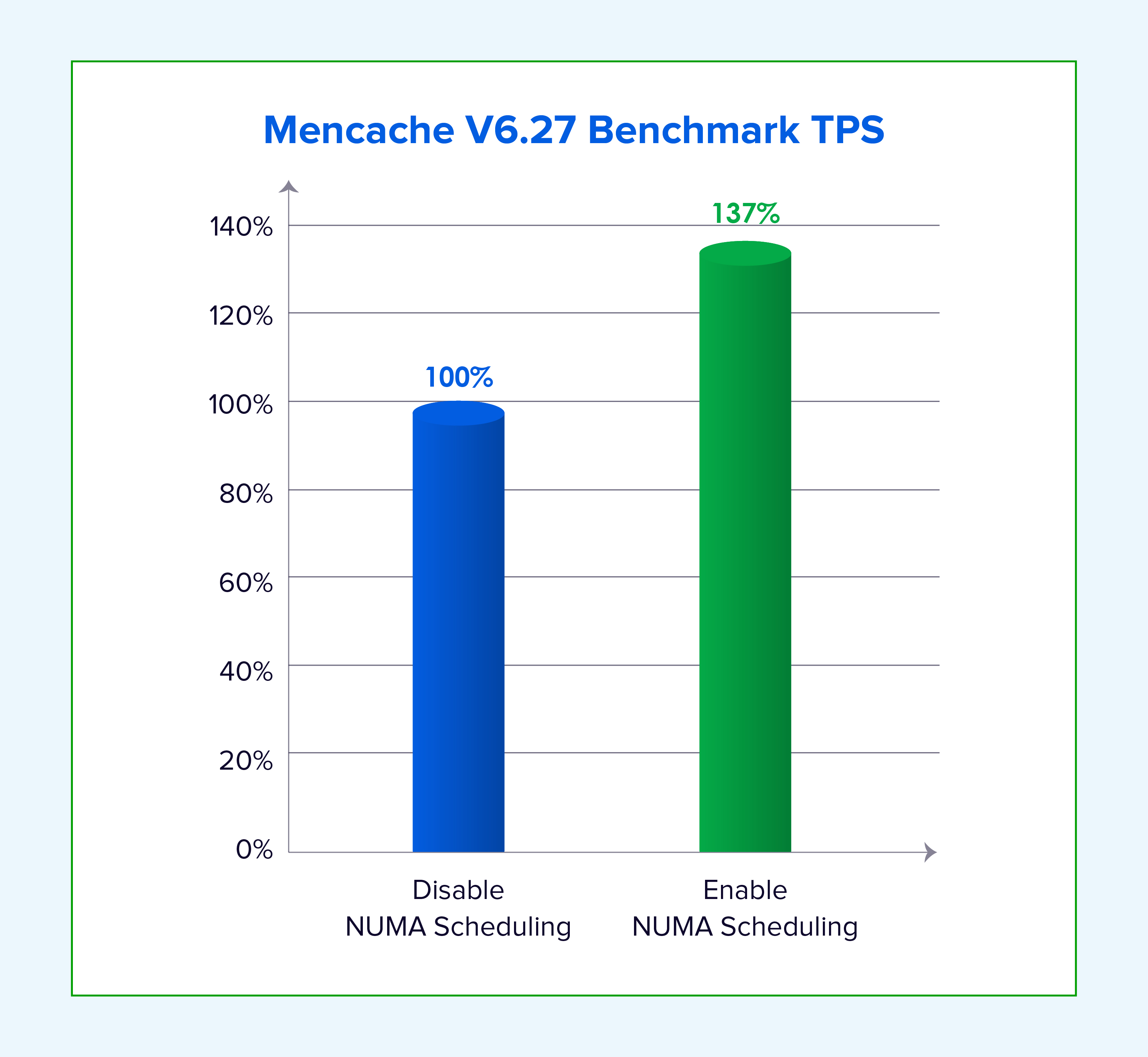
Figure 6: Relative Memcached transactional throughput gains with NUMA scheduling enabled.
The results above show clear benefits for memory-intensive applications. The following sections explain how the optimization works.
1. Adaptive NUMA Node Allocation
Sangfor adaptively partitions VM vCPUs and schedules them onto suitable NUMA nodes to reduce remote-memory access. If the number of VM vCPUs is lower than the core count of one NUMA node, the VM is scheduled on a single node. If the VM requires more cores than one node can provide, it is distributed across multiple nodes, and the vNUMA topology is exposed to the guest operating system for topology-aware decisions.
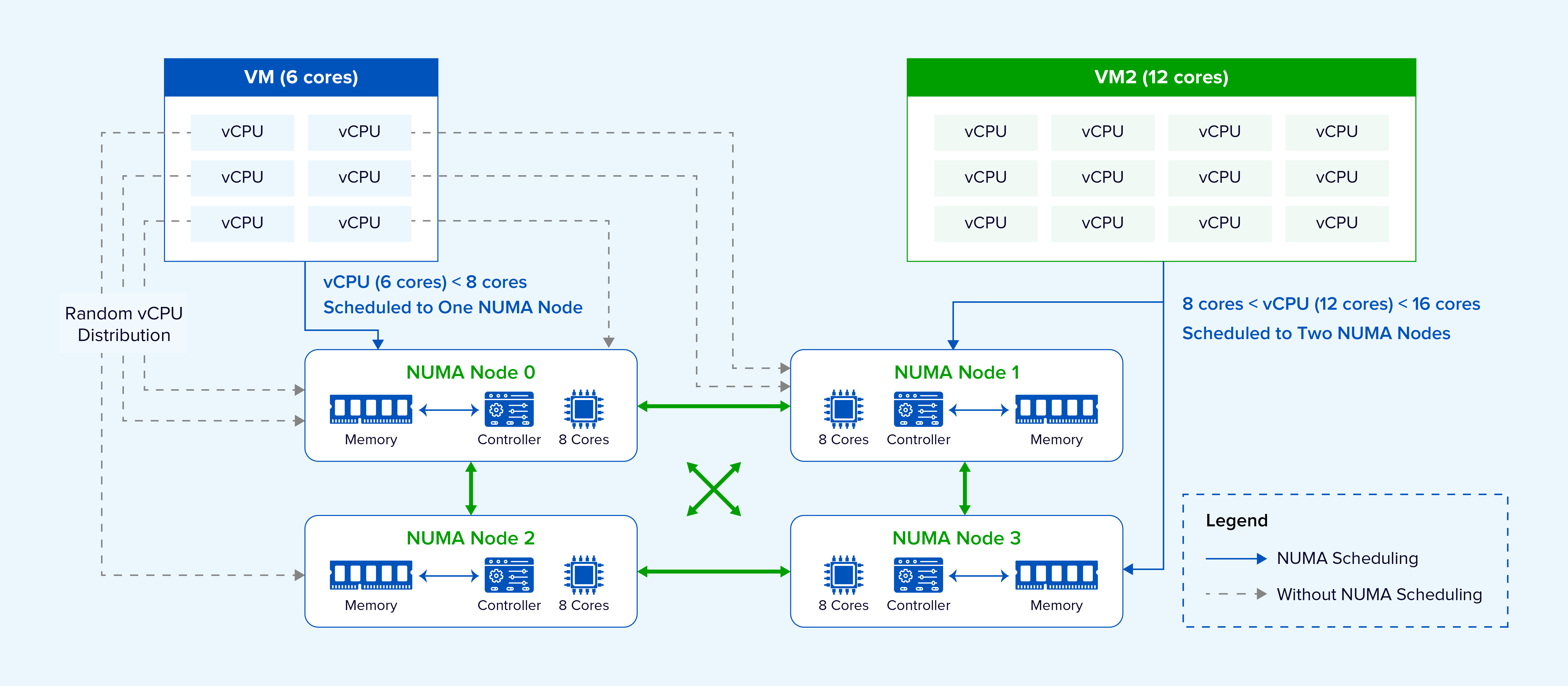
Figure 7: Sangfor intelligent vCPU partitioning and vNUMA topology mapping.
To maintain balanced utilization, VM placement considers the current load across NUMA nodes and selects a less-busy node. During runtime, VMs may be migrated between nodes as utilization changes. Priority VMs are preferentially placed on less-contended nodes to reduce competition for CPU, memory bandwidth, and cache resources.
2. Optimization for Heterogeneous Server Platforms
Some server platforms contain many NUMA nodes, different inter-node distances, and relatively few cores per node.
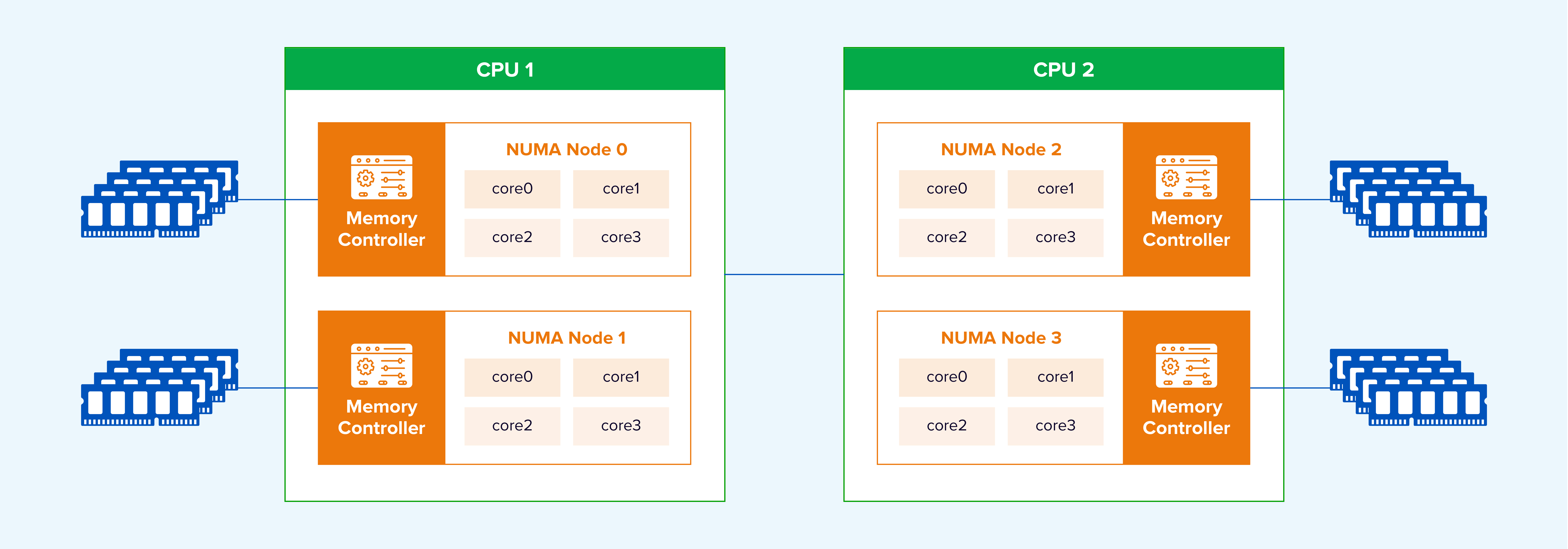
Figure 8. Topology-aware vNUMA placement on a multi-node server.
Sangfor identifies the distance between NUMA nodes and preferentially places multiple vNUMA nodes from the same VM on nearby physical NUMA nodes.
To further improve data-forwarding performance, Sangfor developed NUMA affinity between VMs and data-plane processes. The VM and its data-forwarding process are scheduled on the same NUMA node, increasing local-memory access. In the following figure, DP refers to the data-plane process.
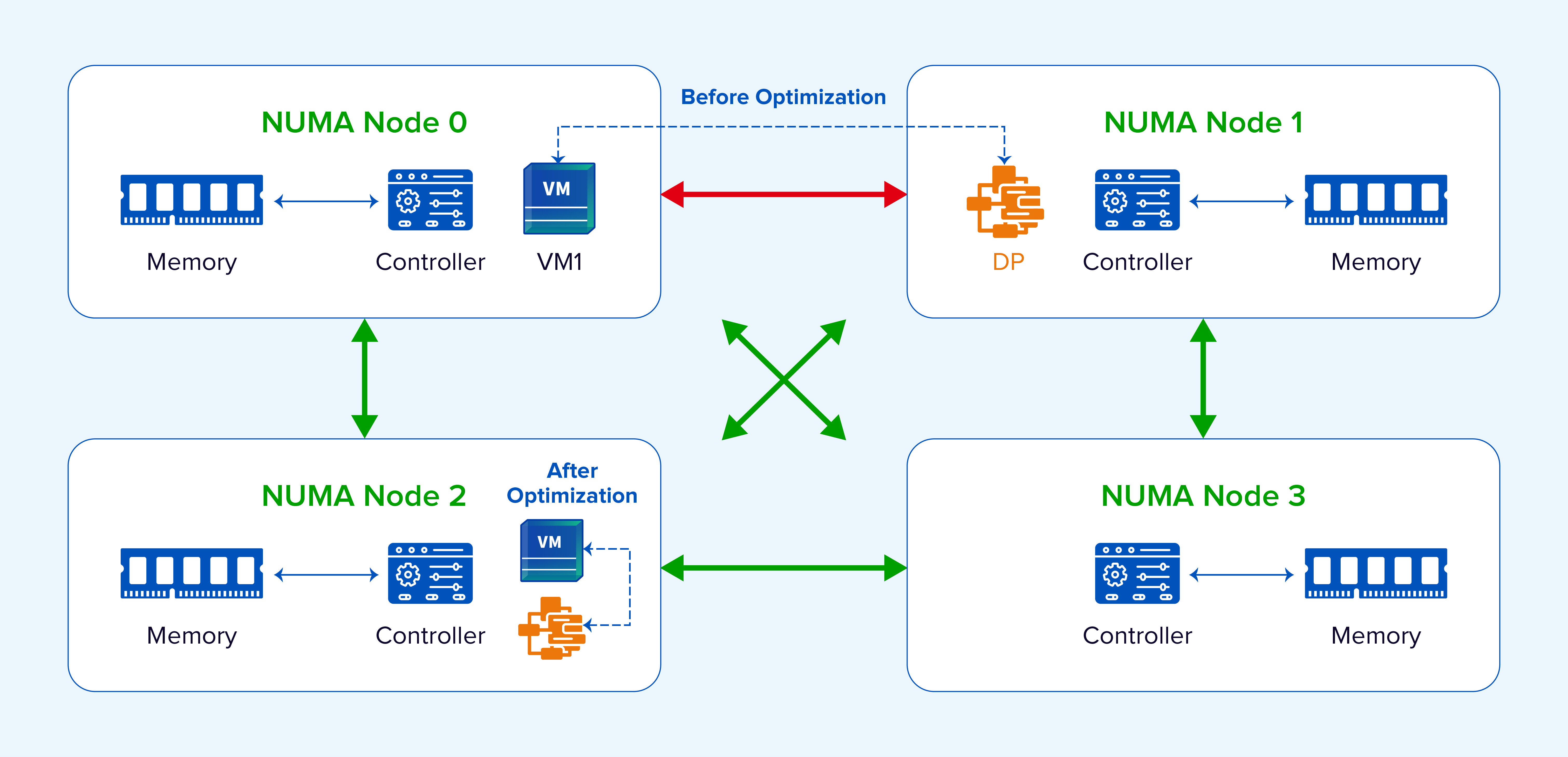
Figure 9. VM and data-plane affinity keeps processing close to local memory.
To maximize NUMA benefits across storage, Sangfor places the vCPU, QEMU, libnfs, aSAN, and other processes involved in a complete I/O path on the same NUMA node. This avoids remote-memory access. Large memory pages further improve memory-access performance, reduce processing overhead, and increase I/O-flow efficiency.
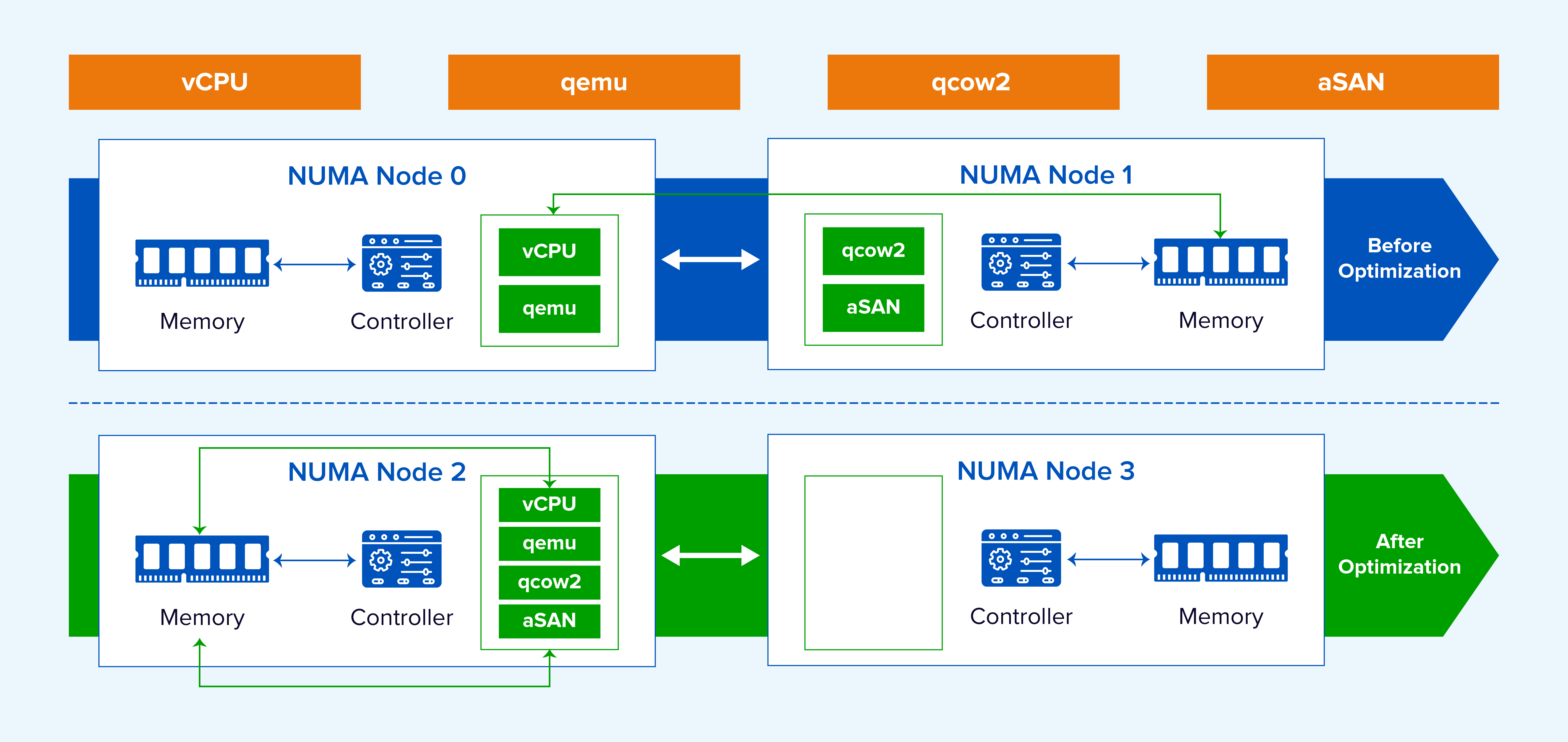
Figure 10. Coordinated NUMA placement across the virtual storage I/O path.
Data moving from a NIC buffer to virtual storage must be processed by CPU threads. As network performance increases, single-core buffer-copy efficiency can become a bottleneck, while cross-NUMA access further reduces efficiency. Sangfor enables multiple CPU cores to process NIC traffic and applies NUMA affinity. This removes the single-core bottleneck, reduces transfer latency, and improves concurrency. In internal testing, high-queue-depth, large-block VM write performance improved by more than 20%.
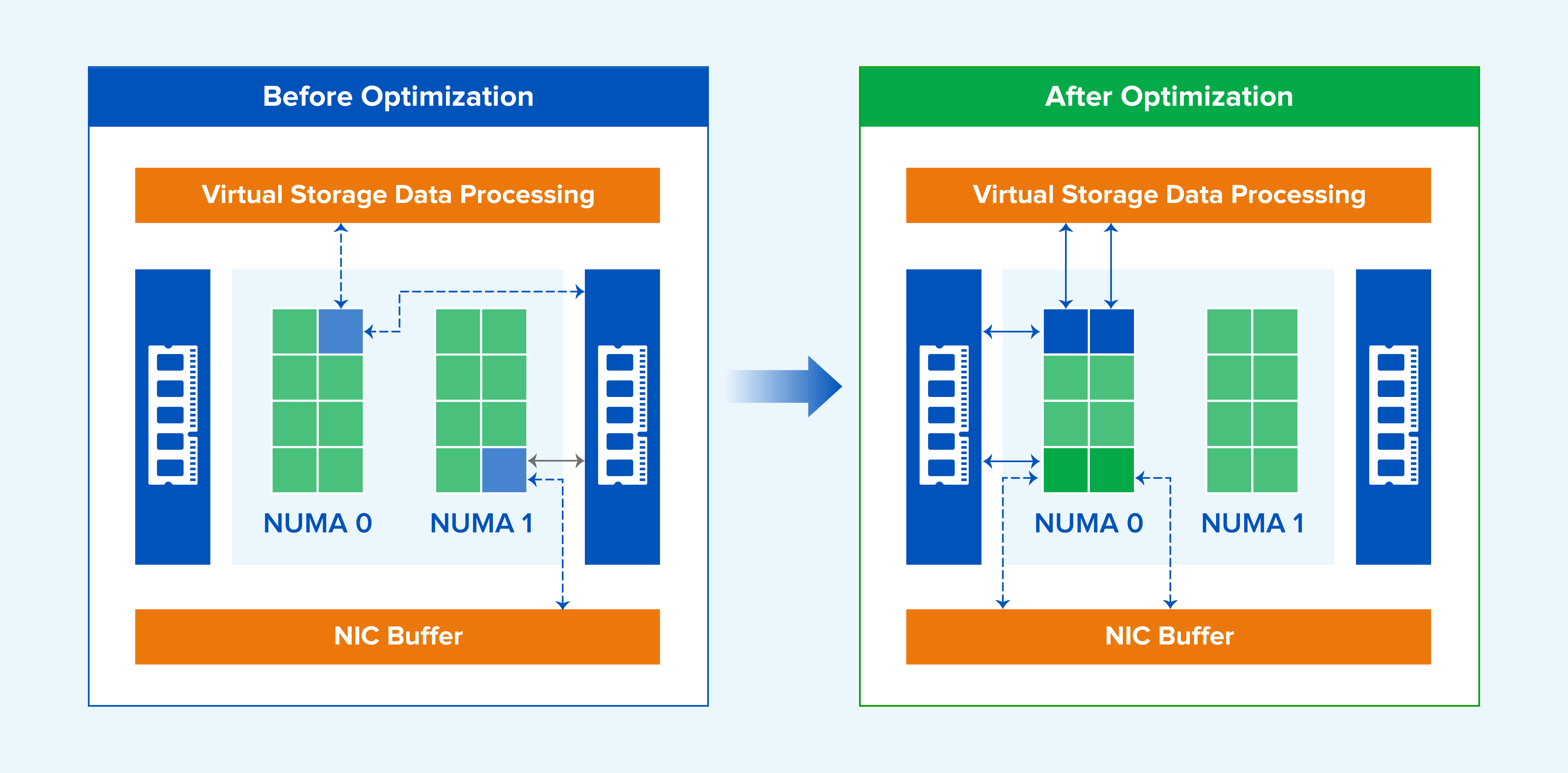
Figure 11. Multi-core, NUMA-affine processing between NIC buffers and virtual storage.
3. Comparison with Other Industry Approaches
Industry support varies. One vendor allows administrators to configure the NUMA node on which each VM vCPU runs, another does not support this capability, and VMware supports adaptive NUMA scheduling.
Sangfor automatically partitions and places VM vCPUs on NUMA nodes to reduce remote-memory access. Compared with manually configuring the location of each vCPU, Sangfor adaptive NUMA scheduling automates vCPU partitioning and placement, balances utilization across nodes, and improves overall performance.
Compared with a basic adaptive NUMA implementation, Sangfor extends optimization to storage-service scheduling, priority-VM recognition, heterogeneous server platforms, and VM network affinity. These enhancements reflect joint engineering between Sangfor research and cloud product teams and are designed around real platform-service behavior.
PART 5. Summary
Sangfor adaptive NUMA scheduling is optimized for multiple infrastructure scenarios to improve application memory-access efficiency:
- Adaptively partition and place VM vCPUs on NUMA nodes to reduce remote-memory access.
- Migrate VMs between NUMA nodes to maintain balanced utilization.
- Identify priority VMs and keep them on less-contended nodes, reducing competition for CPU, memory bandwidth, and cache.
- For servers with many NUMA nodes and different inter-node distances, identify topology distance and preferentially place related vNUMA resources on nearby physical NUMA nodes.
- Provide a VM network-affinity option that places a VM on the same NUMA node as the network data plane to improve forwarding performance.
- Apply NUMA-aware scheduling not only to VMs, but also to storage services.
UnixBench Test Example
UnixBench is a widely used benchmark for Unix-like systems, including UNIX, BSD, and Linux. It measures multiple system-performance dimensions, including CPU, file system, memory, and process performance.

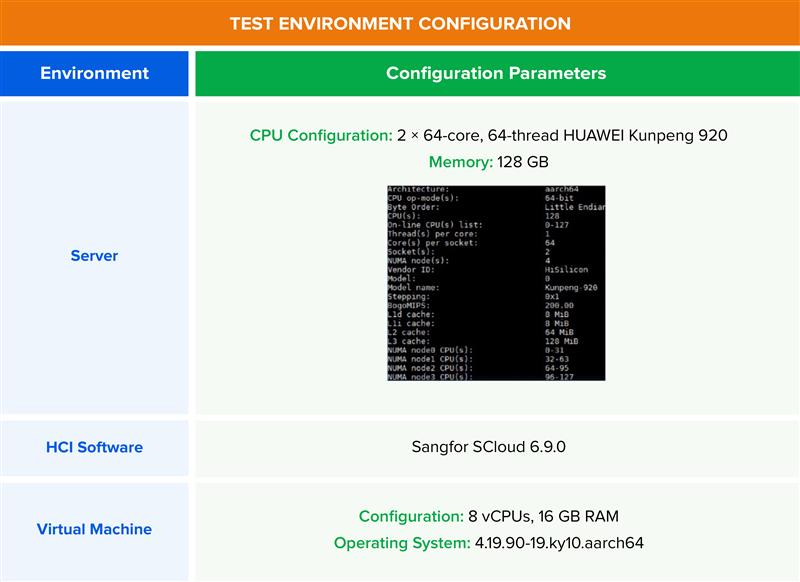
Figure 12. Virtual machine configuration for UnixBench testing.
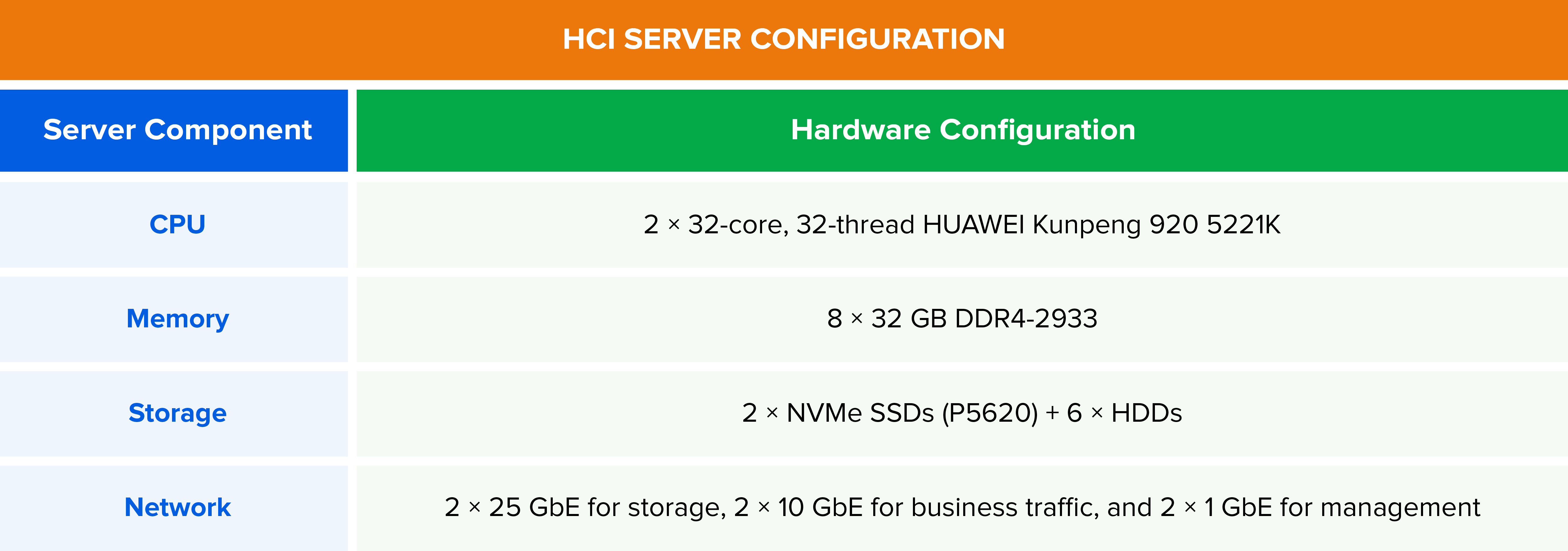
Figure 13. HCI server hardware configuration for UnixBench testing.
Test Results: In Sangfor HCI 6.9.0, with NUMA enabled, the aggregate UnixBench score for 6 VMs running concurrently on the same host was 20.2% higher than the anonymized comparison platform. For 8 concurrent VMs, the aggregate score was 34.17% higher.
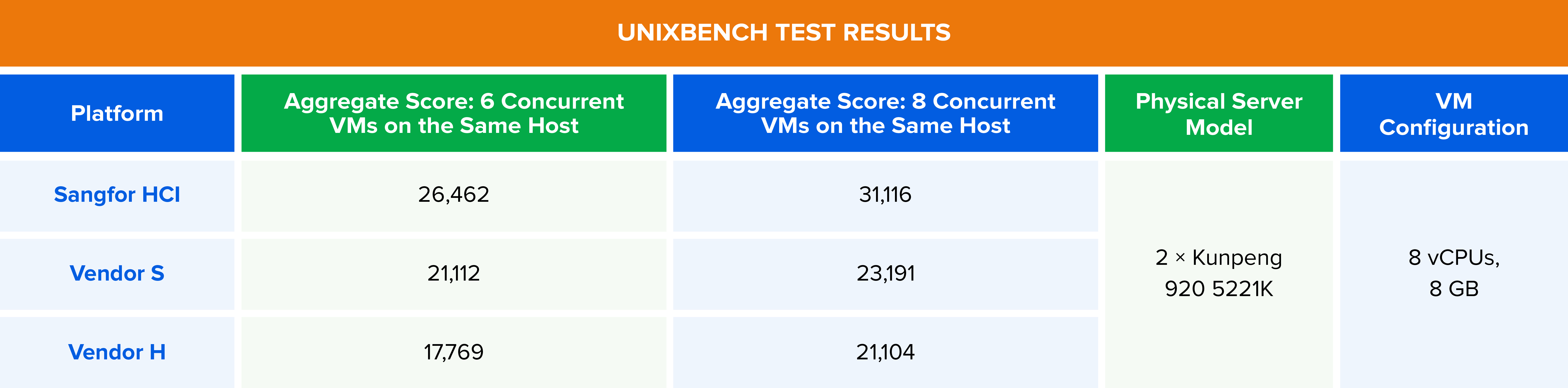
Figure 14. Comparative UnixBench benchmark results under concurrent virtual machine workloads.
Benchmark observations in this article reflect specific Sangfor internal test environments and are provided for technical illustration. Actual results vary by hardware, software version, configuration, and workload. Customers should validate representative applications against their own service-level objectives.

